Introduction: Strategy Selection—Its Impact Is Deeper Than You Think! #
Imagine this: when you’re training a robot, a simple mouse click to choose a “training strategy” seems like you’re just picking an algorithm. In reality, that click determines the number of demonstrations required, training time, and even which hardware the system will be running on three months down the line! Today, let’s uncover the mysteries of “strategy selection,” so that before you make your choice, you already have the whole picture in mind!
Background & Technical Overview: Task Variability Calls for Different Strategies #
In today’s automated production lines, AI robots are gradually replacing traditional manual operations. But when faced with different tasks, how do you choose the most suitable training strategy? The answer is simple—it depends on whether your task involves “variability”!
Introducing the Two Main Players: #
- ACT: Best for tasks with fixed actions and stable environments. For example, workpieces are always placed in the same position on the production line, lighting conditions are constant, and the robotic arm follows the same path every time. ACT is like a new operator, focused on memorizing actions and executing them consistently.
- GR00T N1.5: Designed for tasks where object positions or appearances change. For example, workpieces are placed randomly each time, component sizes vary, and on-site lighting can be dim or bright. GR00T N1.5 is a large, pre-trained robot model from NVIDIA, like a seasoned technician—capable of understanding instructions, assessing the situation, and adjusting actions flexibly.
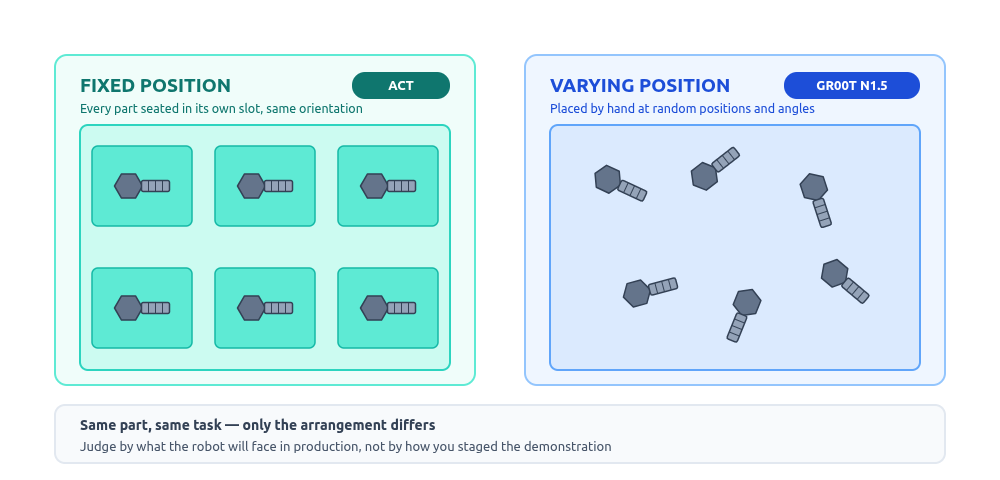
Tip: When deciding which to choose, focus on “actual operation” variability, not just conditions during recording! If, after deployment, workpieces are always placed randomly, choose GR00T directly and make sure to demonstrate a variety of position changes during recording.
Implementation Process & Key Findings: Number of Demonstrations, Quality Thresholds, and Operational Details #
Recording demonstrations is the most “practical” step in training AI robots—this is where labor cost comes in! Every time you personally guide the Leader Arm through the entire task, you’re generating valuable data.
| ACT | GR00T N1.5 | |
|---|---|---|
| Learning Method | Learns actions from scratch | Fine-tunes on foundational capabilities |
| Number of Demonstrations Needed | Dozens needed for stability | Only a few demonstrations required |
| Recording Labor Hours | High | Low |
| Demonstration Consistency Requirement | High—each demo must be very consistent | Minor variations are acceptable |
If you choose ACT, be prepared for the patience needed to “repeat the task dozens of times.” With GR00T, it’s much easier—a few demonstrations are enough. However, fewer demos doesn’t mean you can be sloppy! Every demonstration matters; any hesitation in action may affect overall quality. If labor resources are extremely limited, you can also use simulation environments to auto-generate training data—we’ll cover this in detail in the future.
Results & Applications: Deployment Hardware Determines Strategy! Breaking Through Traditional Limits #
This section is “the most easily overlooked and most likely to be regretted”!
Advantech’s Physical AI platform provides two deployment pathways—but each pathway supports only one type of strategy:
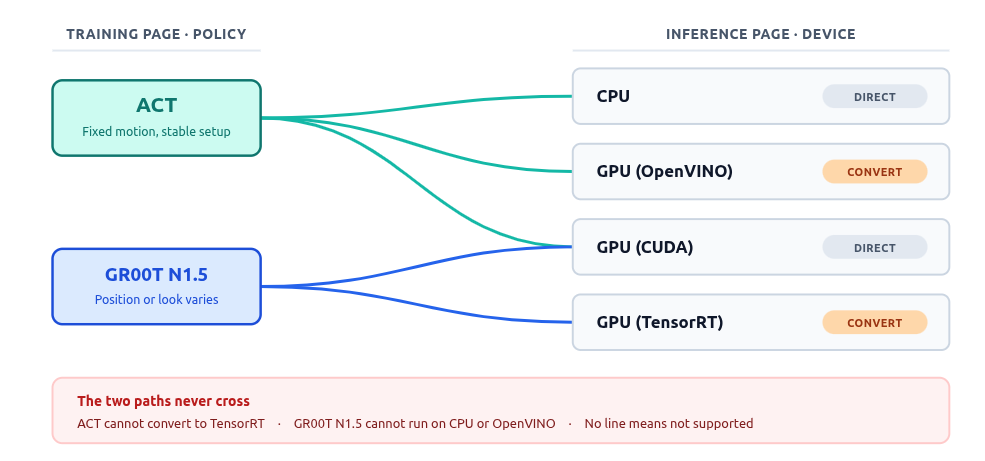
- Intel-based edge devices (no dedicated GPU, cost and power sensitive) → OpenVINO → Must use ACT
- NVIDIA Jetson AGX Thor and other edge platforms (strict timing, multi-stream video) → TensorRT → Must use GR00T N1.5
- Workstation verification with NVIDIA GPU → GPU (CUDA) → Both strategies can be loaded directly
In other words, choosing a strategy is like “choosing your engine specs,” which determines what kind of fuel you can use later on. Note that the hardware options on the training page differ from those on the inference page: GPU (TensorRT) appears only on the inference page, so don’t mistakenly think GR00T can’t be used—training and deployment are naturally separate stages!
Quick Decision Table: Pick the Right Strategy for You in 30 Seconds #
| Your Scenario | Recommended Strategy |
|---|---|
| Workpiece position fixed, actions repeated | ACT |
| Workpiece position or appearance often changes | GR00T N1.5 |
| Only Intel edge devices available on site, no GPU | ACT (the only option for OpenVINO) |
| On-site is NVIDIA Jetson platform, strict timing required | GR00T N1.5 |
| Ample manpower, can record dozens of demonstrations | Decide as per above |
| Only a few demonstrations possible | GR00T N1.5 |
| Just want to see results or are in evaluation stage | ACT (fast training, low hardware requirements) |
| Want to compare both | Train both once |
Pro Tip: Use the same set of demonstration data to train both strategies! The dataset is in a standard format—just change the strategy and folder name and run again. No need to guess; let the results decide what works best for you. The only cost is extra training time and disk space—if that’s not a bottleneck, we recommend running both!
Conclusion & Future Outlook: Strategy Selection Is Hardware Selection! Continuous Breakthroughs for Smarter, Easier Automation #
ACT and GR00T N1.5 aren’t “basic versus advanced” options; they’re solutions for different levels of uncertainty and hardware requirements. The degree of variability in your task and the constraints of your on-site hardware directly determine your strategy choice. If your hardware specs are already set (e.g., only Intel edge devices allowed), then your strategy is already decided—knowing in advance is better than finding out post-training that you can’t deploy!
If you haven’t decided yet, we recommend running through the entire process with ACT first—training is fast and hardware requirements are low, giving you more intuitive insight into your task’s demands.
Advantech continues to develop and innovate in the field of Physical AI, making robot teaching simpler and automation more accessible. The next step is to record demonstration data—but before you start, how do you decide on the camera placement? Stay tuned for our next in-depth analysis!
Physical AI – Making robot teaching simple, making automation possible.