This article has been rewritten and reorganized using artificial intelligence (AI) based on referenced technical documentation. The purpose is to present the content in a clearer and more accessible manner. For technical clarifications or further verification, readers are advised to consult the original documentation or contact relevant technical personnel.
Introduction: Are You Ready for the Era of “All-in-One Upgrades”? #
Imagine this: your Jetson device is like a house. Routine maintenance is about fixing and patching, maybe changing a door or window; but NVIDIA’s Image-Based OTA upgrade is like moving into a fully renovated house, with a brand new lock and even the foundation replaced! This “clean-slate” style firmware upgrade is not only cleaner and more reliable, but also brings tremendous advantages for offline deployments and large-scale batch updates. Today, follow Advantech engineers as we unveil the mystery behind this technology, and see how we continuously innovate to make Jetson upgrades smarter, safer, and more in line with industry needs!
Background & Technical Overview: What is OTA? Why is the Industry Paying Attention? #
Image-Based OTA vs. Traditional Upgrades: Which Do You Choose? #
- Image-Based OTA: Replaces the entire operating system (rootfs) and bootloader on the device in one go, like moving into a new house.
- APT Upgrade: Updates individual software packages one by one, similar to partial renovations.
| Comparison Item | Image-Based OTA | APT Upgrade |
|---|---|---|
| Update Method | Complete replacement (whole system) | Patch individual files |
| Reliability | High (environment not affected by old system) | Medium (possible package conflicts) |
| Offline Deployment | ✅ Supported | ❌ Requires Internet |
| Suitable Scenarios | Major upgrades, offline, batch deployment | Daily minor updates |
Market Demands & Application Scenarios #
With AIoT and edge computing devices in mass production, enterprises are looking for:
- Fast batch upgrades: Upgrade thousands of devices at once, ensuring “consistency, cleanliness, and reliability”
- Offline deployment: Confident upgrades even in factories, outdoors, or environments without Internet access
- Custom hardware support: For non-reference boards like Advantech ROM-AB2210, upgrades must be error-free
Image-Based OTA is tailor-made for these needs!
Implementation & Key Findings: The Upgrade Process is Like an Escape Room! #
Jetson’s Dual Storage Architecture #
Jetson Orin Nano’s system is distributed across two main storage devices: QSPI Flash (blue) and eMMC/NVMe SSD (gray):
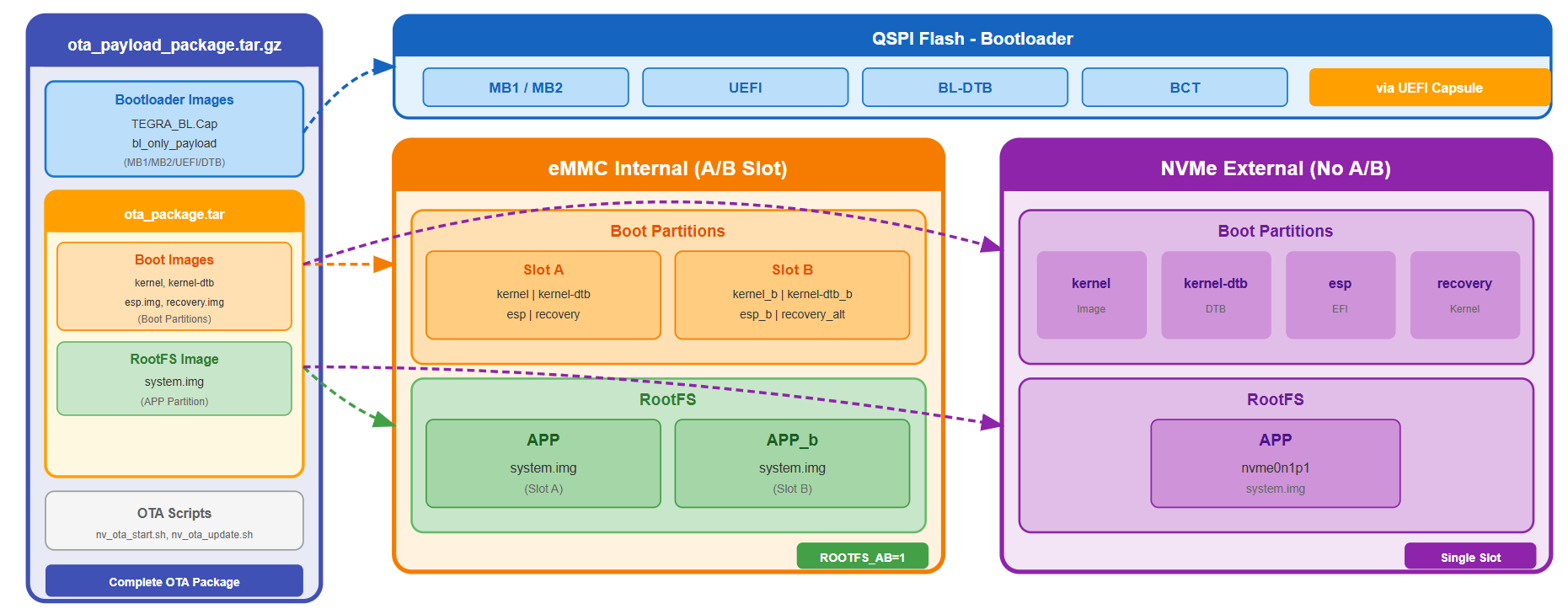
- QSPI Flash: Stores bootloader (MB1/MB2/UEFI) and hardware configuration
- eMMC/NVMe: Stores kernel, device tree, Recovery kernel, and the entire Ubuntu OS
Two Upgrade Mechanisms #
- UEFI Capsule: Industry standard; OTA places the Capsule file in the ESP partition, UEFI firmware auto-detects and updates the bootloader
- Recovery Kernel: A minimal Linux environment dedicated for backing up/restoring data and writing new rootfs
The Upgrade Process Revealed #
Single Slot Process: Requires Two Reboots #
- Preparation: Unpack the installation package, verify board identity, place Capsule in ESP, set “next boot to Recovery” flag
- Reboot #1 → Recovery Kernel: Backup data, write new system.img, restore data, update kernel/DTB
- Reboot #2 → Boot into New System: UEFI auto-applies Capsule, upgrade complete!
Dual Partition (A/B Slot) Process: Only One Reboot Needed #
- Write on Old System: Write new image to the inactive Slot, update boot images, switch boot Slot
- Reboot → Boot into New System: Old Slot fully retained, can roll back if upgrade fails!
| Comparison Item | Single Slot | A/B Slot |
|---|---|---|
| Number of Reboots | 2 | 1 |
| Rollback Capability | ❌ None | ✅ Supported |
| Power Loss Risk During OTA | High | Low |
Board Identification: Hardware “ID Card” for Safer Upgrades #
TNSPEC: The DNA of the Board #
Every Jetson has a TNSPEC that records model, SKU, batch, and board name. This is the key to preventing the wrong firmware from being installed!
Example: Advantech ROM-AB2210
TNSPEC = 3767-300-0003-T.1-1-1-jetson-orin-romab2210-a1-
Before upgrading, the OTA tool compares the board name in the installation package with the device’s TNSPEC to ensure you’re using the “right recipe.”
Custom Board Challenge: What if the Names Don’t Match? #
- Option A: Use the custom board config when building the installation package so board names are identical (recommended!)
- Option B: Dynamically patch the device-side TNSPEC to temporarily match the installation package (quick workaround)
The Advantech engineering team has developed a complete solution, ensuring custom carrier boards can also be safely upgraded!
OTA Package Generation: One Command to Create Your Upgrade Toolkit! #
cd Linux_for_Tegra/
sudo -E ./tools/ota_tools/version_upgrade/l4t_generate_ota_package.sh \
    --external-device nvme0n1 \
    jetson-orin-nano-devkit \
    R35-4
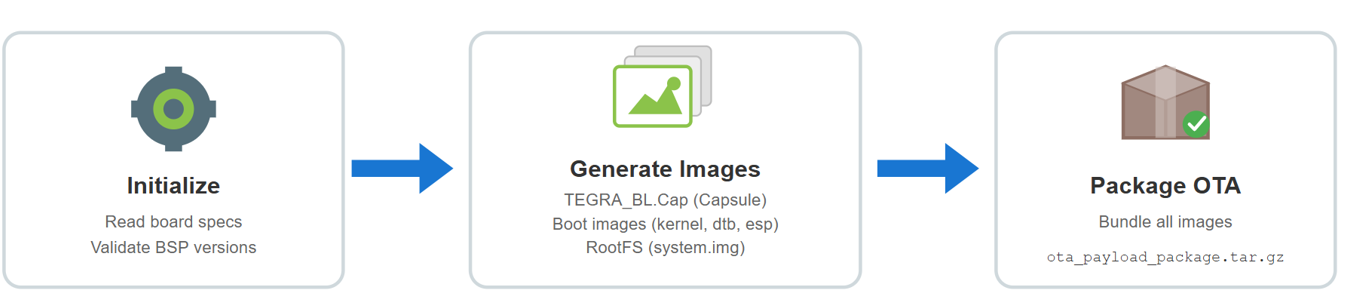
The tool will automatically:
- Initialize: Read board specifications and verify BSP version
- Generate Images: Package bootloader Capsule, kernel, and rootfs
- Integrate & Package: Add board identification, version info, backup list, and produce an installation package about 800MB~2GB in size
OTA Execution Flow: Three Steps to Foolproof Upgrades! #
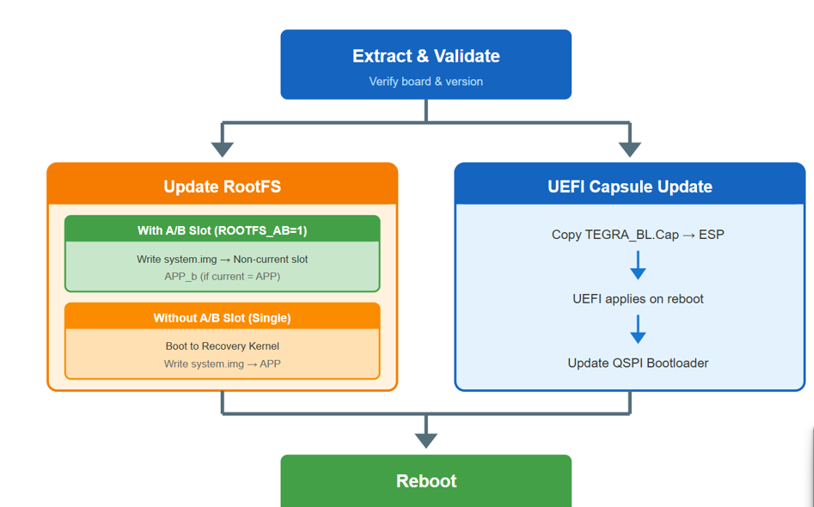
Step 1: Extract & Validate #
- Unpack the installation package
- Match board identity and version (prevent incorrect installations)
- Update TNSPEC (so the new system knows what board it is)
Step 2: Update the Operating System (Update RootFS) #
- A/B Slot: Directly write the new image to the spare partition, switch boot
- Single Slot: Reboot into Recovery Kernel, backup/restore data, overwrite rootfs
Step 3: Update Bootloader (UEFI Capsule Update) #
- Place Capsule file in ESP
- On next boot, UEFI automatically updates QSPI Flash bootloader
After Completion: New system boots, data is restored, upgrade is done! #
User Data Retention Mechanism: Upgrades Without Losing Personal Data #
Image-Based OTA completely overwrites the rootfs, so user-installed applications, settings, accounts, etc. may be lost. NVIDIA provides a two-layer backup framework:
- First Layer (Automatic): Backup/restore critical system files (extlinux.conf, nv_boot_control.conf, fstab)
- Second Layer (Customizable): Based on
ota_backup_files_list.txt, backup files or directories you specify
Recommended essential list:
- User accounts and passwords:
etc/passwd,etc/shadow - sudo permissions:
etc/sudoers - Network settings:
etc/NetworkManager/system-connections - SSH settings:
etc/ssh/sshd_config - User directories:
home - Custom apps:
opt - Boot target:
etc/systemd/system/default.target(easily overlooked!)
Remember to use relative paths (e.g.,
etc/passwd), otherwise the backup will fail!
Advantech Innovation: OTA Challenges & Breakthroughs for Custom Carrier Boards #
Why Are Custom Board Upgrades Difficult? #
NVIDIA’s OTA tools originally only supported the official Developer Kit. For custom boards (like ROM-AB2210), board names often differ, causing verification failures during upgrades.
Advantech’s Solution #
- Register Custom Boards on Build Side: Add ROM-AB2210 specs, version aliases, and device lists in the OTA tool configuration, so the tool “recognizes” your board
- Dynamic Patching: When there’s no time to rebuild the package, temporarily modify the board name to pass verification
This not only solves upgrade bottlenecks, but also makes Advantech products more flexible and competitive in customized and mass deployment scenarios!
Results & Applications: Upgrades are No Longer “Adventures” but “Insurance” #
Value Brought by Image-Based OTA #
- High Reliability: Whole-package replacement, immune to old system environment contamination
- Batch Deployment Friendly: Offline installation, unified delivery via remote management platform, making mass upgrades of production devices simpler
- Rollback Capability: A/B Slot supports one-click rollback, so failed upgrades are no longer a concern
- Custom Board Support: Advantech’s continuous R&D ensures seamless upgrades for its carrier boards
Highlights Compared to Traditional Methods #
- No more package dependency or version conflicts
- Supports offline environments, no need to connect to NVIDIA apt repo
- System is “spotless” after upgrade, just like a new device
Conclusion & Future Outlook: OTA Upgrades Advance Intelligent Devices! #
Image-Based OTA is not just an “upgrade,” but a crucial step toward large-scale, intelligent, and customized device management. Advantech continues to invest in this field, from custom board support to data retention mechanisms and batch deployment integration, ensuring every Jetson can be upgraded safely, reliably, and quickly. Looking ahead, we will keep optimizing the process and developing smarter remote management tools, making upgrades not an “adventure,” but a form of “insurance” that makes devices stronger, more stable, and more aligned with industry needs.
FAQ & Tips #
Q1: What if the upgrade fails? #
- OTA logs record the entire process in detail, located at
/ota_log/ - A/B Slot allows rollback to the previous system
Q2: Data lost after upgrade? #
- Ensure your backup list includes accounts, passwords, network settings, and other critical files
Q3: Entered OEM initial setup screen after upgrade? #
- Be sure to include
etc/systemd/system/default.targetin your backup list
Q4: Custom board name mismatch? #
- It’s recommended to rebuild the installation package with a custom board config, or dynamically patch TNSPEC
Want to learn more or facing technical challenges? Contact Advantech! We are continuously innovating to make every upgrade safer, smarter, and more user-friendly!