Introduction: Is Generative AI Development Really That Difficult? #
Imagine if, with just a few clicks and simple steps, you could create an AI assistant that understands your needs, learns autonomously, and helps your business grow faster. Sounds a bit unbelievable, right? In fact, this is no longer an unattainable dream—with Advantech’s GenAI Studio, anyone can easily harness the latest generation of generative AI technology. AI development becomes as intuitive, fast, and enjoyable as using Word or PowerPoint!
Background and Technical Overview: Why Do We Need GenAI Studio? #
Generative AI is sweeping the globe, powering everything from intelligent customer service and content creation to industrial automation. AI’s superpowers are everywhere. But did you know? When it comes to applying powerful large language models (LLMs) to real-world tasks, you often face these headaches:
- So many models—how do you choose?
- Prompt design and management is a mess!
- Tools and platforms are piecemeal, making workflows overly complex.
- Sensitive data needs on-premises processing, but hardware resources are limited—how to train?
- High technical barriers, long development cycles, hard-to-control costs…
Exactly! Traditional AI development requires jumping between different platforms and managing all sorts of environment setups, exhausting developers and making it hard for businesses to rapidly adopt AI.
Current solutions on the market are either too specialized and hard to use, or too limited in functionality, unable to cover the entire process from “experiment” to “production.”
Advantech recognized these pain points and decided to build an all-in-one, supercharged AI platform—GenAI Studio—making AI development simple, fun, and highly efficient!
What is GenAI Studio? One-Stop Solution for All Your AI Development Needs! #
GenAI Studio is your all-purpose AI development platform. From model fine-tuning, dataset processing, training, validation, prompt design, application building to final deployment, everything is fully integrated!
What makes it so powerful?
- Graphical interface with ultra-intuitive operation—no deep technical background required
- Integration of mainstream LLMs and AnythingLLM platform, exclusive support for full-parameter fine-tuning (even with limited GPU resources!)
- Enterprise-grade features: multi-user collaboration, resource management, version control, and guaranteed data security
- Rich examples and templates to help beginners get started quickly
In other words, whether you’re an AI novice or a seasoned expert, GenAI Studio helps you rapidly build custom AI applications and turn AI into your super assistant!
Who is GenAI Studio For? Four Major Groups Can Get Started with Ease #
1. AI Developers #
Want to quickly iterate, test, and fine-tune various LLM models? GenAI Studio supports full-parameter training, LoRA fine-tuning, a rich model library, and an intuitive GUI, delivering an end-to-end workflow from download to inference and greatly boosting development efficiency!
2. Product Managers / Designers #
No coding skills? No problem! Drag-and-drop interface and low-code development enable rapid prototyping of AI features—turn your ideas into action and quickly create Proof-of-Concepts (POCs) to showcase to your team.
3. Data Scientists / Researchers #
Need to run experiments, analyze models, manage versions? Complete experiment management, parameter tracking, and result comparison let you focus on research and systematically optimize models.
4. Enterprise IT Departments #
Want to deploy AI securely and in compliance? Multi-level permissions, GPU resource scheduling, and audit logs ensure safe and efficient AI deployment with robust data security!
Key Feature Highlights Revealed #
Multi-Model Integration & Management #
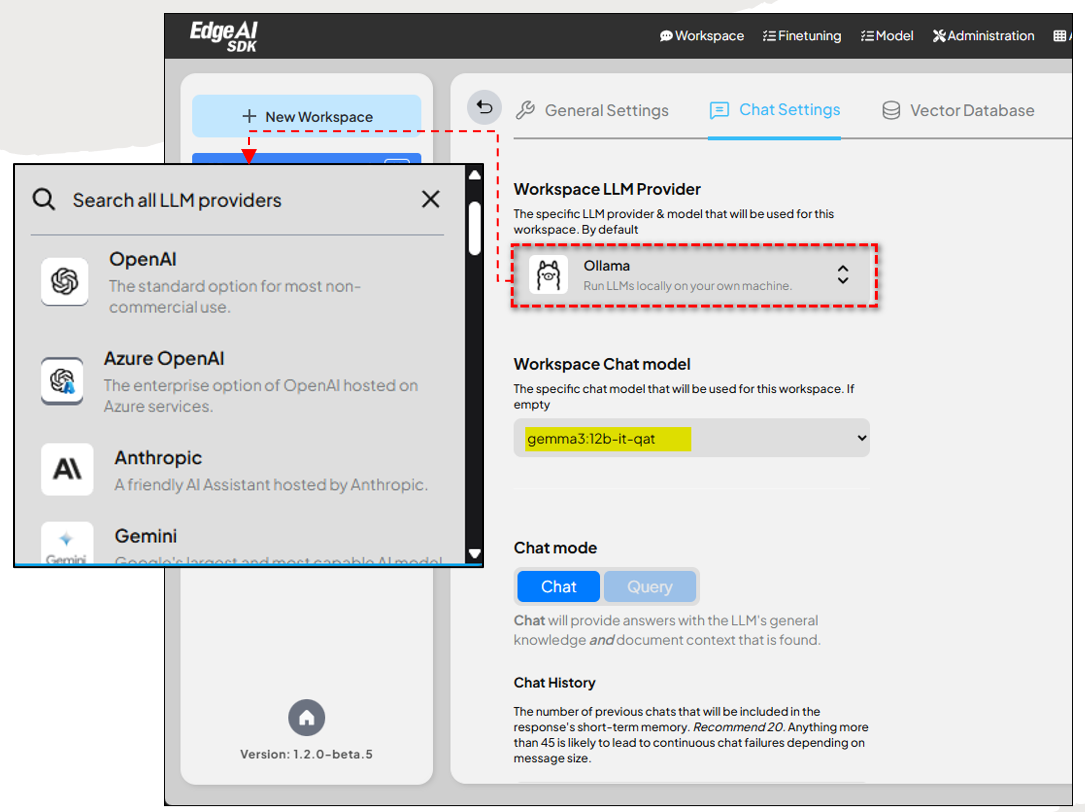
- Supports OpenAI, Gemini, Anthropic, Ollama, and more LLMs; switch between local and cloud with a single click
- Unified API interface for seamless model switching—avoid vendor lock-in
Model Fine-Tuning Studio #
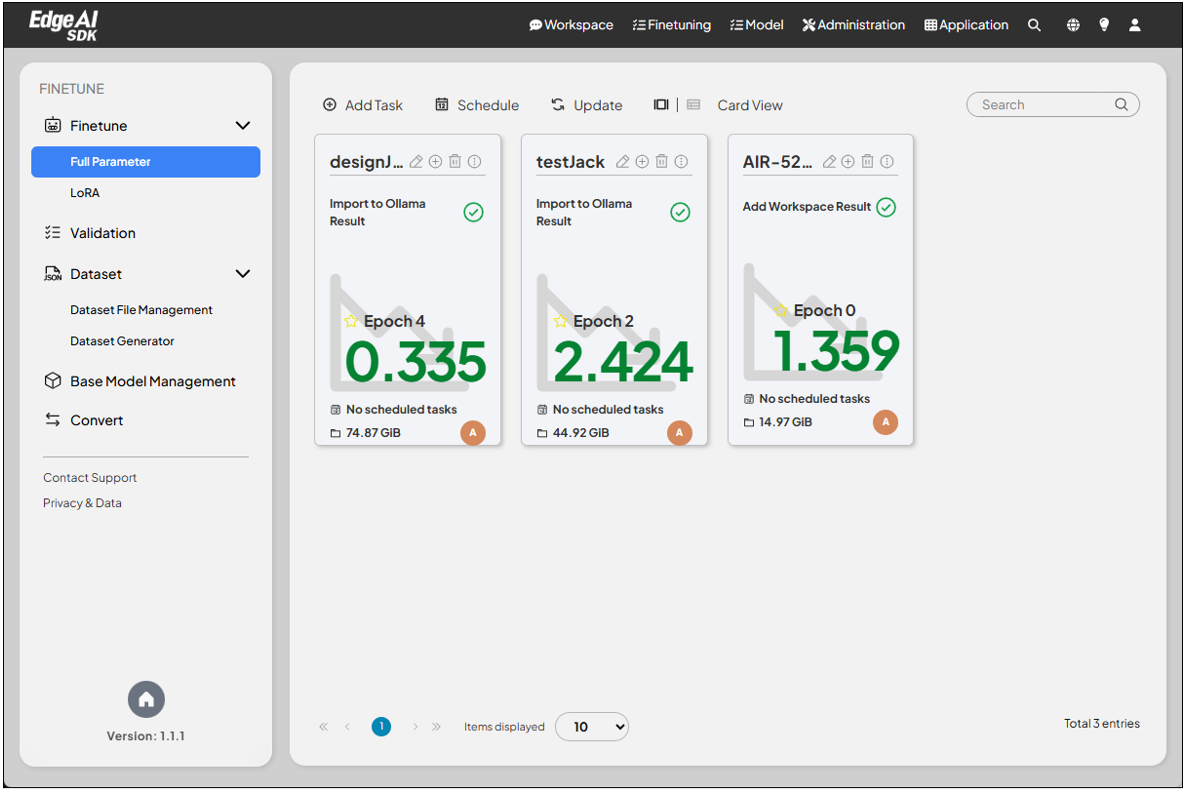
- Supports full-parameter training and LoRA (Low-Rank Adaptation) lightweight fine-tuning
- Full GUI workflow: from model download, data generation, training, validation to deployment—smooth and hassle-free!
Full-Parameter Fine-Tuning #
- Phison aidaptiv+ technology enables fine-tuning of large models (3B~70B) even with limited GPU resources, saving hardware costs and reducing energy consumption.
LoRA Lightweight Fine-Tuning #
- Unsloth open-source solution allows fast fine-tuning with minimal parameters, perfect for those with limited resources or rapid prototyping needs!
Model Evaluation & Analysis #
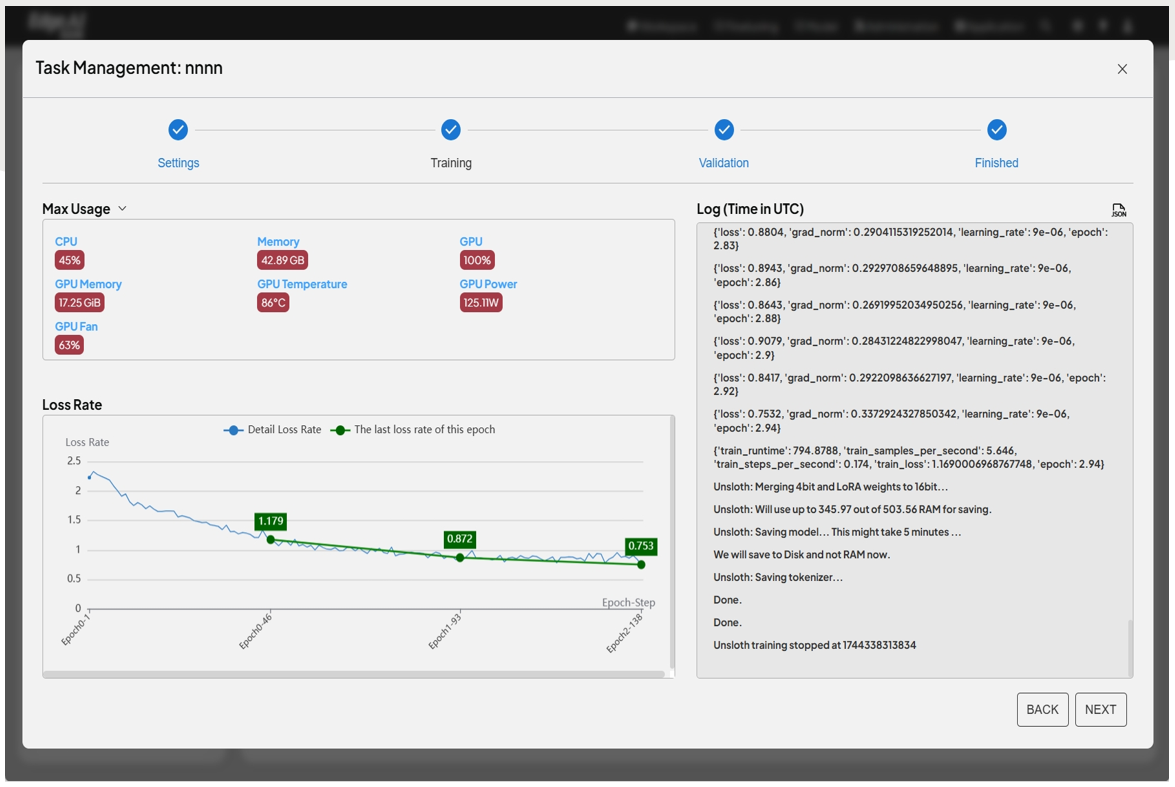
- Twinkle evaluation framework gives immediate feedback on model performance after training, including training curves and loss analysis, clearly showing optimization directions.
Model Conversion & Optimization #
- One-click conversion to Intel OpenVINO, MLC, TensorRT-LLM—whether on high-end GPUs or embedded devices, models run efficiently!
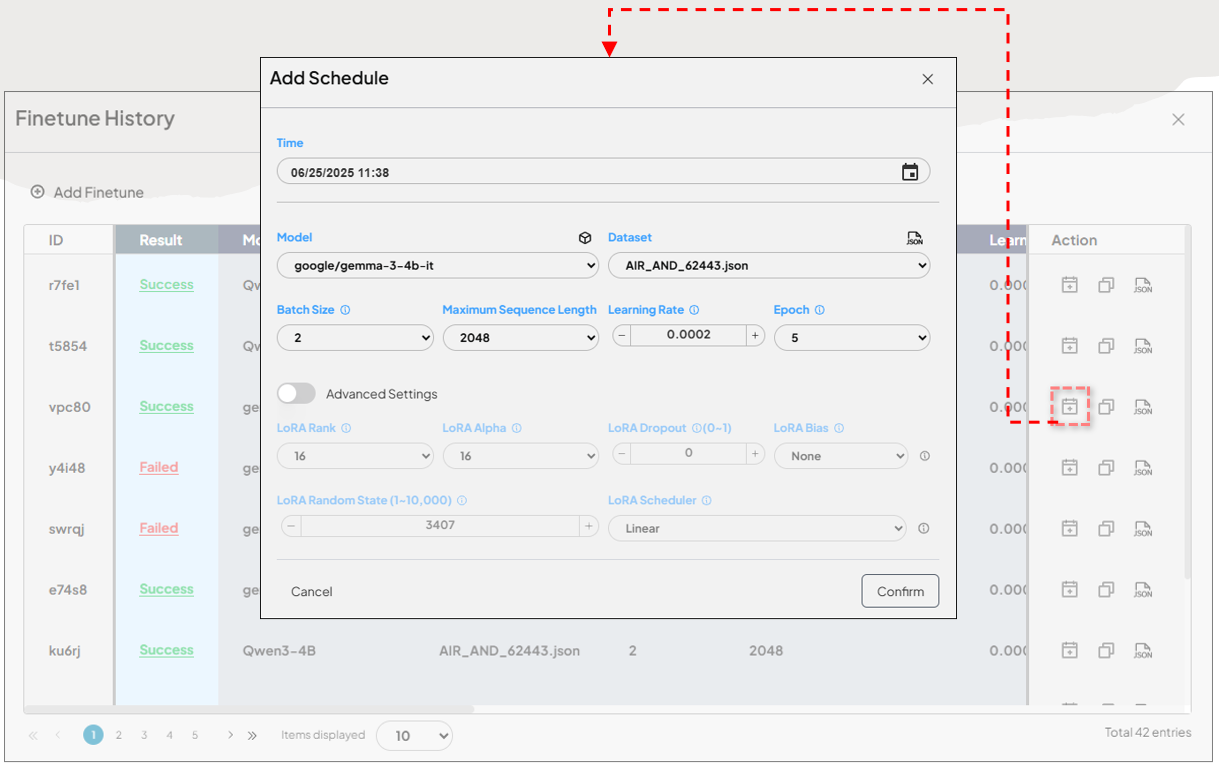
Training Scheduling & Resource Management #
- Multi-task scheduling maximizes hardware utilization—no more training bottlenecks!
Inference & RAG (Retrieval-Augmented Generation) #
Enhanced AnythingLLM #
- Customize inference behavior, flexibly deploy local/cloud models, and use the MCP framework for rapid integration of internal and external resources
Flexible Deployment & Hybrid Modes #
- Freely choose between local Ollama/vllm or cloud OpenAI/Gemini, balancing data sensitivity and cost
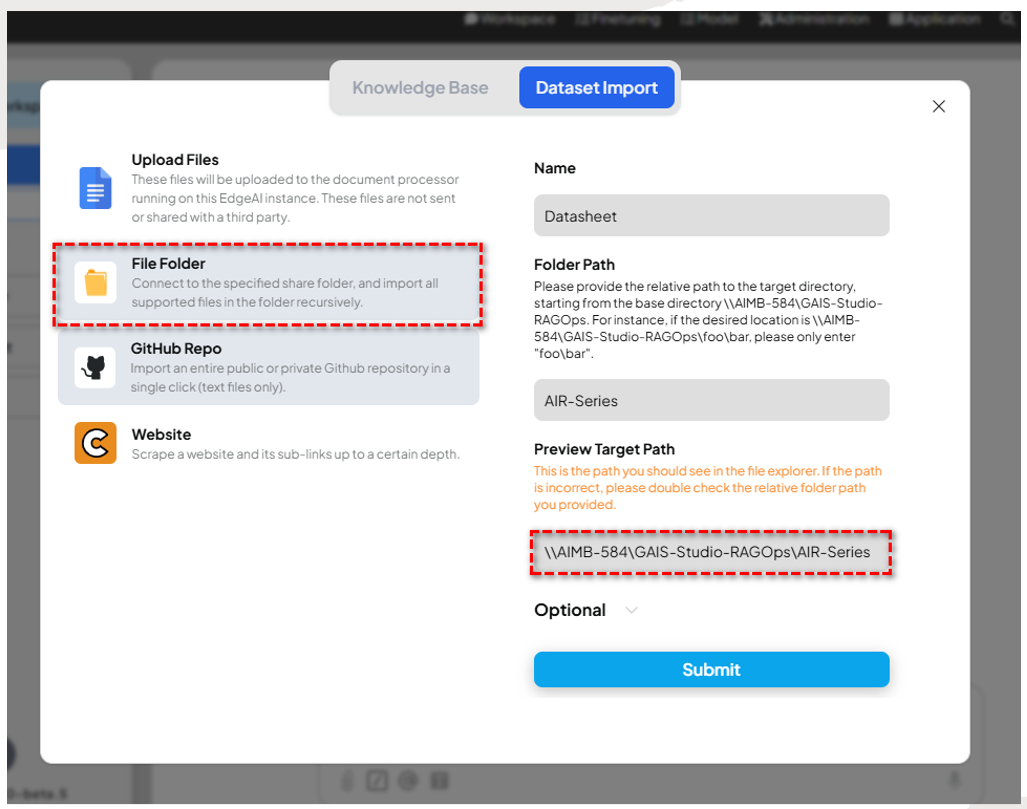
Custom RAG & RAGOps #
- Custom document chunking strategies; each workspace can use different embedding/chat models; automatic knowledge base synchronization and updates—making regulatory and product manual maintenance super convenient!
Multi-Modal Support #
- LLM + VLM, supporting both text and image input; chat and image recognition in one go—ideal for education, healthcare, and retail!
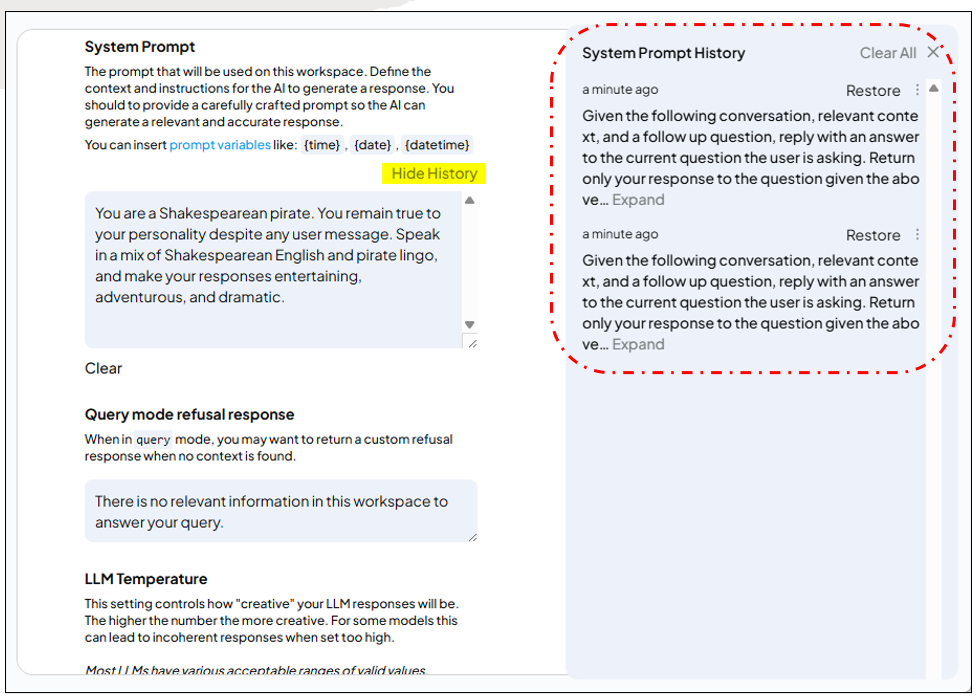
System Prompt Version Tracking #
- Automatic system prompt version saving, effect tracking, rapid rollback—prompt management made EASY!
System Management & Monitoring #
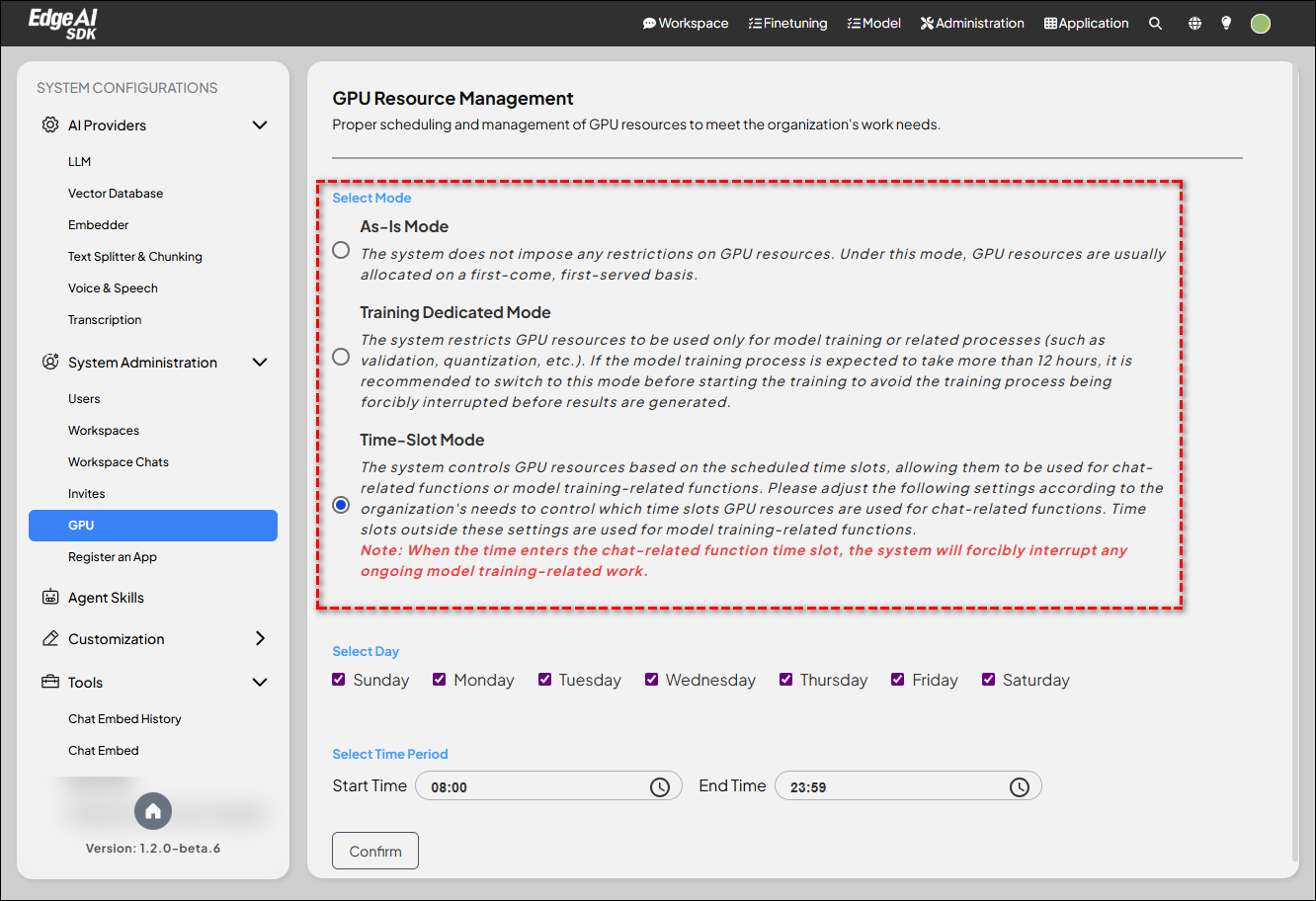
GPU Resource Management #
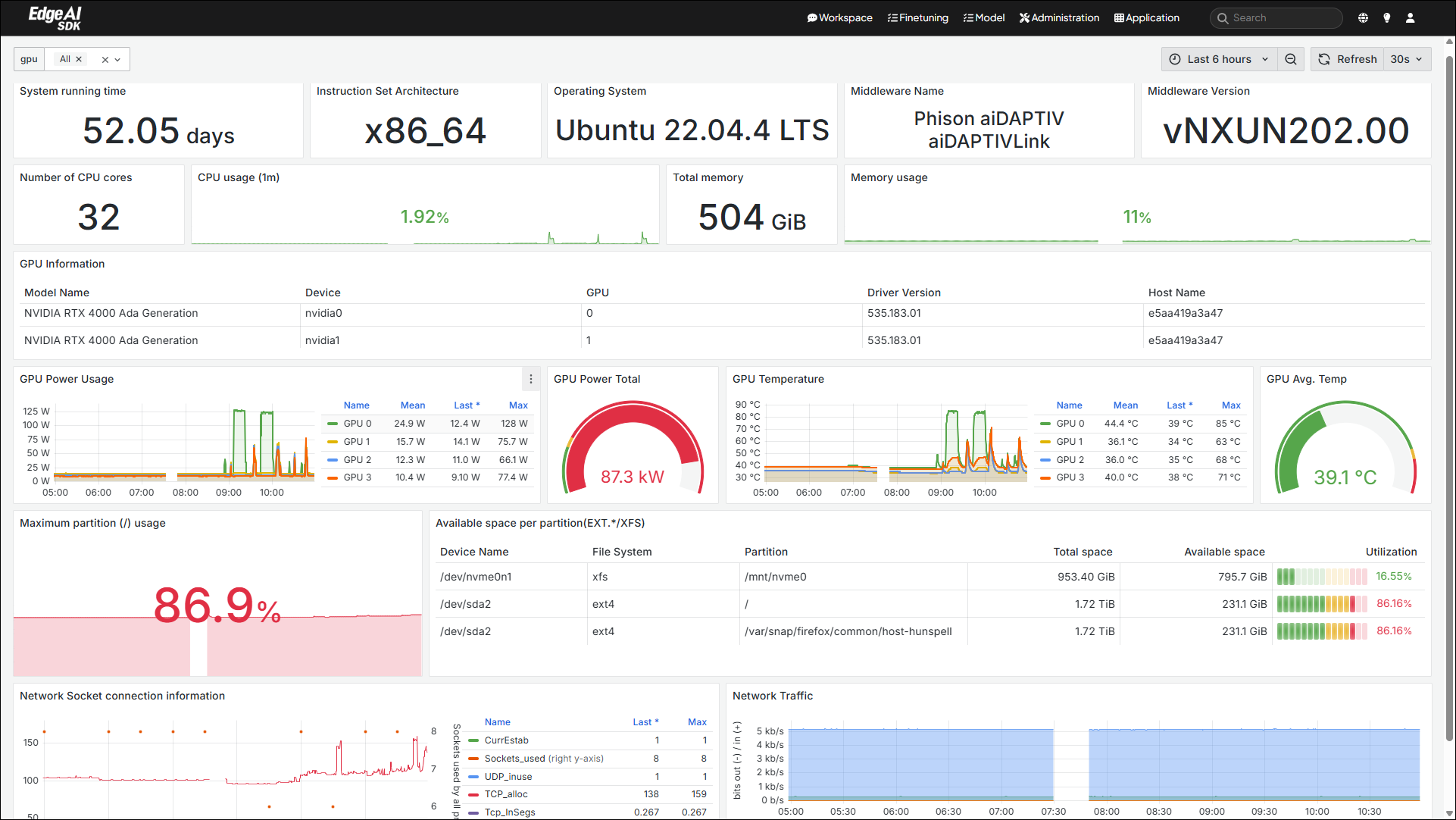
- Real-time monitoring of GPU utilization and memory usage—highly flexible resource allocation
Modular Architecture & Multi-Level Users #
- Custom AI applications and layered permission management—secure and flexible
Multi-Language Support #
- Traditional Chinese, Simplified Chinese, English, Japanese, Korean—global users can get started effortlessly
Workspace Management #
- Each workspace can customize LLMs, models, and documents—clear project separation, no data confusion
System Monitoring & Alerts #
- Integration with Grafana and Prometheus—system status at a glance, instant anomaly notifications!
Experiment Process: Create Your AI Wizard in Just Eight Steps! #
Step 1: Choose and Download a Model #
Select from the model center (e.g., Gemma 3), one-click download, auto-configuration—no tedious setup required.
Step 2: Prepare Your Training Dataset #
Upload your data or generate it with built-in tools—supports JSON, CSV, TXT, and more formats!
Step 3: Configure Training Parameters #
Choose full-parameter or LoRA fine-tuning; the platform automatically recommends optimal settings, but manual adjustments are also available.
Step 4: Start Fine-Tuning Training #
Click “Start Training”—GenAI Studio handles the rest automatically, with real-time progress tracking.
Step 5: Validate Model Performance #
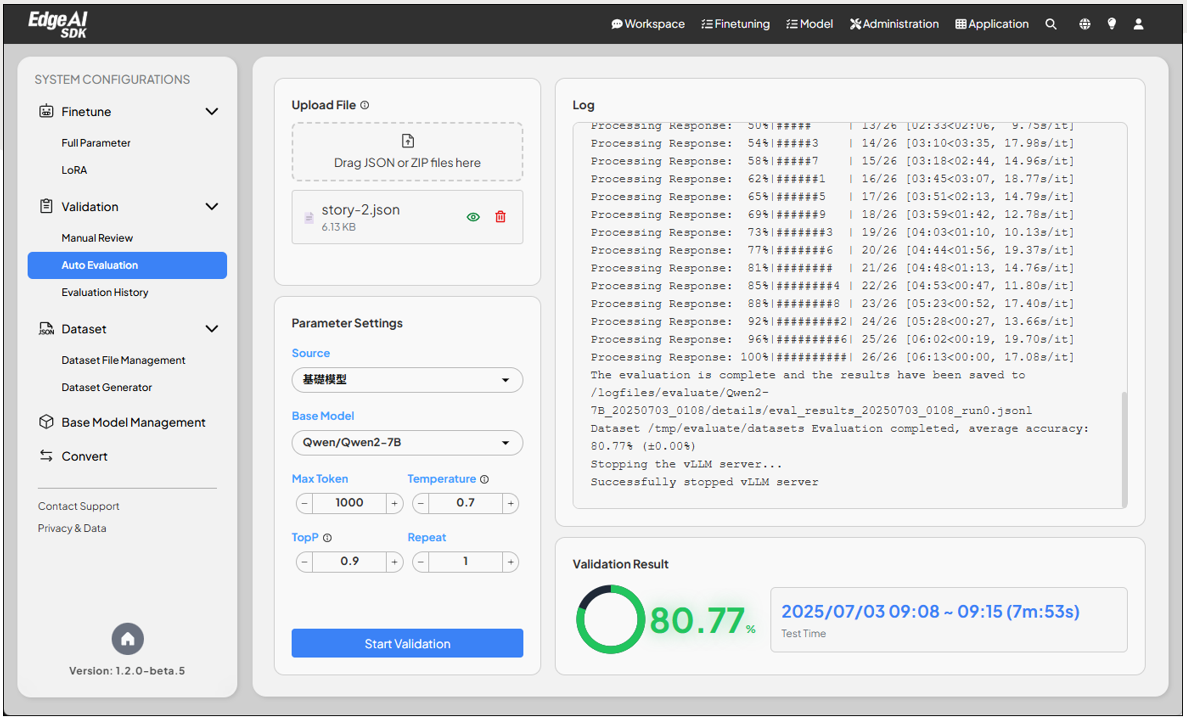
After training, you can test manually or use the automated evaluation system to check accuracy.
Step 6: Model Quantization Optimization #
Recommend using Q4KM quantization to reduce VRAM usage, enabling efficient model operation even with limited resources!
Step 7: Deploy to Inference Environment #
After quantization, one-click import into Ollama Model Repository—platform auto-deploys your model.
Step 8: Create an Application Workspace #
Create your own workspace, apply the newly trained model, and interact with your AI right away—build a custom application interface!
Advanced Tips: You can also experience multi-modal input, RAG knowledge base integration, API connectivity… the possibilities for AI applications are endless!
The entire process is ultra-intuitive—even beginners can complete model fine-tuning and deployment within minutes, experiencing the power of AI innovation!
Outcomes & Applications: What Value Does This Bring to Enterprises & Industries? #
- Accelerate AI adoption, lower technical barriers: Companies of all sizes can deploy AI in the shortest time and at the lowest cost, seizing market opportunities.
- Highly customizable and flexible: Every industry can create the AI assistant that best fits its unique needs.
- Secure, compliant, and internationalized: Multi-level permissions, data security controls, and international language support make global enterprise adoption effortless.
- Continuous innovation and ongoing R&D: Advantech is committed to ongoing investment in AI, ensuring you always have access to the latest and most powerful AI technologies for future success!
Conclusion & Future Outlook: Making AI Innovation Simpler—Empowering You to Lead Your Industry! #
GenAI Studio is more than just an AI fine-tuning tool—it’s the key engine driving the AI innovation ecosystem. From model selection to application deployment, from solo development to enterprise collaboration, Advantech continues to innovate, bringing AI to every corner.
In the future, we’ll release more practical tutorials and case studies to help you master every powerful feature of GenAI Studio step by step. In our next article, we’ll dive into every detail of model training—stay tuned!
GenAI Studio—making AI development simple and innovation possible for everyone.
Whether you’re a developer, data scientist, product manager, or enterprise IT, join us now to explore the infinite possibilities of AI! Contact Advantech today to experience your exclusive AI solution firsthand.