Have you ever encountered this scenario—your on-site Windows devices are unable to connect to the internet, yet still require regular security patch updates to avoid skyrocketing risks? At Advantech, we truly understand this pain point! Today, let’s explore how we leverage the DeviceOn platform to build a dedicated cybersecurity defense for “offline Windows devices,” ensuring your equipment’s security is always up-to-date!
Why Is This So Important?—Background and Technical Insights #
With the rapid development of smart factories, automated production, remote monitoring, and other applications, on-site Windows endpoint devices are often “offline,” making “security updates” a major challenge. The traditional approaches are either manually installing updates device by device (which is exhausting), or risking network exposure (which is extremely risky). At this point, being able to remotely and automatically deploy security updates in batches becomes the savior of operations management.
Advantech’s DeviceOn is designed precisely for these needs! It allows administrators to centrally push Windows security updates even when devices are offline, safeguarding the information security of every device.
Experiment Process Revealed—How Did We Achieve This? #
Curious about how we mastered this technology? Here’s our complete experimental process:
1. Preparation #
- A Windows device with DeviceOn Agent installed and connected to the DeviceOn Server
- The latest Windows cumulative security updates (downloadable from the Microsoft official website; make sure to select the KB file that matches your OS version and build)
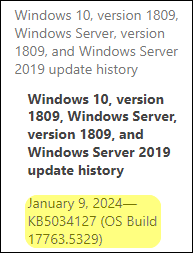
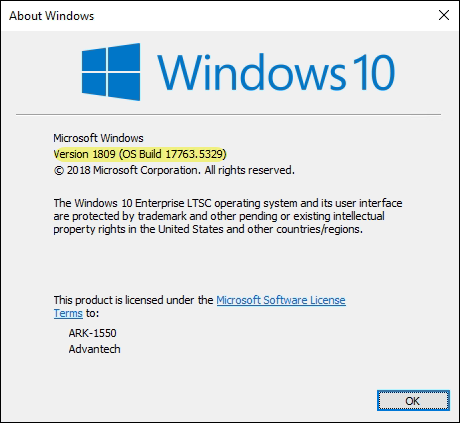
⚠️ Reminder: Be sure to verify that the security update (KB number) you downloaded matches the Windows version and build of your existing device exactly to avoid installation errors that could cause system issues!
2. Download and Verify Update Files #
- Carefully review Microsoft’s official documentation to ensure the update file matches your device’s system
- Download the corresponding KB cumulative update file from the Microsoft Update Catalog
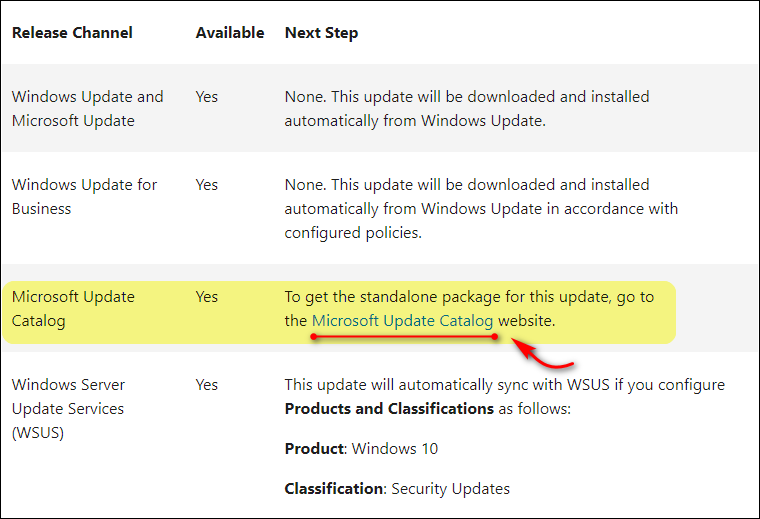
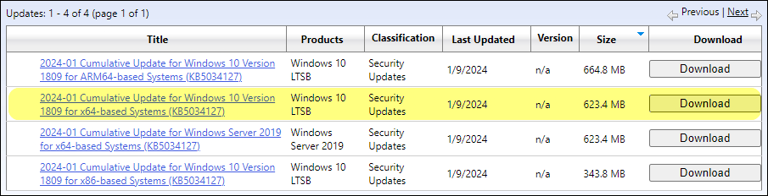
3. Test Installation Scripts to Ensure Smooth Deployment #
-
First, select a test machine to conduct a silent installation test (add the
/quietparameter to the installation command to enable seamless, user-transparent installation) -
For example:
windows10.0-kb5033911-x64-ndp48_fd9c7de7eff3906ed882d2a338030d33ea373ba5.msu /quiet -
Once you confirm the silent installation proceeds smoothly, package the installation script into an OTA update package, ready for wide deployment
4. Best Practices: How to Handle Multiple Updates? #
- If devices require multiple KB security updates, it’s recommended to package only one KB per OTA update package
- After each installation, reboot before proceeding to the next update to avoid potential issues caused by simultaneous patch installations
5. Verifying Installation Results #
-
After deployment, make sure to check that the update was indeed installed
-
Steps:
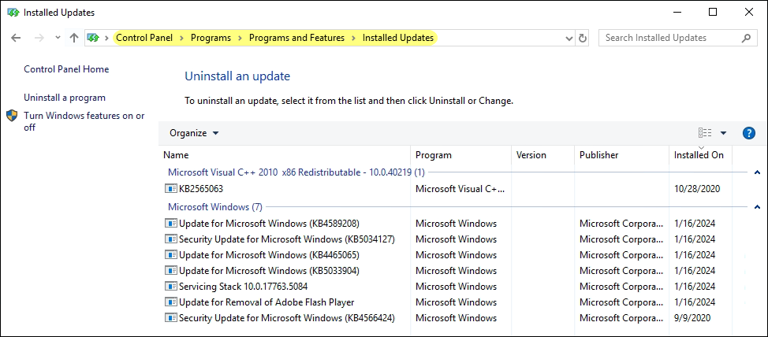
- Open “Settings” > “Update & Security” > “Windows Update”
- Click “View update history”
- Check the installed updates and confirm that the deployed KB number appears
Highlights and Industry Value #
What are the impressive benefits of the DeviceOn “Offline Windows Security Update Deployment” solution?
- Fully automated, unattended: Greatly reduces manual operation time and lowers the risk of human error
- Updates without network connection: Perfectly solves the cybersecurity maintenance challenges for offline devices in factories, closed environments, and more
- Flexible group deployment: Allows you to push updates to specific device groups or individual devices as needed
- Trackable and verifiable: Transparent update process with clear visibility into each device’s installation status
Compared to traditional manual installation or opening network access, DeviceOn’s innovative deployment method not only saves significant manpower but also greatly enhances information security, bringing enterprises greater operational flexibility and competitiveness.
Advantech’s Commitment to Innovation and Future Outlook #
This experiment demonstrates Advantech’s ongoing innovation and breakthroughs in endpoint device management and cybersecurity automation! As industries such as smart manufacturing, healthcare, and retail demand ever-higher standards for information security, we will continue to enhance the DeviceOn platform. In the future, we plan to integrate more automated security tools, intelligent scheduling, and anomaly tracking features to build a comprehensive endpoint security ecosystem.
Do you also have offline device management needs? Let Advantech’s innovative power be your strongest cybersecurity shield!
Want to learn more about DeviceOn’s innovative applications or interested in technical cooperation? Feel free to contact us anytime!