Have you ever imagined remotely deploying applications to thousands of devices with just a few clicks? Now, Advantech makes this a reality! This article takes you deep into our latest remote deployment experiment with the DeviceOn App Store, unveiling the secrets of next-generation software management.
App Store: Making Software Deployment Easy and Intelligent #
In this era of digital transformation, enterprises are demanding software deployment that is “fast, flexible, and secure” more than ever. Especially for industries that need to manage large fleets of devices, the traditional manual installation method is outdated. Advantech DeviceOn App Store is the innovative solution to this pain point! It not only allows you to remotely install programs on individual devices but also deploys to multiple devices with a single click, significantly saving time and manpower.
Whether you’re a maintenance team member, field engineer, or sales partner, this platform enables effortless management of software resources, application upgrades, and even BIOS updates. This is a testament to our relentless innovation and ongoing R&D.
Experiment Goal: Delivering the Perfect “Remote Deployment” Experience #
The star of this experiment is the beloved Notepad++ text editor. The objectives are clear:
- Learn how to package applications for remote deployment
- Successfully achieve automated installation of Notepad++ on target devices
- Demonstrate the powerful remote cross-device management capabilities of DeviceOn App Store
Experiment Steps Revealed! Step-by-Step Guide to the App Store #
Step 1: Prepare Your Application Package #
Before you begin, please prepare the following materials:
- DeviceOn Server: Activated and running properly
- Target Device: Windows device with DeviceOn Agent installed and connected to the server
- Application Files: For this demo, the Notepad++ installer (32-bit version recommended; download from the official website)
- Automated Installation Script: A .bat or PowerShell script for Windows to ensure a fully unattended installation
- Uninstall Script: If you want to support removal functionality
- Professional Icon: Square JPG, PNG, or GIF no larger than 400 x 400 px
- Detailed Description, Keywords, Categories, Provider Info, Contact Details: All these help your app stand out in the App Store!
Pro tip: You’ll need the complete installer, scripts, icon, and description—don’t leave anything out!
Step 2: Fill Out App Information to Make Your App Stand Out #
Now enter the App Store upload process—the interface is straightforward:
- App Name: Make your application instantly recognizable
- Upload Icon: Give your app its unique identity!
- Visibility Setting: Decide who can install this app (Note: cannot be changed after setting)
- Detailed Description: Help users quickly understand the features
- App Screenshots: Showcase your software’s interface
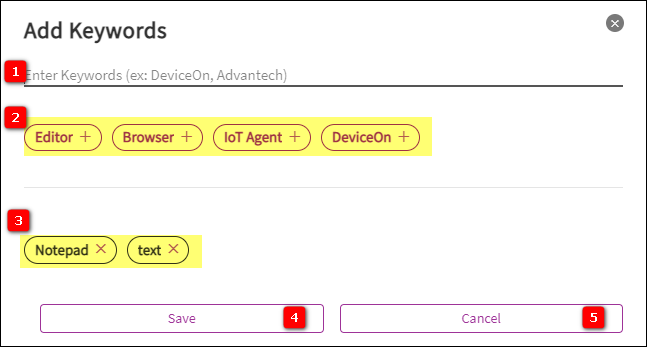
- Keyword Settings: Up to 10 keywords to boost search visibility
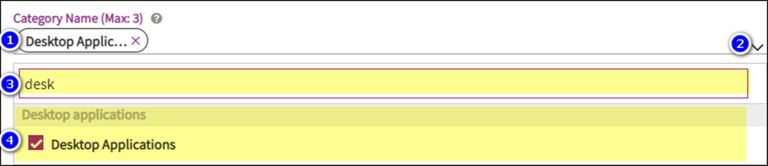
- Category Management: Precise categorization for easy user filtering
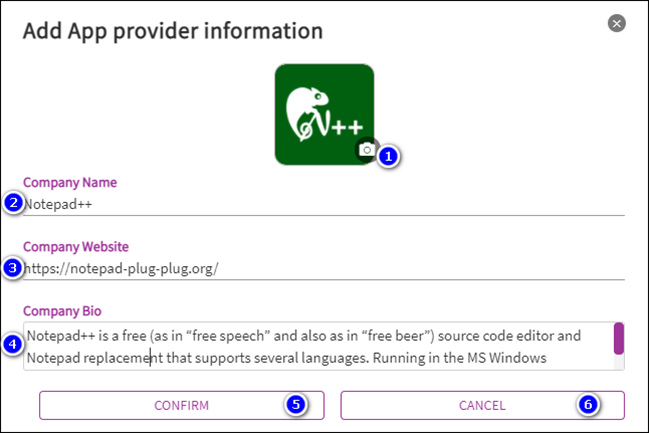
- Provider Management: Add company name, LOGO, website, and introduction
- Contact Management: Provide a technical support contact window
- Next Step: Confirm everything is correct before proceeding to file upload
Complete information not only enhances professionalism but also makes your app easier to discover by target users!
Step 3: Upload Your Application with Precision Packaging #
Now it’s time for packaging and deployment—details matter:
- Version Number: For example, 1.0.0
- Supported Operating Systems: Windows? Linux? Check as needed
- Storage Method:
- Download two zip files locally
- Or upload directly to the designated repository
- Select Directory: Include all files required for installation
- Installation Script: Specify the automated installation process; ensure the script returns “0” for success
- Support Uninstall?: Toggle on/off and upload the uninstall script if required
- Advanced Settings:
- Need to reboot?
- Installation result check script (returns “0” for success)
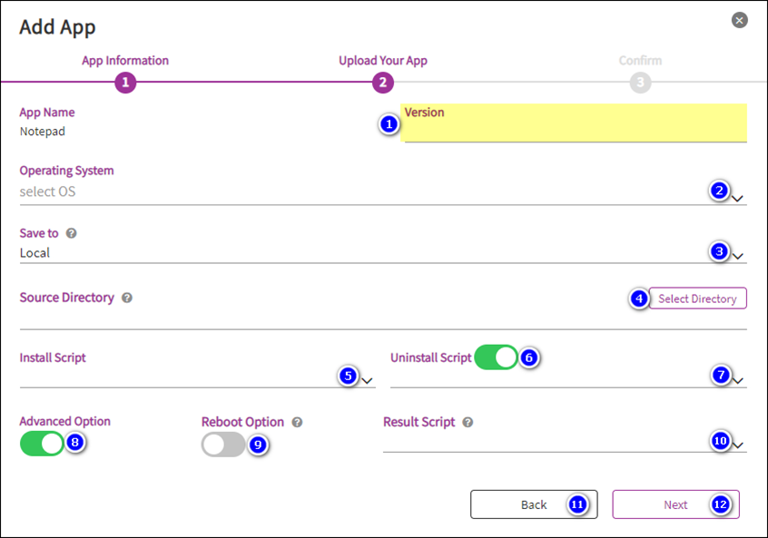
A rigorous file structure and automation scripts ensure every deployment is flawless!
Step 4: Final Confirmation and Effortless Publishing #
- Review All Information: Don’t miss any details
- Confirm Publish: Click “Confirm” to officially launch the deployment process!
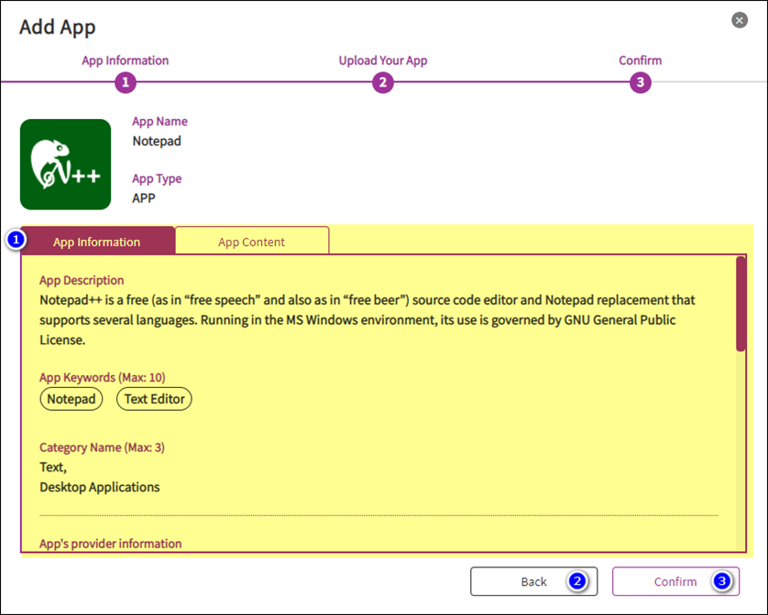
Based on your storage method selection in Step 3, the system will automatically download or upload the application package—deployment made super easy!
Experimental Results & Highlights: Breaking Tradition and Pioneering Remote Software Management #
Through this experiment, we have successfully achieved:
- Zero-Touch Deployment: No on-site operations required; software installs automatically on target devices
- High Degree of Automation: From packaging and publishing to installation and uninstallation—the entire process is automated
- Flexible Scalability: Supports multiple operating systems and application types
- Optimized Management Experience: Categorization, keywords, search, and provider info keep software asset management organized
This process is not only suitable for Notepad++, but can also be seamlessly applied to various enterprise software, drivers, and even BIOS updates (see BIOS Update SOP), greatly enhancing IT efficiency and security for enterprises.
Advantech Continues to Innovate, Powering the Future of Intelligent Management #
The birth of the DeviceOn App Store showcases Advantech’s ongoing breakthroughs and innovation in the field of remote device management. We not only focus on technological depth but also prioritize user experience, ensuring that every partner and customer enjoys the convenience brought by smart management.
Moving forward, Advantech will continue to optimize the DeviceOn platform, expand more automated deployment scenarios, and help industries embrace a new era of digital transformation. Want to know more? Contact us and let’s create the future of smart management together!