This article has been rewritten and reorganized using artificial intelligence (AI) based on referenced technical documentation. The purpose is to present the content in a clearer and more accessible manner. For technical clarifications or further verification, readers are advised to consult the original documentation or contact relevant technical personnel.
Have you ever felt confused about Windows security settings? Or worried about system vulnerabilities but struggled to find a simple and effective protection method? Don’t worry—Advantech Windows Power Suite makes upgrading cybersecurity as natural as breathing! This article will take you deep into our latest security diagnostics feature experiment. Whether you’re a sales partner, application engineer, or a newcomer interested in Advantech technology, you can easily grasp the latest trends in cybersecurity!
Why Is Upgrading Cybersecurity So Important? #
In this era of the Internet of Everything, industrial and commercial equipment increasingly rely on Windows systems, making cybersecurity protection a frontline requirement. Not only are hacker techniques evolving rapidly, but international standards like IEC 62443-4-2 have also become the basic threshold for many industry clients. Advantech is committed to making cybersecurity compliance and protection simple, intuitive, and efficient—this is precisely why we developed Windows Power Suite!
Technical Principles and Market Applications: From Complex to Simple #
What Is Attack Surface Reduction (ASR)? #
Imagine hackers as burglars looking for cracks in your doors, and ASR (Attack Surface Reduction) is the function that seals up those cracks one by one!
ASR is a security control tool launched by Microsoft that proactively blocks common malicious attack methods, such as automatically blocking suspicious macros and restricting the auto-launch of unknown programs. Enterprises can customize or select default rules according to their needs to enhance system defenses and reduce risks.
What Is the IEC 62443-4-2 Standard? #
This is the international gold standard in industrial cybersecurity, ensuring that devices comply with rigorous protection regulations from design to deployment. Advantech Windows Power Suite offers a dedicated “IEC Standard Settings Page,” helping users achieve compliance with a single click—saving both time and effort. Whether you’re a cybersecurity novice or a seasoned expert, you can handle it with ease!
Experimental Process Revealed: One-Click Automation, Effortless Security Upgrade #
Step 1: Enable Attack Surface Reduction #
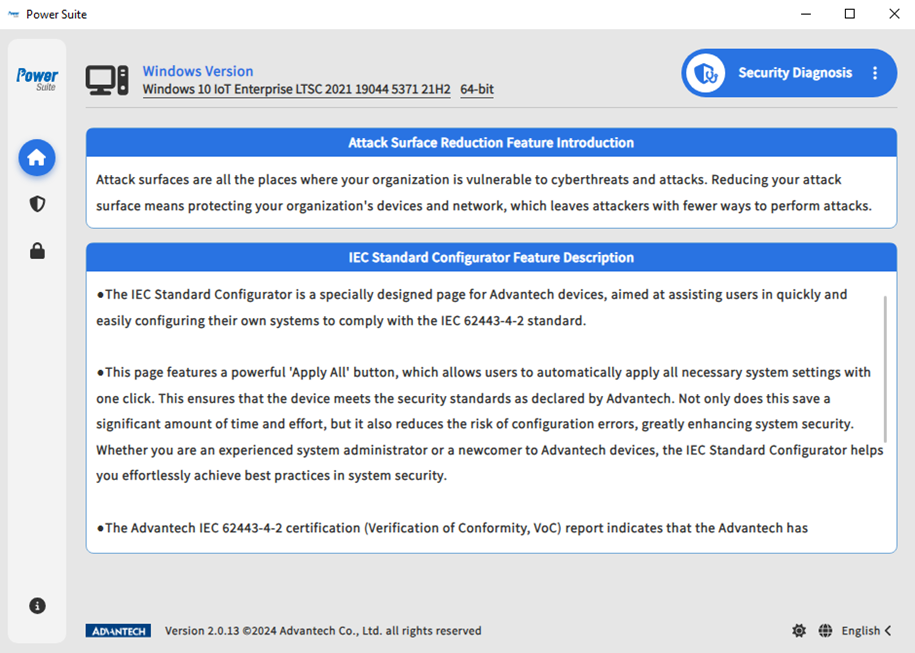
-
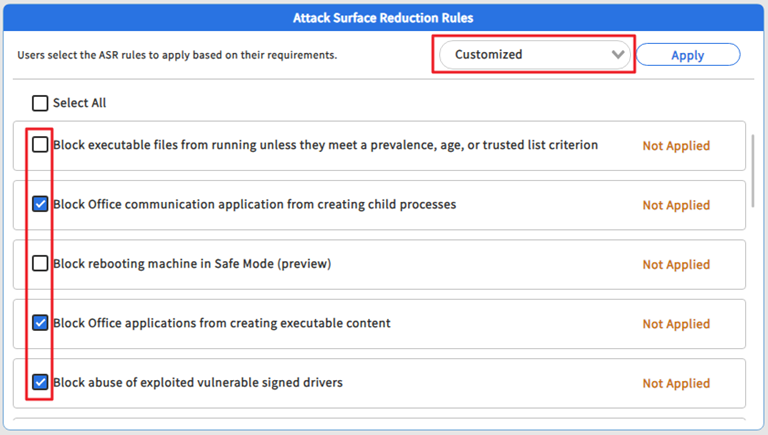
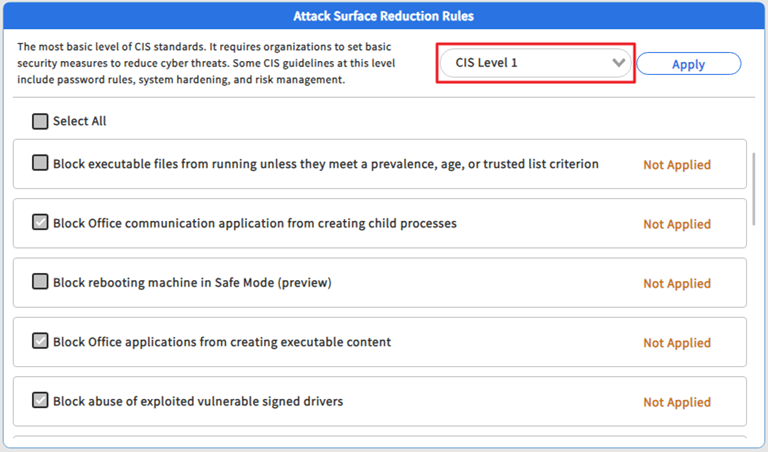
Select Security Protection Level
- Custom Mode: Customize ASR rules according to your specific needs.
- CIS Level 1: Follows the basic rules recommended by the international security authority (CIS), suitable for most scenarios without affecting normal system operations.
- Custom Mode: Customize ASR rules according to your specific needs.
-
Apply Rules with One Click
- Click the “Apply” button.
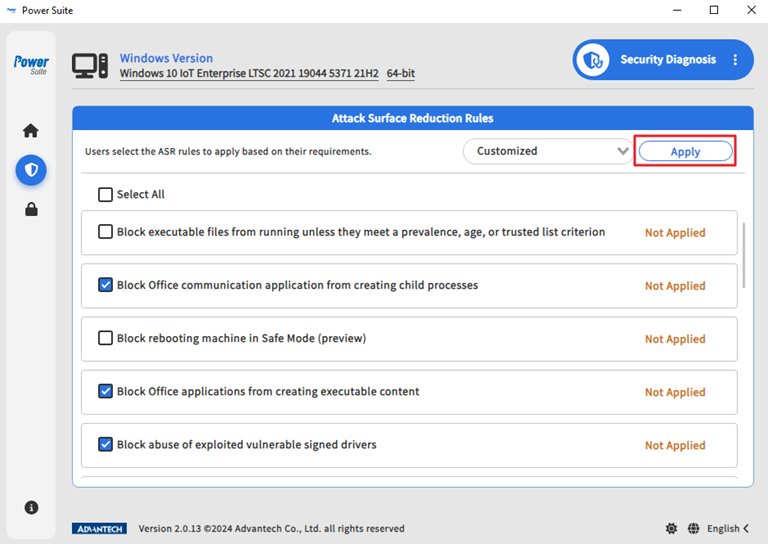
- When the dialog box appears, click “Confirm.”

- The system will automatically apply the selected protection rules.
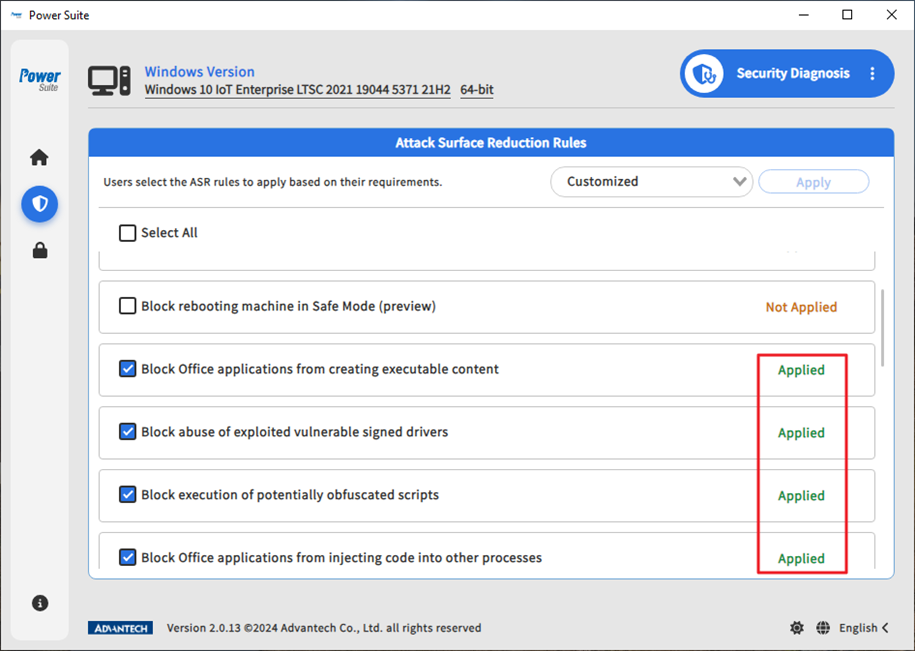
- Click the “Apply” button.
Friendly Reminder: Please ensure that Microsoft Defender Antivirus and relevant protection engines have been updated to the latest versions (Platform version: 4.18.2008.9, Engine: 1.1.17400.5) for optimal protection!
Want to learn more? Please refer to Attack surface reduction rules overview.
Step 2: IEC Standard Settings Page – Compliance Protection with One Click! #
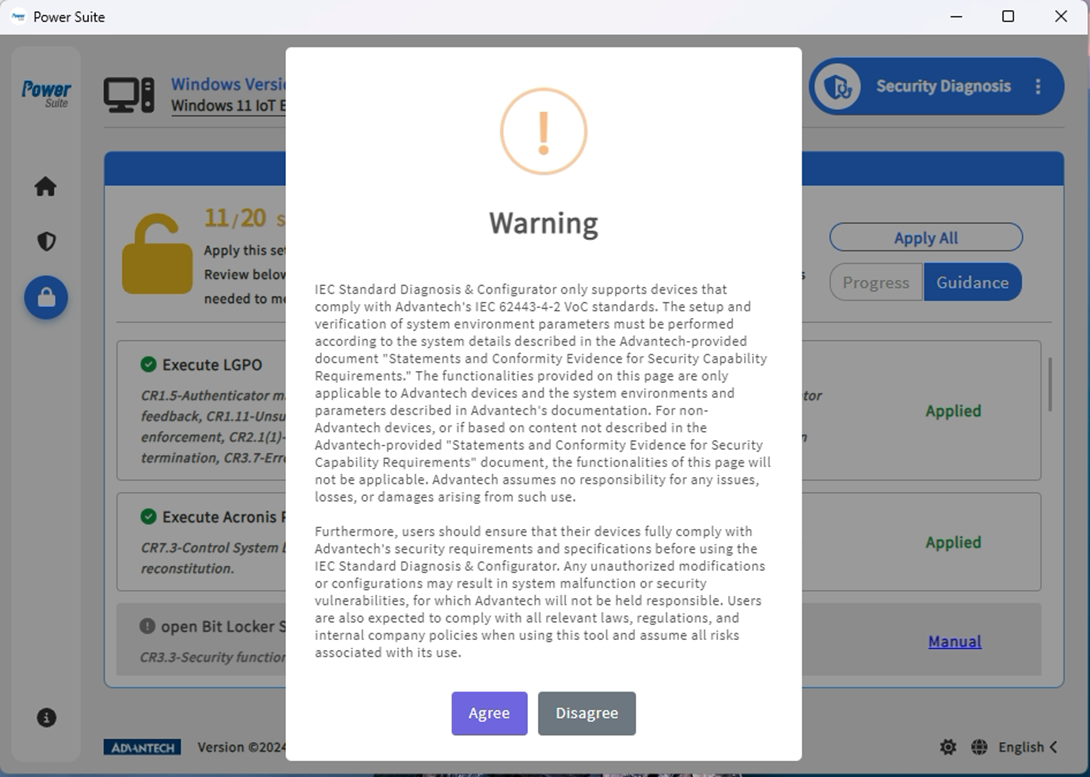
-
First Entry
- Be sure to read the page instructions carefully and click “Agree” to enable the feature.
-
Compliance Guidance and Progress Tracking
- Clearly displays which IEC 62443-4-2 standards your system currently meets.
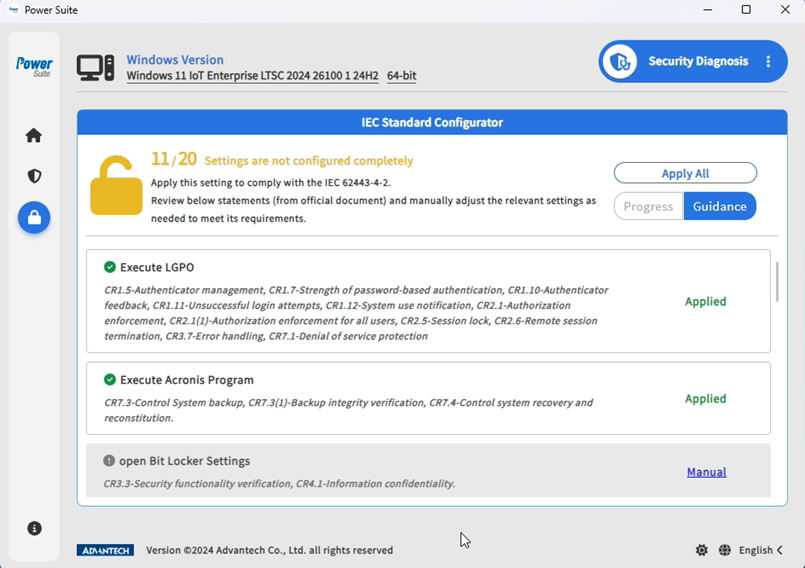
- The progress bar provides a clear overview of how many steps remain for full compliance.
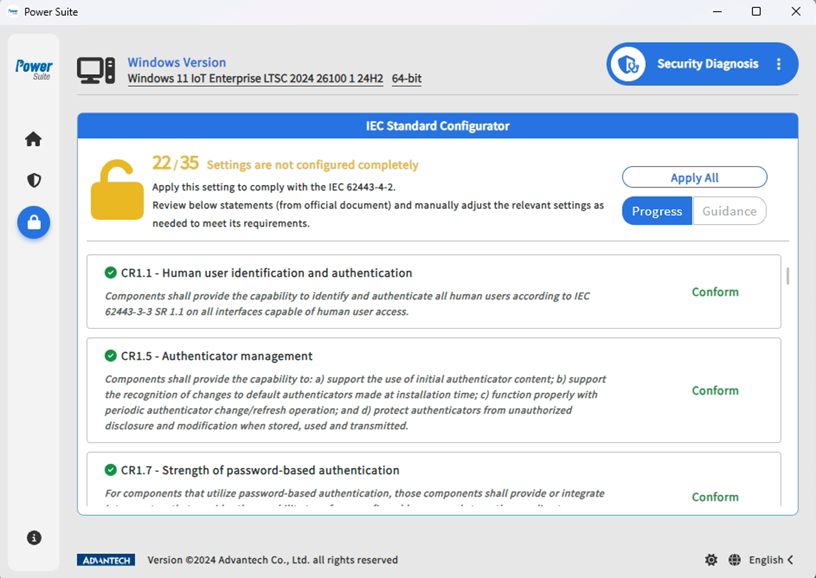
- Clearly displays which IEC 62443-4-2 standards your system currently meets.
-
One-Click “Apply All” Setting
- Click “Apply All” and the system will automatically update all security settings that can be automated.
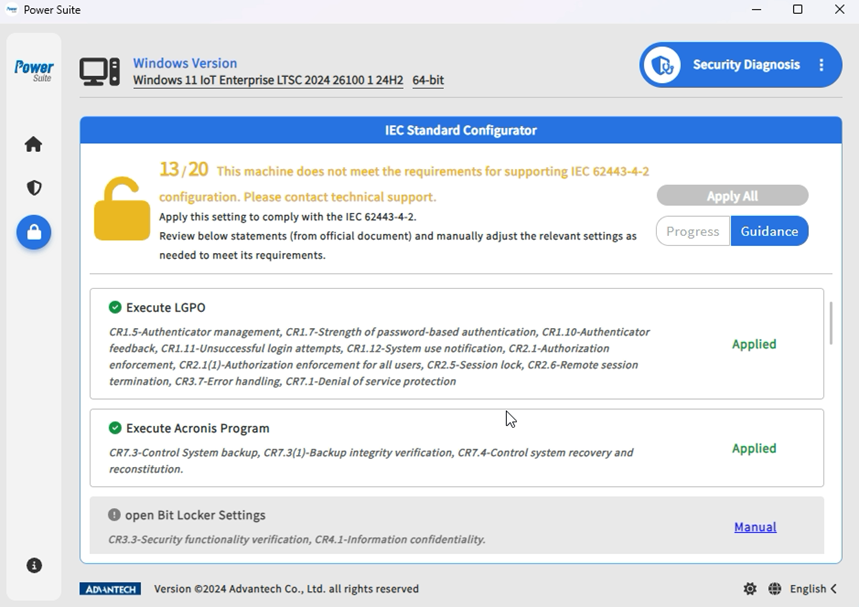
- Click “Apply All” and the system will automatically update all security settings that can be automated.
-
Manual Setting Items
- Some details need to be executed manually; click “Manual” to follow the guidance.
- Click “Launcher APP” to directly open the corresponding tool, follow the steps to complete the settings, and remember that Trellix-related steps should be performed last!
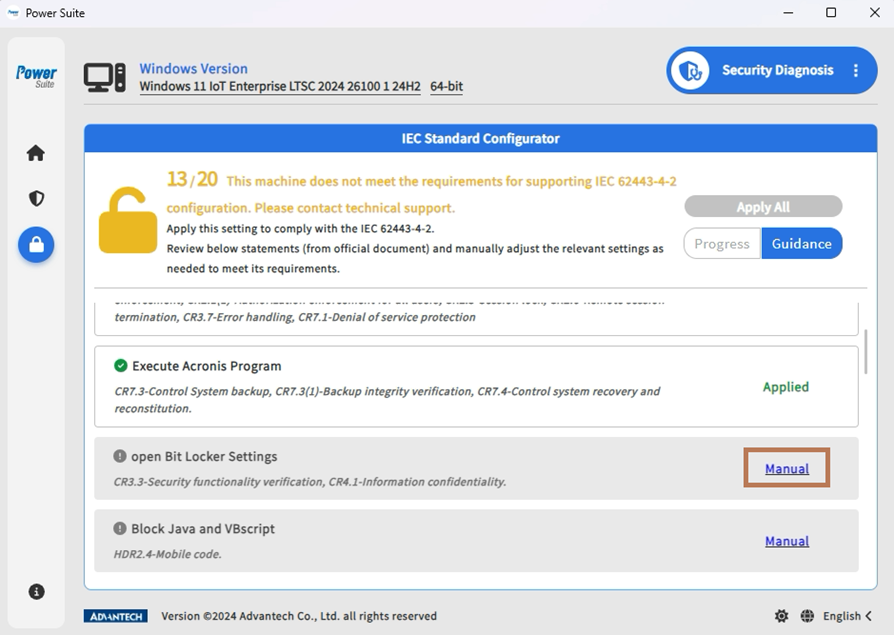
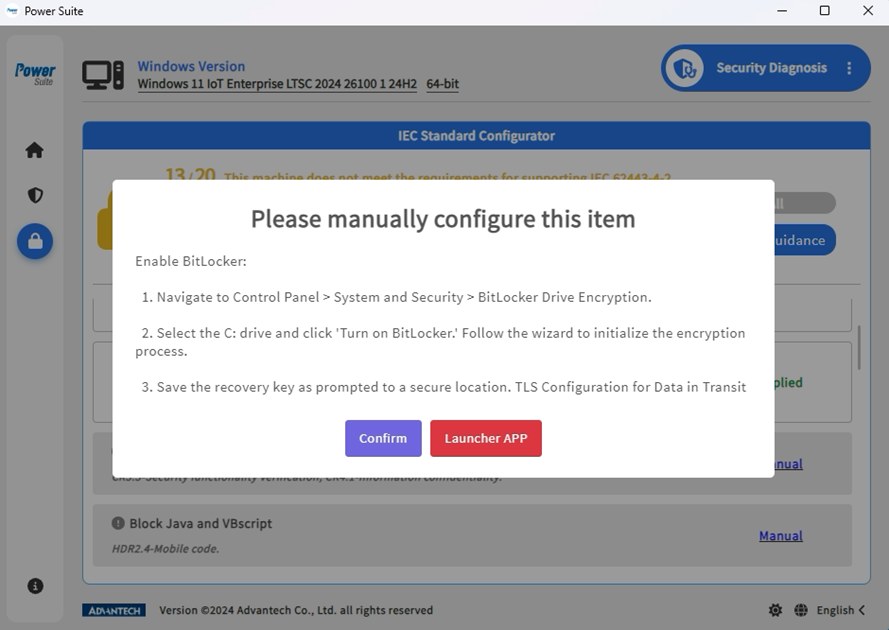
-
Clear Diagnostic Results
- When all settings comply with IEC standards, the screen will display a verification passed prompt.
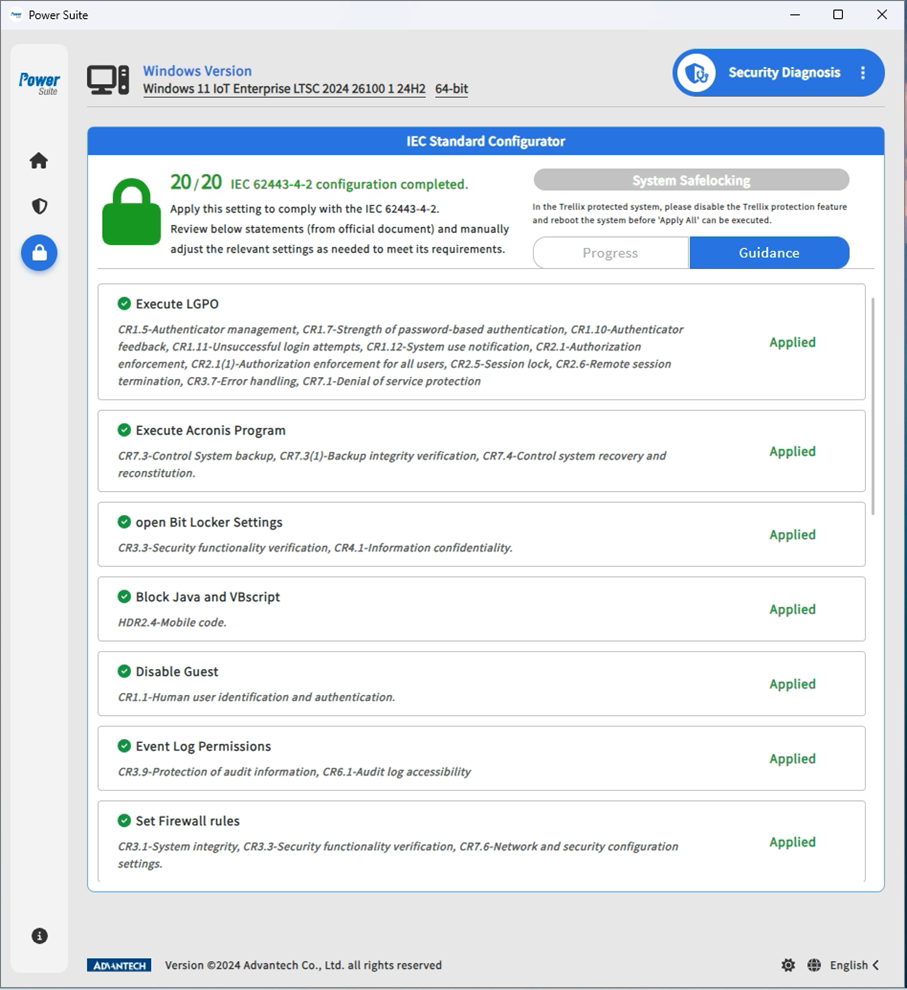
- When all settings comply with IEC standards, the screen will display a verification passed prompt.
Innovative Achievements and Application Value #
- Significant Efficiency Improvement
Advantech IEC 62443-4-2 certification (VoC) shows that we have passed 51 standard requirements, 23 of which can be completed with one click via the standard settings page, making compliance no longer tedious! - High Flexibility, Customer Customization Freedom
In addition to automated items, other settings can be manually adjusted according to customer needs, avoiding excessive restrictions that may hinder operations. - User-Friendly Interface, Accessible for All
Whether you’re a cybersecurity expert or a beginner, users can quickly complete settings, reduce human error, and enhance overall system security. - Leading Technology, Continuous Innovation
Advantech is actively investing in cybersecurity R&D, not only achieving international standard certifications but also continuously optimizing user experience to ensure technological innovation is truly implemented.
Conclusion: Moving Toward a Smarter Cybersecurity Future, Advantech Is With You #
Cybersecurity challenges are constantly evolving, and Advantech never stops innovating! Through the security diagnostics and one-click compliance features of Windows Power Suite, we not only make security management simple but also help users easily tackle various cybersecurity threats. In the future, we will continue to deepen automation and intelligent protection technologies, joining hands with customers to usher in a safer, smarter new era for the industry!
Want to learn more about our products or explore partnership opportunities? Feel free to contact us and let Advantech be your best partner on the road to cybersecurity!