Have you ever imagined that safety helmets, personnel movement, or even special objects in a factory can be instantly and automatically recognized, recorded, and tracked by AI? This is no longer science fiction—it is an emerging technology that the Advantech team is actively working to realize! This time, we are focusing on the “NanoOWL” image recognition technology and have conducted a series of experiments on the high-performance embedded platform, EPC-R7300. Let’s unveil the mystery of this technology and explore how it brings new value to the industry!
Background & Technical Overview: What is NanoOWL and Why Is It Worth Attention? #
With the rise of AI and Edge Computing (Edge AI), more and more enterprises are hoping to analyze images and recognize scenarios in real time on-site, reducing data transmission delays and improving responsiveness. Here, “NanoOWL” is an intelligent image recognition technology specifically designed for embedded devices. Combined with the NVIDIA Jetson Orin Nano-Super (8GB) platform, NanoOWL can quickly recognize people and objects in videos and even combine them into complex scenarios—all without relying on the massive computing power of the cloud.
Example Application Scenarios:
- Smart Manufacturing: Real-time monitoring to check if factory personnel are wearing safety equipment
- Smart City: Recognizing specific vehicles, pedestrians, or behaviors
- Retail Analytics: Analyzing customer behavior and evaluating product placement effectiveness
EPC-R7300, as our test platform, not only delivers powerful hardware performance (8GB RAM, 128GB NVMe SSD) but also supports the latest JetPack 6.2 software environment, making it an ideal carrier for AI edge computing.
Complete Experiment Log: Step-by-Step Implementation of Image AI Recognition #
In this experiment, we deployed the NanoOWL DEMO on the EPC-R7300 to thoroughly experience every detail from installation to execution. Let’s break down this technological magic into easy-to-understand steps together!
Step 1. Building the AI Computing Environment: Installing Docker & NVIDIA Support #
To ensure the smooth operation of the AI model, we first installed nvidia-container and Docker. This is like putting a “smart coat” on the EPC-R7300, empowering it with advanced image recognition capabilities.
- Perform system updates
- Install nvidia-container and curl
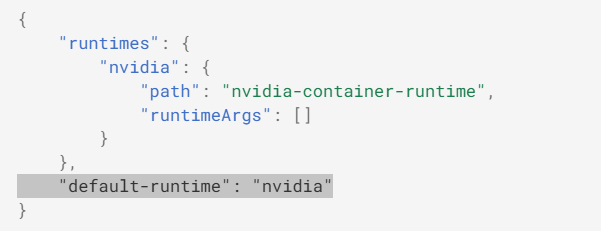
- One-click install Docker and set NVIDIA as the default runtime engine
Step 2. Storage & Performance Optimization: Expanding SWAP Memory #
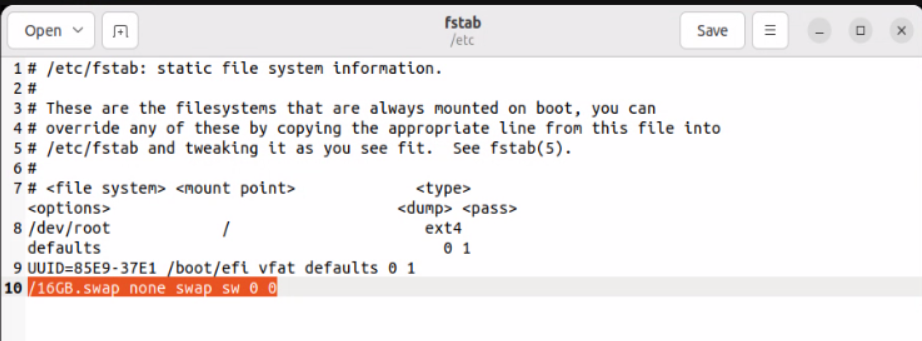
When dealing with large image datasets and AI model operations, memory resources are crucial. We chose to create a 16GB SWAP file on the NVMe SSD to ensure smooth system performance without lags.
- Disable ZRAM
- Create and enable a 16GB SWAP file
- Edit
/etc/fstabto make the setting permanent
Step 3. System Tips: Disabling Popup Warning Notifications #
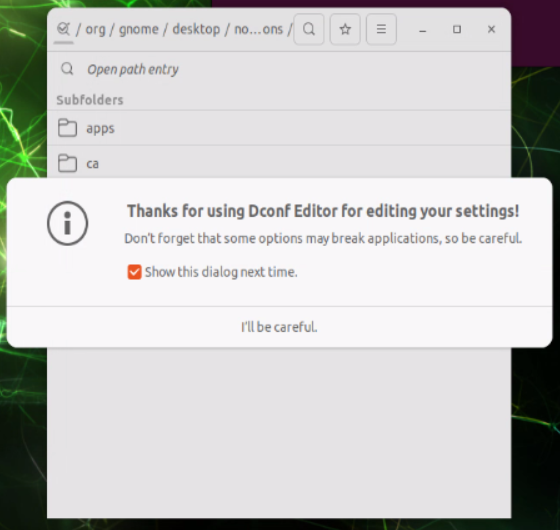
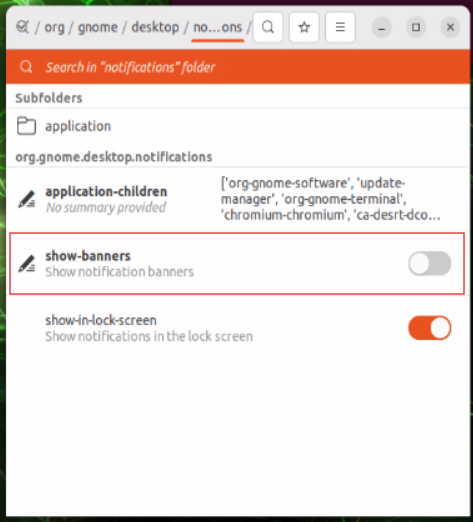
Popup notifications can be very annoying during live demonstrations or development! We used dconf-editor to directly turn off notification prompts on the GNOME desktop, making the demo process smoother and less interrupted.

Step 4. Installing Jetson-containers #
We downloaded and installed jetson-containers, which forms the basic environment for running the NanoOWL DEMO. With just three simple steps, rapid deployment is possible!
Step 5. NanoOWL DEMO Hands-On Operation #
- Prepare Image Data
Place the MP4 video files to be recognized into thejetson-containers/datafolder. - Start NanoOWL DEMO
Run the dedicated Docker image to enter the NanoOWL work environment. - Execute Scenario Recognition
In theexamples/tree_demodirectory, use Python commands with the model files to perform AI recognition directly on the video!

-
Real-Time Interactive Operation
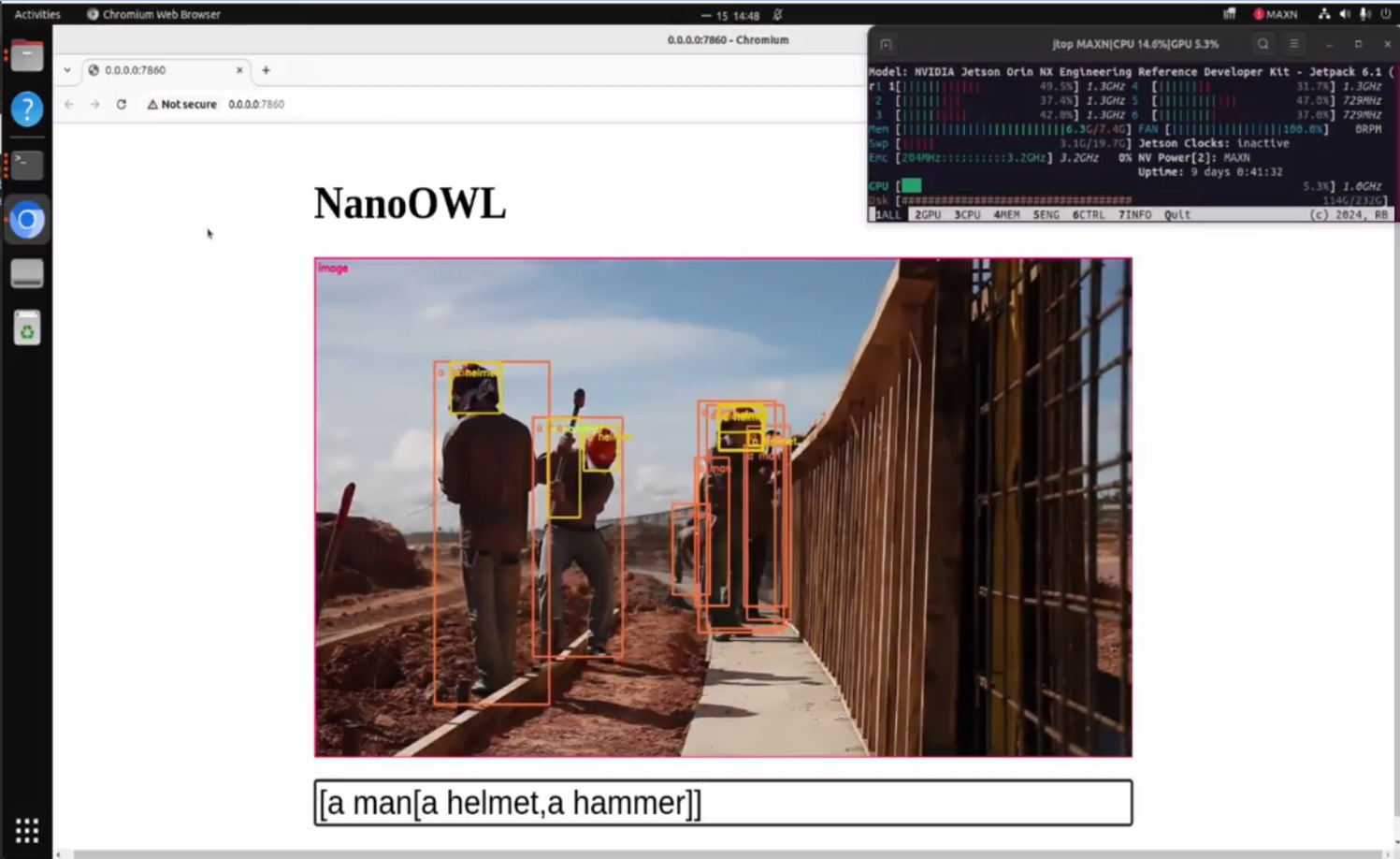
Open your browser and go to http://<IP_ADDRESS>:7860. The video will be displayed in real time, and you can enter the “object combinations to be recognized” in the field below.- For example, input: [a man[a helmet,a hammer]] to simultaneously detect a person “wearing a helmet and holding a hammer”.
- The more objects you add, the slower the recognition becomes, but it allows for highly precise and complex scenarios.

Key Outcomes & Industry Applications: The New Value Brought by NanoOWL #
Through this experiment, NanoOWL demonstrated impressive real-time image recognition capabilities on the EPC-R7300. Whether recognizing single objects (such as safety helmets) or complex combinations (multiple objects appearing simultaneously), it delivers fast and accurate responses. This technology represents Advantech’s ongoing breakthroughs in the field of AI edge computing and can be widely applied in the future to:
- Smart Factory Safety Monitoring: Automatically detect violations and improve on-site management efficiency
- Smart Retail Environments: Behavioral analysis and customer flow statistics to drive data-driven decision making
- Traffic & Urban Surveillance: Instantly detect abnormal events and enhance public safety
Compared to traditional solutions:
- On-site real-time recognition with ultra-low latency, no need to rely on the cloud
- Flexible specification of various complex object combinations for higher precision
- Simple and quick system setup process, easy to deploy on-site
Conclusion & Future Outlook: Continuous Innovation, Opening a New Chapter in Smart Imaging #
This NanoOWL experiment on the EPC-R7300 not only verified Advantech’s leading capabilities in AI edge computing platforms but also showcased our team’s courage to take on challenges and our spirit of continuous innovation. Moving forward, we will keep optimizing NanoOWL technology to make it smarter and easier to use, and proactively expand its applications across diverse industries.
If you are interested in smart image recognition or are searching for practical AI solutions, feel free to contact us. Let’s build a bright future for industrial and smart city applications together!