Have you ever wondered what it would be like to package our proud SUSI technology directly into a Docker container? This article takes you right into the heart of the Advantech engineering team’s technical experiment, unveiling the mysteries of SUSI running inside a Docker environment! Whether you are a technical expert, AE, sales partner, or a newcomer curious about embedded solutions, you’ll easily understand the exciting content of this “container magic show!”
Background: SUSI Meets Docker, Sparking New Industry Innovations #
With the rise of Industrial IoT (IIoT) and edge computing, system deployment flexibility and portability have become increasingly important. Docker has become the “packaging expert” in today’s IT world, capable of bundling applications and their dependencies into a small container that can run instantly anywhere. SUSI (Secure and Unified Smart Interface) is Advantech’s intelligent API suite developed for hardware control and device management, serving as a core component in many of our smart system solutions.
What does it mean to deploy SUSI in a Docker container?
- More flexible deployment options
- Faster system replication and scaling
- Reduced manpower costs for development and maintenance
- Making our solutions easier to implement for clients!
Experiment Process: SUSI Parties Inside Docker! #
Our team’s goal this time was to successfully run the SUSI suite inside a Docker container on an Ubuntu system and to actually verify its functionality. You can follow our steps and experience the magic of SUSI containerization firsthand!
Step 1: Install Docker and Pull the Base Image #
- Install Docker
sudo apt-get install docker.io - Get the Ubuntu image
sudo docker pull ubuntu - View the list of images
sudo docker images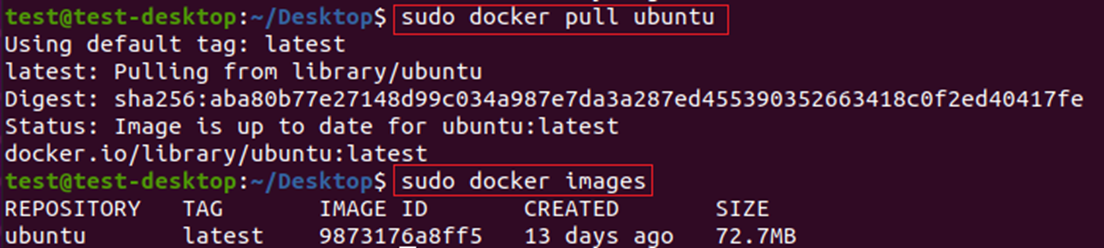
Step 2: Create and Start the Container #
- Create an Ubuntu container
sudo docker run -it --rm --privileged ubuntu - If you find the
/sys/firmware/efi/efivarspath is empty inside the container, remember to use the-vparameter to mount the host path:sudo docker run -it --privileged -v /sys/firmware/efi/efivars/:/sys/firmware/efi/efivars/ ubuntu /bin/bash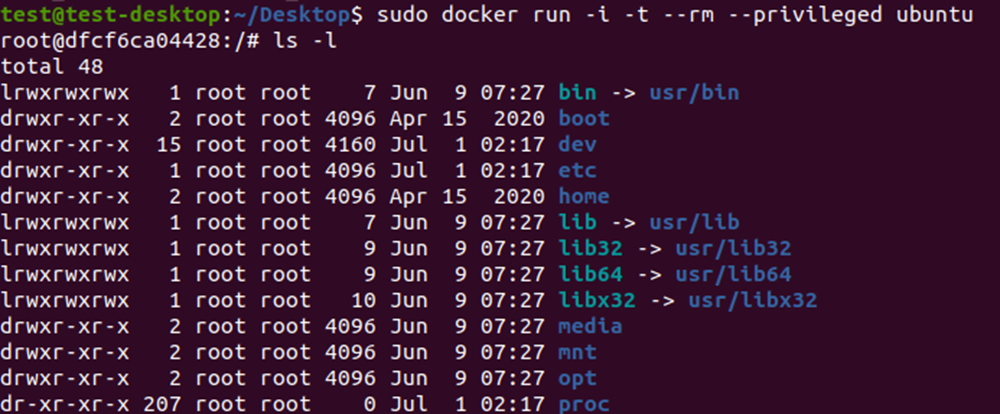
Step 3: Bring the SUSI Suite into the Container #
We tested two methods:
Method 1: Directly Copy the Suite into the Container #
-
Find the name of the running container
sudo docker ps -
Assuming the container is called “elastic_blackburn”, copy the SUSI suite into it:
sudo docker cp XXX.tar.gz elastic_blackburn:/home
-
After entering the container, update packages and install necessary components:
apt-get update
apt install -y libpci-dev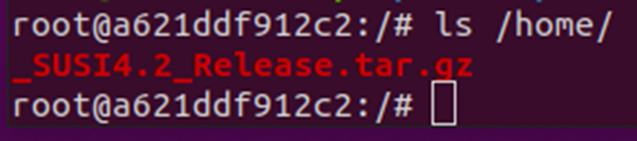
Method 2: Directly Mount the Host Folder #
- Place the SUSI archive (XXX.tar.gz) in
/home/test/Desktopon the host - When starting the container, mount that folder into
/homein the container and also mount the necessary system libraries:sudo docker run -it -rm --privileged -v /home/test/Desktop/:/home -v /usr/lib:/usr/lib ubuntu:20.04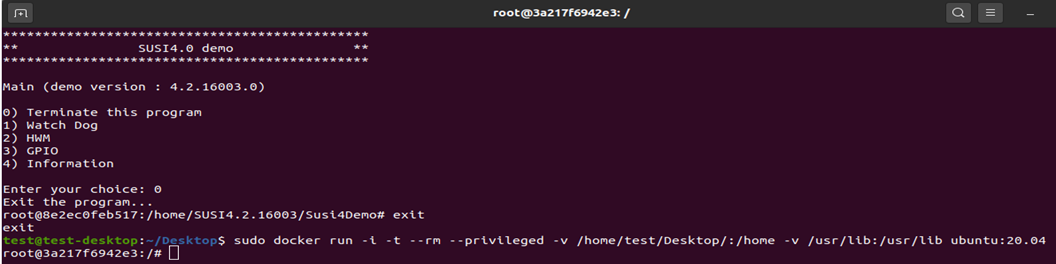
Step 4: Install and Run SUSI #
- Extract the SUSI suite and execute the installation script
./SUSI4.2.X/Driver/install.sh - Test the SUSI Demo program
./SUSI4.2.X/Susi4Demo/susidemo4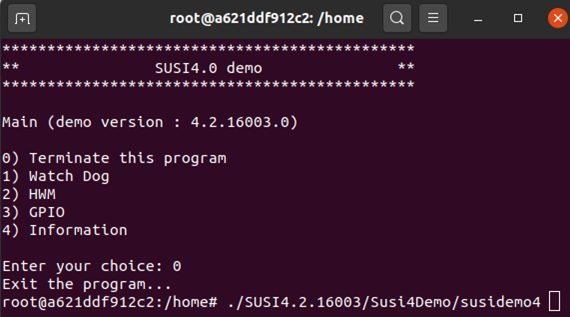
Advanced Application: SUSI IoT Containerization, Even Easier on x86 Architecture! #
Want to make SUSI IoT services run even more smoothly in containers? We’ve also designed a dedicated Dockerfile for x86 architecture, making deployment more automated!
Create a Dockerfile #
FROM ubuntu:20.04
ENV DEBIAN_FRONTEND=noninteractive
RUN apt update && apt install -y pciutils && apt clean
RUN mkdir -p /opt/Advantech/susi/service/ && \
    mkdir -p /usr/lib/x86_64-linux-gnu && \
    mkdir -p /usr/lib/Advantech
CMD ["/bin/bash"]
Build the Image #
docker build -t susiiot_x86:1 .
Run the Container (Mount Necessary Folders and Libraries) #
Here we mount several key directories and libraries to ensure the SUSI IoT service can operate seamlessly! The command is as follows:
sudo docker run \
  -it \
  --name kengweisusiiotdemo \
  --privileged \
  --mount type=bind,source=/opt/Advantech/susi/service/,target=/opt/Advantech/susi/service/,readonly \
  --mount type=bind,source=/etc/Advantech/susi/service/,target=/etc/Advantech/susi/service/,readonly \
  --mount type=bind,source=/usr/lib/x86_64-linux-gnu/libjansson.so.4,target=/usr/lib/x86_64-linux-gnu/libjansson.so.4,readonly \
  --mount type=bind,source=/usr/lib/libjansson.so.4,target=/usr/lib/libjansson.so.4,readonly \
  --mount type=bind,source=/usr/lib/libjansson.so,target=/usr/lib/libjansson.so,readonly \
  --mount type=bind,source=/usr/lib/libSusiIoT.so,target=/usr/lib/libSusiIoT.so,readonly \
  --mount type=bind,source=/usr/lib/libSUSIDevice.so.1,target=/usr/lib/libSUSIDevice.so.1,readonly \
  --mount type=bind,source=/usr/lib/libSUSIDevice.so,target=/usr/lib/libSUSIDevice.so,readonly \
  --mount type=bind,source=/usr/lib/libSUSIAI.so.1,target=/usr/lib/libSUSIAI.so.1,readonly \
  --mount type=bind,source=/usr/lib/libSUSIAI.so,target=/usr/lib/libSUSIAI.so,readonly \
  --mount type=bind,source=/usr/lib/libSUSI-4.00.so.1,target=/usr/lib/libSUSI-4.00.so.1,readonly \
  --mount type=bind,source=/usr/lib/libSUSI-4.00.so,target=/usr/lib/libSUSI-4.00.so,readonly \
  --mount type=bind,source=/usr/lib/libSUSI-3.02.so.1,target=/usr/lib/libSUSI-3.02.so.1,readonly \
  --mount type=bind,source=/usr/lib/libSUSI-3.02.so,target=/usr/lib/libSUSI-3.02.so,readonly \
  --mount type=bind,source=/usr/lib/libEApi.so.1,target=/usr/lib/libEApi.so.1,readonly \
  --mount type=bind,source=/usr/lib/libEApi.so,target=/usr/lib/libEApi.so,readonly \
  --mount type=bind,source=/usr/lib/Advantech,target=/usr/lib/Advantech,readonly \
  -v /home/:/volume \
  susiiot_x86:1 \
  bash
Experimental Results and Industry Applications: Making SUSI More Flexible and Powerful #
This containerization experiment has proven that Advantech’s SUSI technology can not only run stably on traditional operating systems but can now also be seamlessly integrated into modern container platforms. Whether it’s cloud deployment, large-scale edge device management, or hybrid software-hardware automation applications, you can benefit from:
- One-click deployment, rapid environment replication
- Reduced deployment errors, improved operation and maintenance efficiency
- Enhanced system isolation and security
- Support for continuous integration and DevOps development processes
Compared to traditional deployment, containerization greatly enhances SUSI’s flexibility and scalability!
This not only demonstrates Advantech’s innovative capabilities in software engineering and system integration but also enables our solutions to quickly adapt to dynamic market demands.
Conclusion & Future Outlook: Continuous Innovation Toward a New Era of Smart Applications #
This is only the first step in the Advantech R&D team’s containerization journey! We will continue to optimize SUSI’s deployment on various emerging platforms and proactively explore more automated, cloud-based, and AI-powered application scenarios. In the future, whether it’s smart factories, intelligent transportation, telemedicine, or next-generation IoT projects, Advantech will continue to innovate and accompany you at the forefront of digital transformation.
Interested in learning more about SUSI containerized applications? Feel free to contact us and unlock infinite possibilities for smart industries together!