Imagine you need to deploy hundreds or even thousands of IoT devices across the globe. Each device requires software installation and connection setup, which is daunting, time-consuming, labor-intensive, and prone to errors. In the world of IoT, efficiency is everything!
Advantech’s DeviceOn platform is your powerful assistant for managing these distributed devices, and the DeviceOn Agent is like a “special envoy” stationed on each device, responsible for reporting status and receiving commands from headquarters (DeviceOn Server). But how can these “special envoys” automatically find headquarters and “check in” as soon as the device powers on? This is the “auto-onboarding” magic that our engineering team has recently researched in depth and successfully verified!
The goal of this technology is very clear: to enable automated configuration and connection for DeviceOn Agent on Windows devices, especially suitable for large-scale device deployment scenarios. Imagine you only need to prepare a standard device image, copy it to all new devices, and they will automatically connect to the DeviceOn Server after booting, saving a significant amount of manual setup time and labor!
Our engineers conducted a series of experiments to verify this concept. The process is actually more ingenious than you might think:
Experiment Process Revealed: Letting Devices Find Their Way Home
The core idea of this experiment is: when creating a standard Windows device image, pre-embed the “auto-connect” command and the “headquarters” address in the DeviceOn Agent’s configuration file. When the device boots with this image, the Agent reads these instructions and automatically performs the connection task.
Here are the key steps of the experiment (we have converted the engineers’ experiment records into a more easily understandable description):
-
Preparation Phase:
- First, we operate on a Windows device that already has DeviceOn Agent installed.
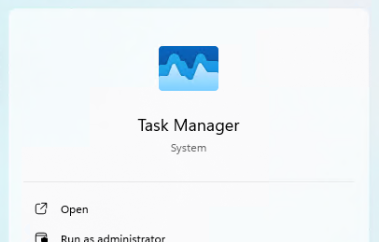
- Open Windows “Task Manager”.

- Stop the
DeviceOnAgentPortalandDeviceOnAgetservices sequentially. This is like temporarily letting the Agent rest, making it convenient for us to modify its “task list”.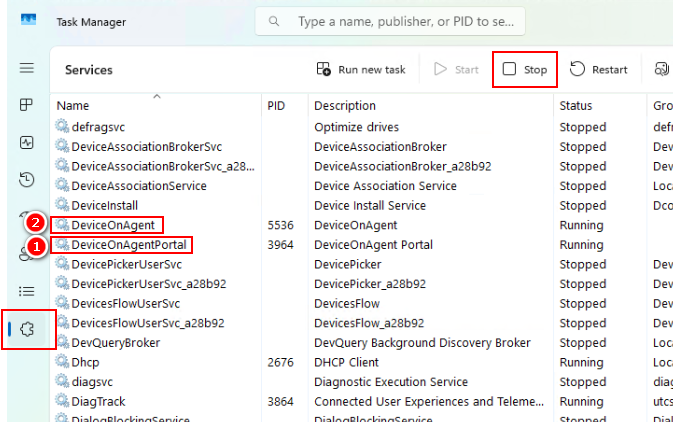
-
Modifying the “Task List”:
- Locate the DeviceOn Agent configuration file
agent_config.xml(usually located atC:\Program Files\Advantech\DeviceOn Agent\agent_config.xml). - This is the most crucial step! We modified several parameters to tell the Agent how to connect automatically:
CredentialURL: Set the URL of the “Device OnBoarding” page on the DeviceOn Server. This is the “headquarters” address.IoTKey: Set the “IoT Key” for the “Device OnBoarding” page. This is like the “passphrase” the Agent uses to check in with headquarters. Please note that this key also serves as the User Name used by the Agent when connecting.AutoStart: Set this value toTrue. This is the switch that activates the “auto-onboarding” magic!DeviceName,DevID,SN: Leave these fields empty. This is to allow the Agent to automatically retrieve and fill in this device-specific information from the DeviceOn Server after the first successful connection.UserName: Set to the same value asIoTKey.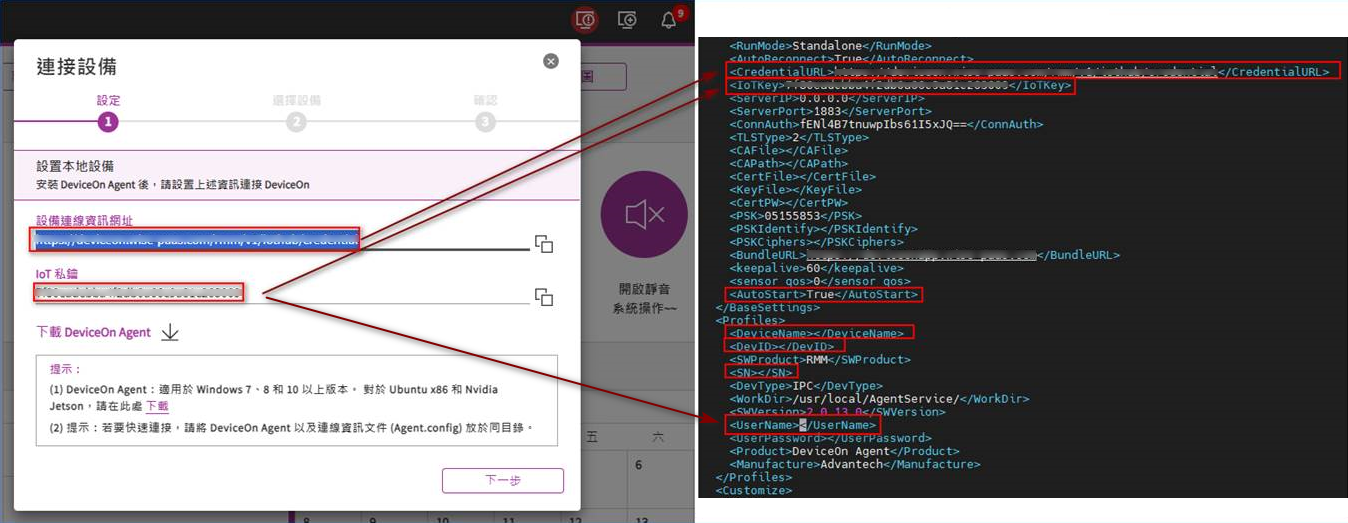
- Locate the DeviceOn Agent configuration file
-
Creating the Standard Image:
- After completing the configuration file modification, power off the device.
- Create a standard system image (Source Image) from this device’s hard drive. This image contains the DeviceOn Agent with pre-configured auto-connection parameters.
-
Large-Scale Deployment Simulation:
- Copy the created standard image to other brand-new edge devices. This simulates the process of rapidly deploying a standard system to a large number of devices.
-
Startup and Verification:
- Connect the network cable to the new edge device, then power it on.
- Start the
DeviceOnAgentPortalandDeviceOnAgetservices that were stopped earlier. - Witness the magic moment! If everything goes smoothly, you should see this new edge device automatically connect to the DeviceOn Server! In the “Device List” on the DeviceOn Server, this new device will automatically appear.
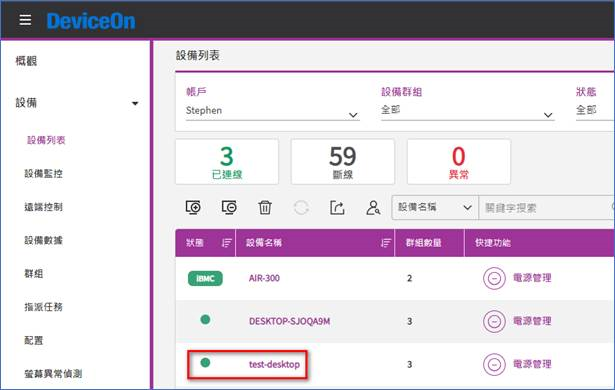
- Go back to the new edge device and open the
agent_config.xmlconfiguration file again. You will find that the previously empty fields likeDeviceName,DevID, andSNhave been automatically filled with the device’s specific information by the DeviceOn Server! This proves that the Agent successfully communicated with the Server and completed initialization.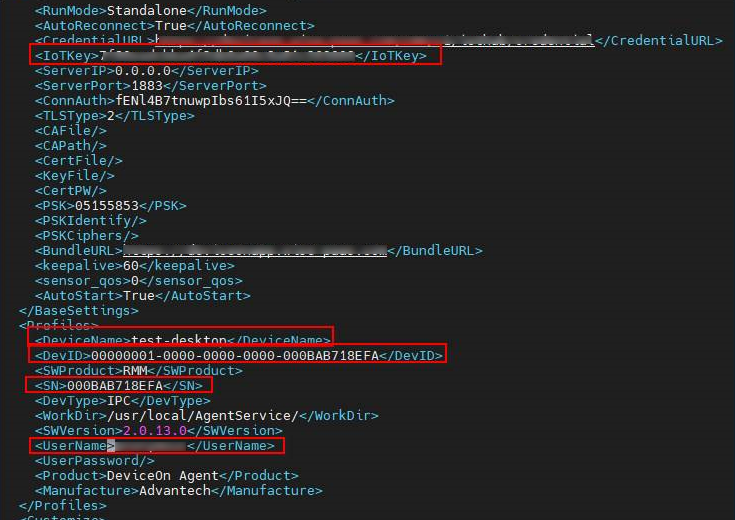
Experiment Results and Application Value: A Leap Forward in Deployment Efficiency!
The success of this experiment means that large-scale deployment of IoT devices will become unprecedentedly simple and fast.
- Say Goodbye to Repetitive Labor: No longer need to manually configure Agent connections for each device.
- Significant Time and Cost Savings: Deployment time is reduced from hours to minutes (or even less, depending on image copying speed).
- Reduced Human Error: Standardized processes minimize errors that can result from manual setup.
- Accelerated IoT Project Implementation: Allows customers to put devices into use faster, accelerating the realization of business value.
This auto-onboarding mechanism is particularly suitable for scenarios requiring the deployment of a large number of homogeneous devices, such as POS systems in chain retail stores, production equipment in smart factories, monitoring nodes in smart cities, and so on.
Conclusion and Future Outlook: Continuous Innovation, Creating Value for Customers
Through this simple yet effective auto-onboarding mechanism, Advantech once again demonstrates our continuous investment and innovation capabilities in IoT software and solutions. We not only provide the powerful DeviceOn platform but are also committed to optimizing deployment and management processes, unlocking more efficient and convenient IoT application models for customers.
In the future, we will continue to explore more possibilities for automation and intelligence, such as supporting auto-onboarding for more operating systems, tighter integration with automated deployment tools, etc., making DeviceOn your most reliable and intelligent partner on your IoT journey.
If you are facing the challenge of large-scale IoT device deployment or are interested in DeviceOn’s automation capabilities, please feel free to contact our AE or sales team, and let’s explore together how to make your IoT deployment lightning fast!