Hey there, partners passionate about Edge AI! Imagine this: you have a super cool AI application ready to be deployed on Advantech’s powerful Jetson platform devices, but then you discover… oh dear, software versions are incompatible, this library needs an old version, that driver needs a new version, making it feel like an endless game of “software conflicts”! Isn’t that a headache?
Especially after NVIDIA JetPack upgraded to version 6.x (based on Ubuntu 22.04), while bringing performance improvements, it also highlighted the issue of “dependency fragmentation” for AI applications across different JetPack minor versions. Simply put, a program that ran perfectly fine on JetPack 6.0 might stop working on JetPack 6.2! This is definitely a big challenge for us who need to quickly and stably deploy a large number of AI applications.
Don’t worry! Today, let our engineering team share a secret weapon: how to completely solve this annoying dependency problem through Docker container technology, achieving “version-agnostic” deployment of AI applications across different JetPack versions!
The Little Annoyance of JetPack 6.x: Why “Software Conflicts” Happen? #
Although JetPack 6.0 and 6.2 are both based on Ubuntu 22.04 and sound similar, there are still some underlying differences:
| JetPack Version | L4T Version | Ubuntu Version | Core Driver/Library Updates |
|---|---|---|---|
| 6.0 | 36.3.0 | 22.04 | CUDA 12.2.1, cuDNN 8.9.4 |
| 6.2 | 36.4.3 | 22.04 | Kernel upgrades for CUDA, TensorRT, etc. (Versions differ from 6.0) |
See? Even within the same major version series, the versions of underlying key AI computing libraries like CUDA and TensorRT still differ. This is like the same App potentially needing different versions of support packages to run smoothly on different minor versions of an operating system.
What problems does this cause?
- A TensorRT model you painstakingly compiled on JetPack 6.0 might not run when moved to 6.2.
- Deep learning frameworks like PyTorch are very sensitive to CUDA versions; changing the JetPack version might require reconfiguration or even recompilation.
- Deploying the same set of AI programs on multiple devices with different JetPack minor versions? It’s a disaster!
Containerization: The “Universal Moving Box” for AI Applications #
This is where Docker container technology comes in! You can think of Docker as a lightweight, independent “digital moving box.” This box not only contains your AI application itself but also packs all the “luggage” required for the program to run – including specific versions of CUDA, cuDNN, TensorRT, PyTorch, and even the operating system environment – all together.
The Two Superpowers of Containerization: #
- Decouple JetPack Dependencies: Your AI application and its runtime environment are completely encapsulated within the container, like living in an independent apartment. It no longer directly depends on the specific version of the underlying JetPack. As long as the underlying JetPack’s GPU driver is compatible with the environment inside the container, your application can run smoothly.
- “Package Once, Run Anywhere”: Using NVIDIA’s official L4T Container Base Image designed for Jetson (e.g., an image based on L4T 36.2) ensures compatibility between the container and the L4T 36.x series. This means the same container image can run stably in both JetPack 6.0 and 6.2 environments! This greatly simplifies deployment and maintenance complexity.
How to containerize AI with Docker #
Here’s how we set up the environment and successfully ran AI applications:
First, to enable Docker containers to use the powerful Jetson GPU for AI inference, the Docker runtime needs to be configured correctly. This is like telling Docker: “Hey, don’t forget to pack the GPU accelerator too!”
Docker Runtime Configuration Steps: #
- Install necessary packages:
sudo apt update sudo apt install -y nvidia-container curl curl https://get.docker.com | sh && sudo systemctl --now enable docker sudo nvidia-ctk runtime configure --runtime=docker - Restart Docker service and add user to the Docker group: This way, you won’t need to type
sudoevery time you execute a Docker command.sudo systemctl restart docker sudo usermod -aG docker $USER newgrp docker - Edit Docker configuration file: Open
/etc/docker/daemon.jsonand add the following content to specify the default use of thenvidiaruntime.{ "runtimes": { "nvidia": { "path": "nvidia-container-runtime", "runtimeArgs": [] } }, "default-runtime": "nvidia" } - Restart Docker service again: To apply the new settings.
sudo systemctl restart docker
After setting up the Docker environment, we can start downloading and running pre-packaged AI application containers! NVIDIA provides a convenient tool called jetson-containers, which includes many commonly used AI application container images.
Install Jetson-containers Tool: #
cd $HOME
git clone https://github.com/dusty-nv/jetson-containers
bash jetson-containers/install.sh
GenAI Example: Running Ollama Inference Service #
We first tested the hottest Generative AI (GenAI). Using the Ollama tool, you can run Large Language Models (LLMs) locally. We directly pulled the Ollama container image provided by NVIDIA:
- Download Docker Image:
docker pull dustynv/ollama:0.6.8-r36.4 - Start the container and run Ollama: The
jetson-containers runcommand makes it easy to start the container.jetson-containers run dustynv/ollama:0.6.8-r36.4 - Execute Ollama commands inside the container: After starting, you can run Ollama from the container’s command line, for example, downloading and running a small language model
gemma3.Look! The model was successfully downloaded and is running, proving that the GenAI application started smoothly within the container!ollama run gemma3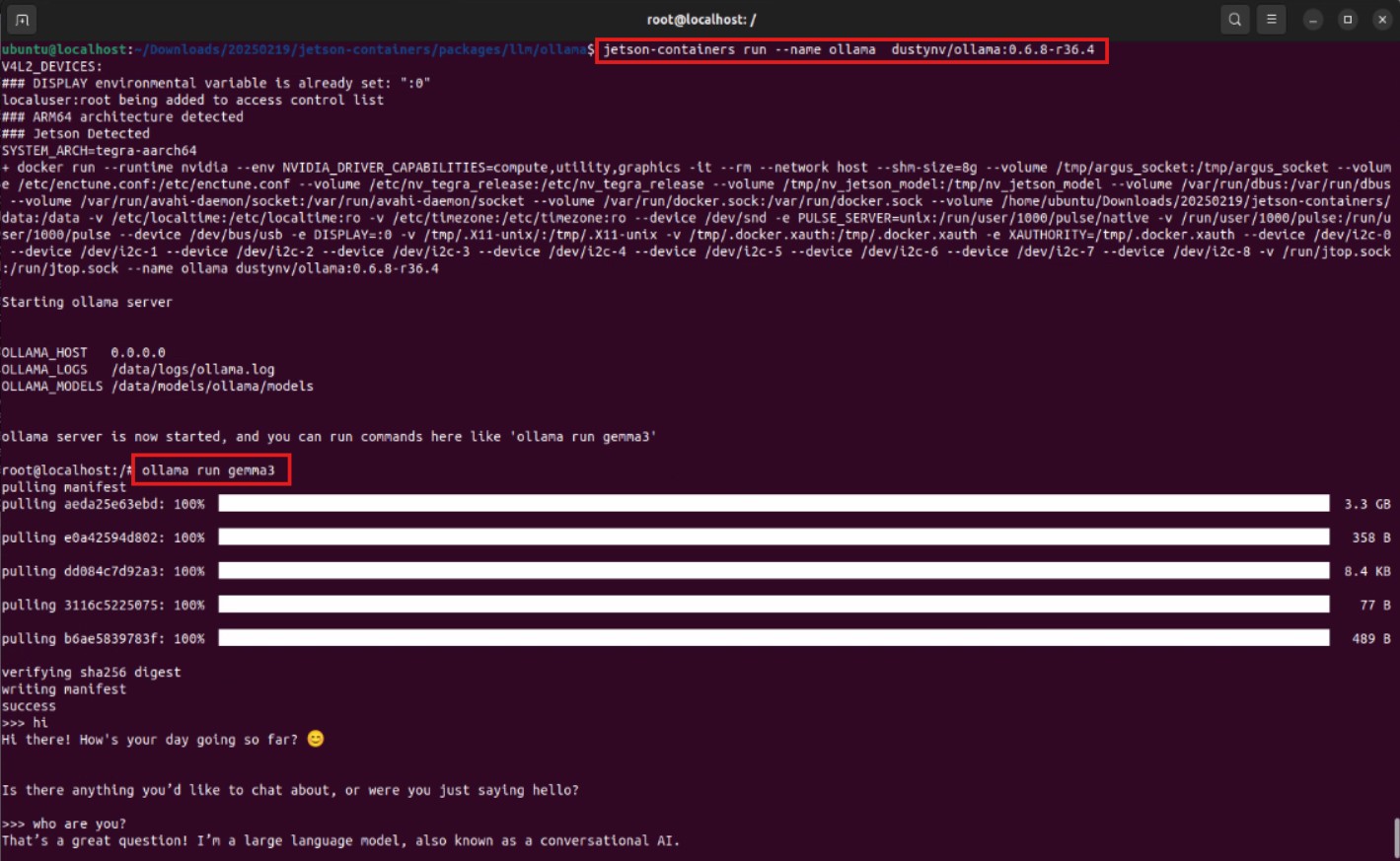
CV Practical Example: Running YOLO Object Detection Service #
Next, we tested the very classic YOLO object detection model in the field of Computer Vision (CV). Similarly, we pulled the official YOLO container image provided by Ultralytics:
- Download Docker Image:
docker pull ultralytics/ultralytics:latest-jetson-jetpack6 - Start the container and mount a folder: This time, we need to mount a local folder (
~/yolo-outputs) into the container to store the detection results.t=ultralytics/ultralytics:latest-jetson-jetpack6 && sudo docker run -it --ipc=host --runtime=nvidia -v ~/yolo-outputs:/ultralytics/runs $t - Execute YOLO inference inside the container: After starting, execute the YOLO inference command from the container’s command line, specifying the model (
yolo11n.pt) and the input source (Here we use a bus image provided by Ultralytics).The results are out! The YOLO model successfully performed object detection on the image within the container and saved the results to the folder we specified. This once again proves the feasibility of containerized deployment!yolo predict model=yolo11n.pt source='https://ultralytics.com/images/bus.jpg'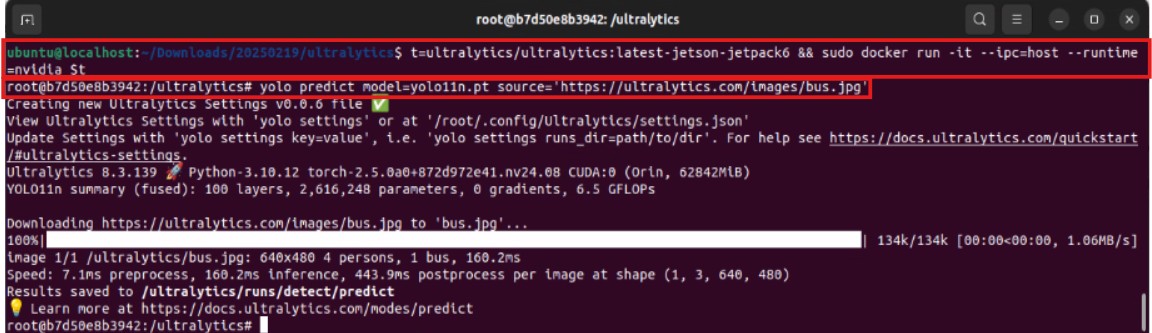
The Value of Containerized Deployment: Not Just Solving Problems, But Creating Advantages! #
Through this experiment, we successfully verified that using Docker container technology on the JetPack 6.x platform can effectively solve the dependency issues of AI applications caused by differences in JetPack minor versions.
What does this mean for Advantech’s customers and partners?
- Faster and More Stable Deployment: No longer need to configure and test environments separately for each JetPack version. Packaged containers can run instantly on compatible JetPack devices, greatly reducing deployment time and minimizing errors.
- Simpler Maintenance: Applications and their environments are isolated. Updating or rolling back versions only requires replacing the container image, without affecting the underlying system.
- Easier Cross-Platform Porting: The same container image can run on Advantech Jetson devices of different models and different JetPack minor versions, expanding the application scope.
- Accelerated Innovation: Engineers can focus more on the development and optimization of the AI application itself, rather than being bogged down by underlying environment configurations, accelerating the adoption of new technologies and applications.
Conclusion: Continuous Innovation, Injecting Strong Momentum into Edge AI! #
Whether it’s Generative AI or Computer Vision, containerized deployment provides a standardized, highly efficient approach. In the future, we will continue to delve deeper, exploring the potential of container technology in the Edge AI domain, such as edge container management, remote model updates, etc., continuously providing our customers and partners with the most leading and reliable Edge AI solutions.