Making AI Talk Faster! How Advantech Unleashes Peak Large Language Model Performance on Qualcomm GPUs with vLLM
·loading
Author
Advantech ESS
Hey everyone! AI enthusiasts, our partner AEs and sales elites, and all friends curious about cutting-edge technology!
Imagine having a smooth conversation with an AI assistant that understands your needs and responds almost instantly, without annoying delays. This isn’t a distant future; it’s a goal Advantech is actively working towards! In the wave of AI, Large Language Models (LLMs) are undoubtedly shining stars, capable of writing, translating, coding, and even performing complex reasoning. However, making these massive models “speak” quickly and effectively on edge or cloud devices is no easy feat. It requires robust hardware support and efficient software technology.
Today, we want to share an exciting experimental result from the Advantech engineering team. We delved into how combining the high-performance Qualcomm Cloud AI 100 Ultra accelerator with vLLM, an open-source library designed specifically for LLM inference, can significantly boost the execution efficiency of AI models. This not only demonstrates Advantech’s commitment to continuous R&D in the AI field but also opens up more possibilities for our customers and partners!
Why is Fast and Efficient LLM Inference So Important?
While Large Language Models are powerful, they are also incredibly “large,” often containing billions or even trillions of parameters. In practical applications (the “inference” stage), every time a user inputs a question or command, the model needs to perform extensive calculations to generate a response. If this process is too slow, the user experience is severely impacted, and many real-time applications (such as smart customer service, voice assistants, and real-time translation) become difficult to implement.
Traditional inference methods are often inefficient and resource-intensive. This is where technologies like vLLM come into play. vLLM is a library specifically designed for large language model inference. It employs many advanced techniques (such as PagedAttention) to significantly increase throughput (imagine how many tokens/symbols the AI can process or generate per second) and reduce latency, making AI responses faster and smoother.
And the Qualcomm Cloud AI 100 Ultra accelerator is a hardware accelerator built for high-performance AI inference. It provides powerful computing capabilities, making it highly suitable for running these complex AI models.
Combining the software advantages of vLLM with the powerful performance of Qualcomm hardware is precisely the core objective of this experiment!
Experiment Revealed: How Did We Do It?
To verify the actual performance of vLLM on Qualcomm GPUs, our engineers conducted a series of environment setups and performance tests. The entire process can be summarized into the following key steps:
Prepare Hardware and System Environment:
First, we need a device equipped with the Qualcomm Cloud AI 100 Ultra accelerator and with the Ubuntu 22.04 operating system installed. This serves as the basic platform for the experiment.
Install the Qualcomm SDK:
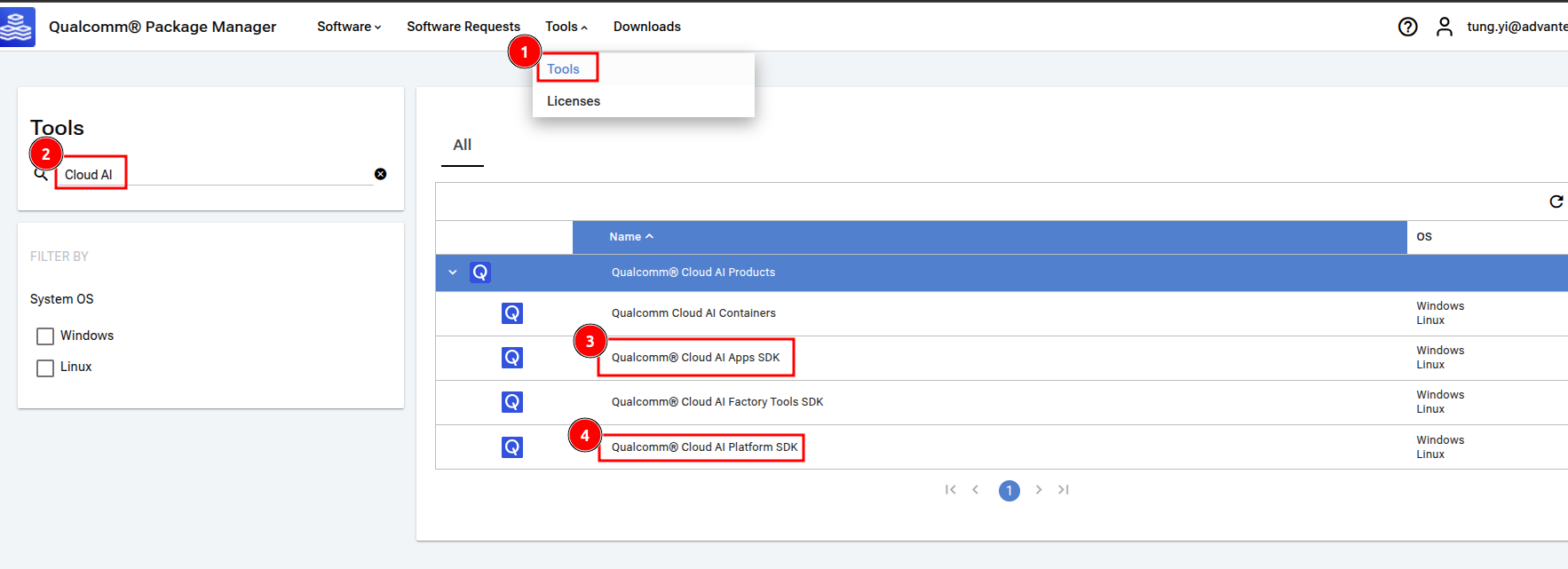
Qualcomm provides dedicated Software Development Kits (SDKs) for its AI accelerators, including the Apps SDK and Platform SDK. These SDKs contain drivers, libraries, and development tools, which are crucial for software to fully utilize hardware performance. We downloaded the required SDK versions from the Qualcomm Package Manager.
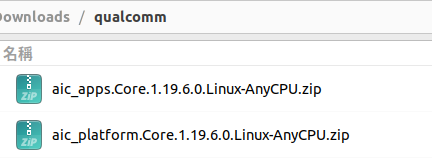
After downloading, you will see files similar to these:
Next, we execute the decompression and installation commands:
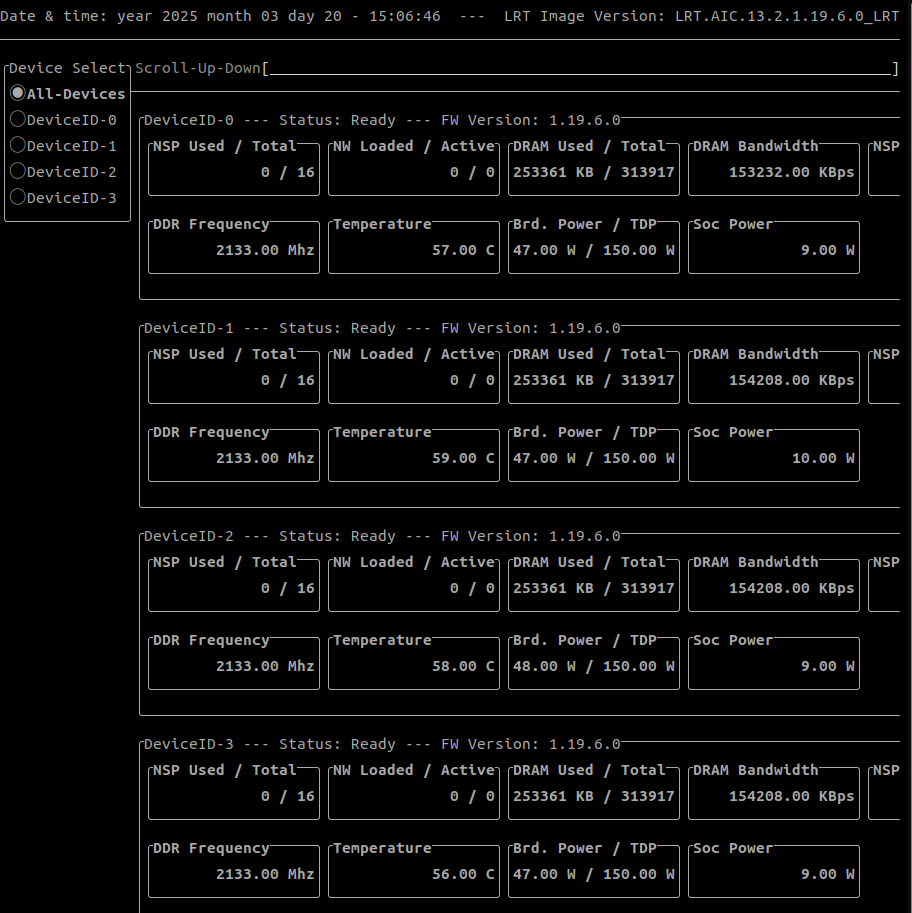
After the installation is complete, restart the system for the settings to take effect. We can use the qaic-util -t 1 command to check if the GPU is working correctly and view its status. If you see output similar to the image below, it means the hardware and basic software environment are ready!
qaic-util -t 1
Create the vLLM Docker Environment:
For ease of deployment and management, we packaged vLLM and its related dependencies into a Docker container. This step uses tools provided by the Qualcomm SDK to build a Docker Image containing vLLM.
After successful creation, you can use the docker images command to see the generated vLLM Docker Image.
docker images
Configure Multi-GPU Usage (Disable ACS):
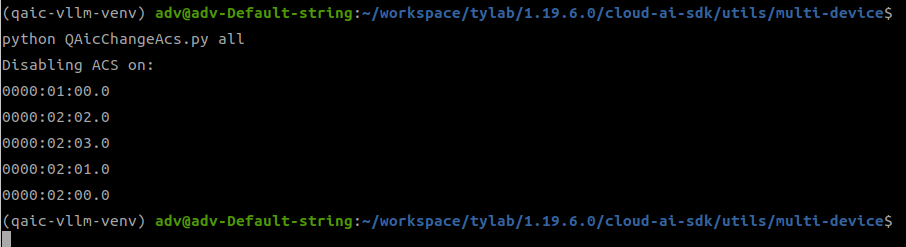
If you need to utilize multiple Qualcomm GPUs simultaneously to accelerate inference (which is very important for running larger models or handling more concurrent requests), we need to perform additional configuration to disable ACS (Access Control Services). This ensures that multiple devices can be effectively used in coordination.
Launch the vLLM OpenAI Compatible Server:
Enter the created Docker container and launch the OpenAI Compatible API Server provided by vLLM. This Server allows us to call the model for inference through a standard API interface, just as conveniently as using OpenAI’s services. We specified the model to load (e.g., TinyLlama or DeepSeek-8B), the devices to use (one or more Qualcomm GPUs), and some optimization parameters.
First, run the Docker container and enter its bash environment:
Perform Performance Benchmarking:
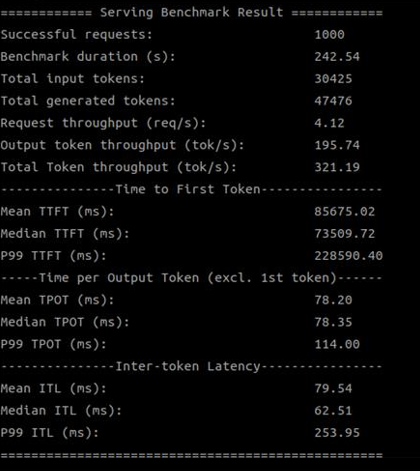
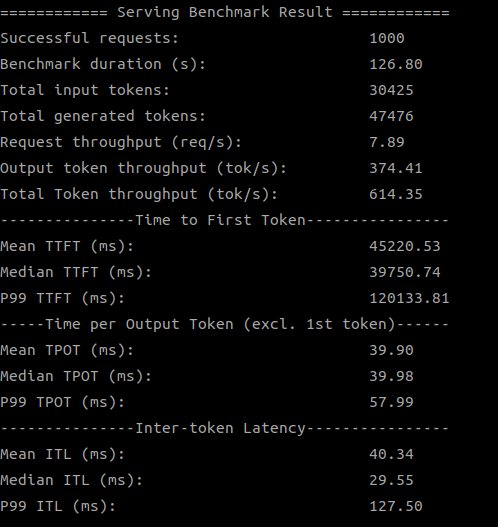
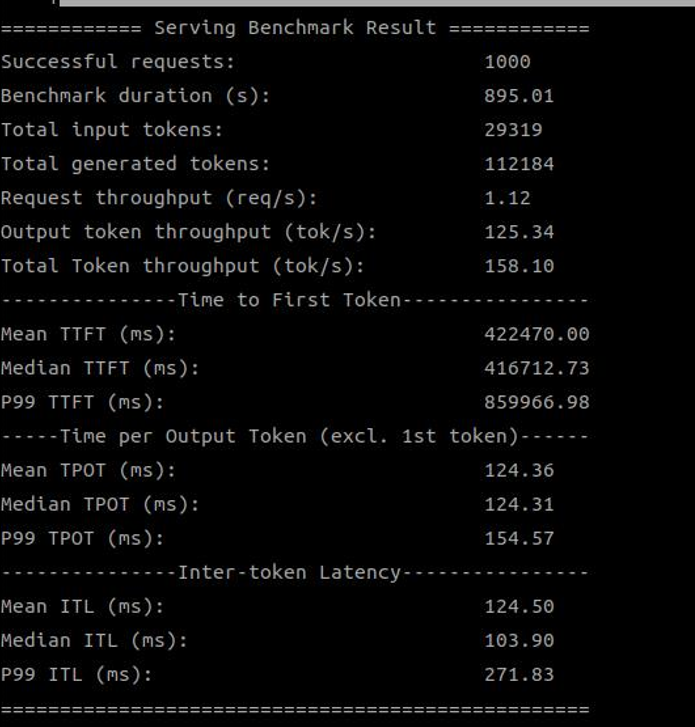
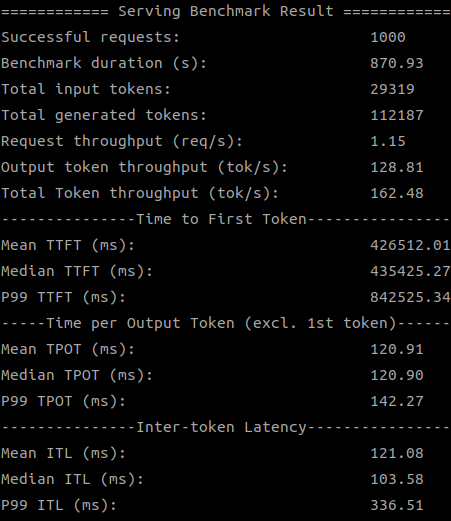
After the Server is started and the model is successfully loaded, we can proceed with stress testing! We used the industry-standard ShareGPT dataset to simulate real-world usage scenarios, testing inference performance under different models and varying numbers of GPUs, with a particular focus on “throughput (Total Token throughput)”.
First, download the test dataset:
After rigorous testing, we compared the performance of running the TinyLlama (1.1B) and DeepSeek-8B models on the Qualcomm Cloud AI 100 Ultra accelerator using different versions of the Qualcomm SDK (1.18.2.0 vs 1.19.6.0).
Below are the comparison results for throughput (Total Token throughput, tok/s) that we compiled:
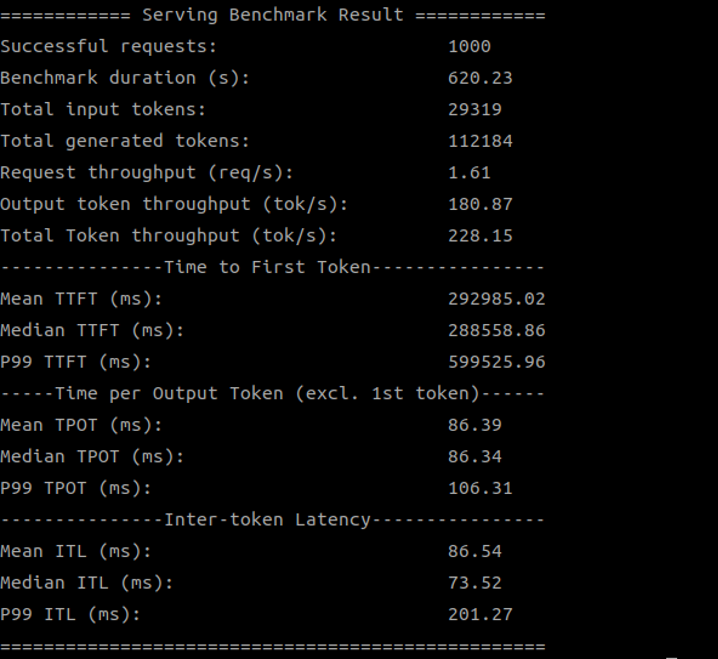
Wow! Aren’t these numbers surprising? For the TinyLlama model, simply updating to the new SDK version resulted in a nearly doubled throughput! This means that within the same amount of time, the AI model can process more requests or generate more content, significantly increasing efficiency.
For the larger DeepSeek-8B model, the improvement with the new SDK on a single GPU, while not as dramatic as with TinyLlama, still shows steady progress.
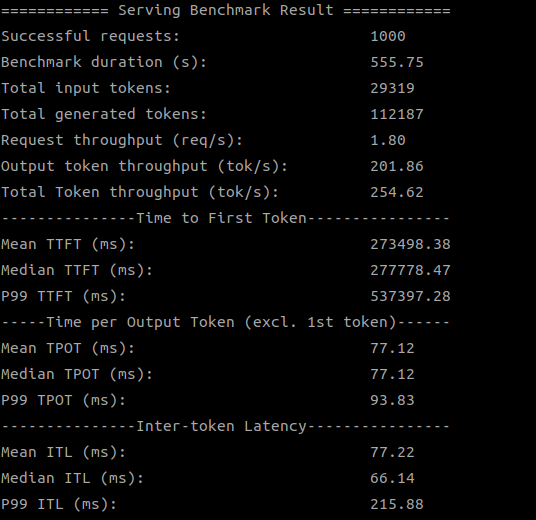
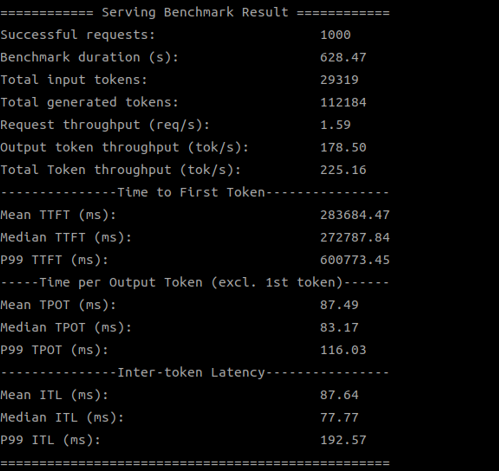
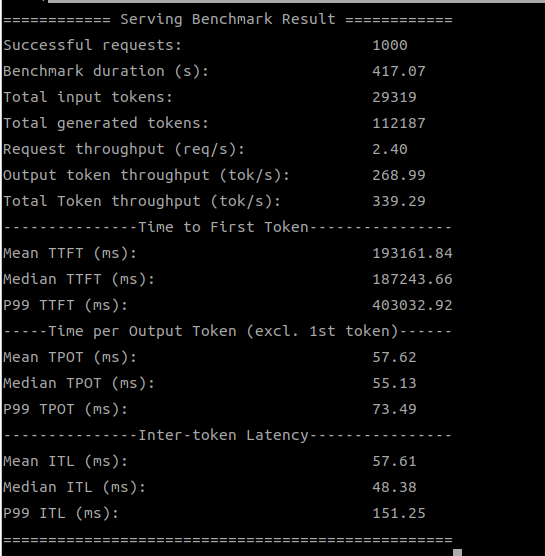
When we used multiple Qualcomm GPUs to run the DeepSeek-8B model, the advantage of the new SDK became even more apparent, especially when using 4 GPUs, where throughput increased by over 50%! This demonstrates the optimization in the new SDK for multi-device collaboration, better unleashing the hardware’s potential.
Below are screenshots of the test results:
SDK Version
Test Result
SDK 1.18.2.0 (2 devices)
SDK 1.19.6.0 (2 devices)
SDK 1.18.2.0 (4 devices)
SDK 1.19.6.0 (4 devices)
What Do These Results Mean?
The success of this experiment not only validates the feasibility of vLLM on the Qualcomm Cloud AI 100 Ultra accelerator but, more importantly, clearly demonstrates that through the tight integration and continuous optimization of software and hardware, we can significantly enhance the inference performance of large language models.
For Advantech, this signifies:
More Powerful AI Solutions: We can provide customers with hardware platforms that run LLMs faster and more efficiently.
Broader Application Scenarios: High-performance LLM inference capabilities will help drive more advanced AI applications in areas such as smart manufacturing, smart healthcare, and smart retail, including real-time voice interaction, intelligent decision support, and automatic content generation.
Continuous Technological Leadership: This experiment proves that the Advantech engineering team possesses the ability to deeply research and integrate the latest AI technologies. We are constantly exploring how to provide customers with the best AI inference solutions.
Conclusion and Future Outlook
Through this experiment on LLM inference using vLLM on the Qualcomm Cloud AI 100 Ultra accelerator, we successfully demonstrated significant performance improvements, particularly by updating the SDK version and utilizing multiple GPUs. This further confirms the importance of software optimization in unleashing hardware potential.
Advantech will continue to cultivate this field, explore more optimization techniques, and integrate these high-performance AI inference capabilities into our products and solutions. We believe that through continuous R&D and innovation, Advantech will be able to bring a smarter and more efficient future to our customers!
If you are interested in our AI solutions or would like to learn more technical details, please feel free to contact our AE or sales team! We look forward to unlocking the infinite possibilities of AI with you!