In today’s digital world, data is like the lifeblood of an enterprise. Whether it’s factory production data, patient information from medical equipment, or surveillance footage from smart cities, any data loss can lead to immeasurable losses. Therefore, ensuring data “security” and “reliability” is a core issue that Advantech has always focused on.
Today, we want to share an experimental story about “data mirroring backup”. The main characters are an operating system we frequently encounter in specific projects—Kylin OS—and a technology that can effectively enhance data reliability: RAID1.
What is RAID1? Why is it Like Data’s “Twin”? #
Imagine you have a very important document and you’re worried about losing it. What’s the simplest way to prevent that? It’s to “photocopy” it and then keep the two copies in different places. The concept of RAID1 is very similar to this!
RAID1, full name Redundant Array of Independent Disks Level 1, is often referred to in Chinese as “Disk Array Level 1” or “Mirroring Mode”. Its principle is very straightforward: write the exact same data completely to two (or more) hard drives. Just like looking in a mirror, the contents of the two hard drives will be identical.
What are the benefits of doing this? The main one is data redundancy and reliability. If one of the hard drives unfortunately fails, no problem! Because there is still a complete copy of the data on the other hard drive, the system can immediately switch to the other drive and continue operating without interrupting service or losing data. For application scenarios that require long-term stable operation and cannot tolerate data loss, RAID1 is like buying double insurance for your data.
Of course, there’s no such thing as a free lunch. The cost of RAID1 is that storage space is halved (because you need twice the number of drives to store the same data), and write speed might be limited by the slowest drive. But for applications where “data security is more important than space or speed”, RAID1 is definitely an option worth considering.
The Challenge Arrives: Setting Up RAID1 on Kylin OS #
Advantech engineers often need to perform technical verification and integration on various operating systems and hardware platforms. The challenge this time was: How to successfully set up and enable software RAID1 on Kylin OS?
Software RAID refers to implementing disk arrays using the operating system’s built-in functions, without relying on a specific hardware RAID controller. This offers greater flexibility but can also encounter operating system-specific configuration issues.
While performing this task, our engineers discovered an interesting “detour”. Kylin OS, by default, blacklisted modules related to software RAID, meaning these necessary modules would not be automatically loaded during system startup. Attempting to set up RAID directly would encounter difficulties.
This is like preparing all your tools to start building a house, only to find that the most important screwdriver is locked in a box you don’t know about! But don’t worry, Advantech engineers are experts at solving these “box” problems!
Experiment Process Revealed: Step-by-Step Unlocking Kylin OS’s RAID Capability #
To solve this problem and successfully establish RAID1 on Kylin OS, our engineers performed the following experimental steps. These steps not only demonstrate how to achieve the goal but also reflect our ability to conduct in-depth research and find solutions when facing specific system limitations:
Prerequisites:
- At least two hard drives are required. One is the system disk, and one or more others are used for building the RAID.
- Important: When installing Kylin OS, you need to reserve a portion of disk space, without specifying a file system or mount point, keeping it as an “empty partition”. This is because system partitions, boot partitions, etc., cannot be directly used to build RAID.
- Unlock RAID Modules: Kylin OS defaults to blacklisting software RAID modules (such as
md). You need to edit the/etc/modprobe.d/blacklist.conffile and remove or comment out the blacklist settings related to software RAID modules.sudo vim /etc/modprobe.d/blacklist.conf - Update System Initialization Environment: After modifying the blacklist, you need to update
initrd(the initial file system loaded during system startup) for the changes to take effect.Restart the system after execution.sudo update-initramfs -u - Verify Module Loading: After restarting, check if the RAID modules have been successfully loaded.
If you see relevant modules (such as
lsmod | grep raidraid1,md_mod, etc.), it indicates success.
Formal RAID1 Setup:
Assume the system disk is sda, the spare disk is sdb, and during system installation, we reserved partitions sda7 and sdb7 for building the RAID1.
-
Partition the Spare Disk: Use
fdiskor other partitioning tools to create partitions (sdb7) on the spare disk (sdb) that match the size and number of the reserved partition (sda7) on the system disk.# mkfs.ext4 /dev/sda7 # Format the reserved partition (if not already done) # mkfs.ext4 /dev/sdb7 # Format the spare disk partition -
Set Partition Type: In
fdisk, set the partition type for the partitions used to build the RAID (sda7,sdb7) toLinux raid auto detect(type codefd). -
Create Software RAID Array: Use the
mdadmcommand to create the RAID1 array/dev/md0.mdadm -C /dev/md0 -a yes -l 1 -n 2 -x 1 /dev/sda7 /dev/sdb7-C /dev/md0: Create a new array device/dev/md0.-a yes: Automatically create device files.-l 1: Set the RAID level to 1 (RAID1).-n 2: Specify the array consists of 2 active devices.-x 1: Specify the array consists of 1 spare device (here/dev/sdb7is both an active device and a potential spare device, depending on the command parameter combination)./dev/sda7 /dev/sdb7: Specify the partitions used to build the array.
sudo update-initramfs -u -
Format and Mount the RAID Array: After the RAID array
/dev/md0is successfully created, it acts like a new hard drive device and needs to be formatted before use.# mdadm --detail /dev/md0 | grep -i uuid # View the array's UUID # vim /etc/mdadm/mdadm.conf # Write array configuration to mdadm.conf (mdadm usually handles this automatically) # mkfs.xfs /dev/md0 # Format the array, using xfs file system here (ext4, etc., can also be used) -
View the Array’s Global UUID: Obtain the unique identifier of the formatted
/dev/md0, used for setting up automatic mounting at boot.blkid /dev/md0 -
Set Up Automatic Mounting at Boot: Edit the
/etc/fstabfile to set the/dev/md0array to automatically mount to a specified directory (e.g.,/data) during system startup. Use the array’s global UUID to specify the device, so the system can correctly identify it even if the device name changes.# vim /etc/fstabAdd a line similar to the following in the file (please replace with the actual UUID and mount options):
UUID="Fill in the global UUID of /dev/md0 here" /data xfs defaults 0 0Create the mount point directory and test mounting:
# mkdir /data
# mount -a # Test mounting all entries in fstab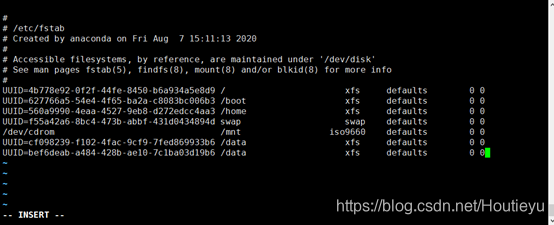
-
Testing: Write data to the
/datadirectory, then simulate a failure of one of the hard drives, and check if the data is still readable and writable, and if the array status is displayed correctly.
Experiment Results and Value: Providing a More Resilient Foundation for Critical Applications #
Following the steps above, we successfully established a software RAID1 array on Kylin OS, providing mirroring backup capability for the specified data partitions.
The success of this experiment not only resolved the technical obstacles to deploying RAID1 on a specific operating system (especially dealing with the system’s default module blacklisting issue) but, more importantly, it verified that Advantech’s solutions can achieve high-reliability data storage on diverse platforms, including Kylin OS.
For our customers, especially those using Advantech products in critical fields such as industrial automation, rail transportation, and energy, and who may be using Kylin OS, this means:
- Higher Data Security: Core application data has real-time mirroring backup, significantly reducing the risk of data loss due to single hard drive failure.
- More Stable System Operation: In case of hard drive failure, the system can continue to read data from the other drive, reducing downtime.
- Advantech’s Technical Assurance: We have verified the technical feasibility of implementing this function on specific platforms (such as Kylin) and possess the capability to provide relevant technical support.
Conclusion and Future Outlook: Continuous Innovation, Building a Reliable Future for Customers #
This RAID1 experiment conducted on Kylin OS is a microcosm of Advantech’s path in technology research and development. We continuously explore, test, and verify new technology and platform combinations to ensure our products and solutions can meet the increasingly complex and stringent demands of our customers.
From resolving operating system-level configuration issues to successfully establishing and verifying the functionality of RAID1, all of this reflects the deep technical expertise and continuous innovation spirit of the Advantech engineering team.
In the future, we will continue to conduct in-depth research in areas such as data storage and system reliability, exploring the application of more advanced technologies, such as performance and reliability testing of different RAID levels, cross-platform compatibility verification, and integration with cloud backup or edge computing storage.
Advantech is committed to being your most trusted partner, providing the most solid and reliable technical foundation for your critical applications. If you have any questions or needs regarding data security or deploying high-reliability storage on specific platforms, please feel free to contact our AE or sales representatives. We will be dedicated to providing you with professional consultation and services!