This article has been rewritten and reorganized using artificial intelligence (AI) based on referenced technical documentation. The purpose is to present the content in a clearer and more accessible manner. For technical clarifications or further verification, readers are advised to consult the original documentation or contact relevant technical personnel.
Hey there! Friends curious about edge computing and AI technology, and our most supportive AE and sales partners!
Imagine you have a powerful embedded system, like the NVIDIA Jetson Orin Nano, processing complex AI inference or high-speed data acquisition. Now, you need to transfer this valuable data or computation results to another host computer (perhaps your industrial PC or standard workstation) for further processing or analysis, in the fastest and most efficient way possible. How would you do it? Traditionally, we might think of Ethernet, USB, or other interfaces. But what if you need “lightning-fast” speed and extremely low latency?
This is where PCIe (Peripheral Component Interconnect Express), the “high-speed highway” inside your computer, comes into play! Typically, PCIe is used to connect graphics cards, SSDs, or expansion cards, with your PC acting as the host (Root Port) and these devices as “endpoints”. But what if we could make an embedded system like the Orin Nano also play the role of this “endpoint”, connecting directly to the host PC’s PCIe high-speed highway? Doesn’t that sound cool and full of infinite possibilities?
At Advantech, our engineers are always full of exploratory spirit for various new technologies! Recently, we conducted an interesting experiment: testing the performance of the NVIDIA Jetson Orin Nano in PCIe Endpoint mode, and attempting to successfully detect it with a standard X86 Windows PC, even recognizing it as a network device!
The goal of this experiment was clear: to verify the feasibility of the Orin Nano as a PCIe Endpoint and explore the potential of this high-speed connection method in practical applications. For scenarios requiring large-volume, low-latency data exchange between embedded systems and host systems, this is definitely a “high-speed channel” worth researching in depth!
The Experiment Environment Revealed! #
The main characters of this experiment were very simple:
- PCIe Endpoint: NVIDIA Jetson Orin Nano Developer Kit (Imagine it as our “smart little device”)
- PCIe Host: An X86 Windows computer (Imagine it as our “command center”)
Our mission was to get the Orin Nano connected to the Windows PC via a PCIe cable and have the PC successfully “see” and “communicate” with it.
The Experiment Process: The Engineer’s Magic Steps! #
To transform the Orin Nano from an independently operating embedded system into a PCIe endpoint for a PC requires some special configuration. This is like preparing a special “high-speed highway pass” for it. Our engineers followed NVIDIA’s guidelines and performed the following key steps:
First, preparing the Orin Nano’s system software:
- Modify system configuration file: Edit the
jetson-orin-nano-devkit.conffile and add a specific line to override ODMDATA. This step tells the system how to configure the hardware’s PCIe lanes.ODMDATA="gbe-uphy-config-8,hsstp-lane-map-3,hsio-uphy-config-41"; - Apply patches and build BSP: Apply necessary software patches and recompile the BSP (Board Support Package) according to NVIDIA’s documentation. This ensures the system software supports PCIe Endpoint mode. https://docs.nvidia.com/jetson/archives/r35.5.0/DeveloperGuide/SD/Communications/PcieEndpointMode.html#bringing-up-an-ethernet-interface-over-pcie
- Re-flash the device: Use a specific command to flash the modified system software onto the Orin Nano.
These steps ensure the Orin Nano is ready at the hardware level to enter PCIe Endpoint mode.
$ sudo ./tools/kernel_flash/l4t_initrd_flash.sh --external-device nvme0n1p1 -c tools/kernel_flash/flash_l4t_external.xml -p "-c bootloader/t186ref/cfg/flash_t234_qspi.xml" --showlogs --network usb0 jetson-orin-nano-devkit internal
Next, booting the Orin Nano and configuring the PCIe Endpoint function:
- Boot the Orin Nano: Power on the specially flashed Orin Nano.
- Enter the system and execute commands: Log in to the Orin Nano’s system and execute the following commands to enable and configure PCIe Endpoint mode, specifically simulating it as a network interface (tvnet).
These commands tell the Orin Nano’s operating system: Hey, I’m going to play the role of a PCIe Endpoint now, and I’m going to simulate a network device, please get ready!
$ cd /sys/kernel/config/pci_ep/
$ mkdir functions/pci_epf_tvnet/func1
$ echo 16 > functions/pci_epf_tvnet/func1/msi_interrupts
$ ln -s functions/pci_epf_tvnet/func1 controllers/14160000.pcie_ep/
$ echo 1 > controllers/14160000.pcie_ep/start
Finally, verifying the results: Detecting the Orin Nano on the Windows PC!
- Boot the Windows host: Turn on our X86 Windows computer.
- Check Device Manager: Open Windows “Device Manager”.
The most exciting moment has arrived! If everything went smoothly, you will see a new “Network Controller” prominently appear under the “Network adapters” or “Other devices” category!
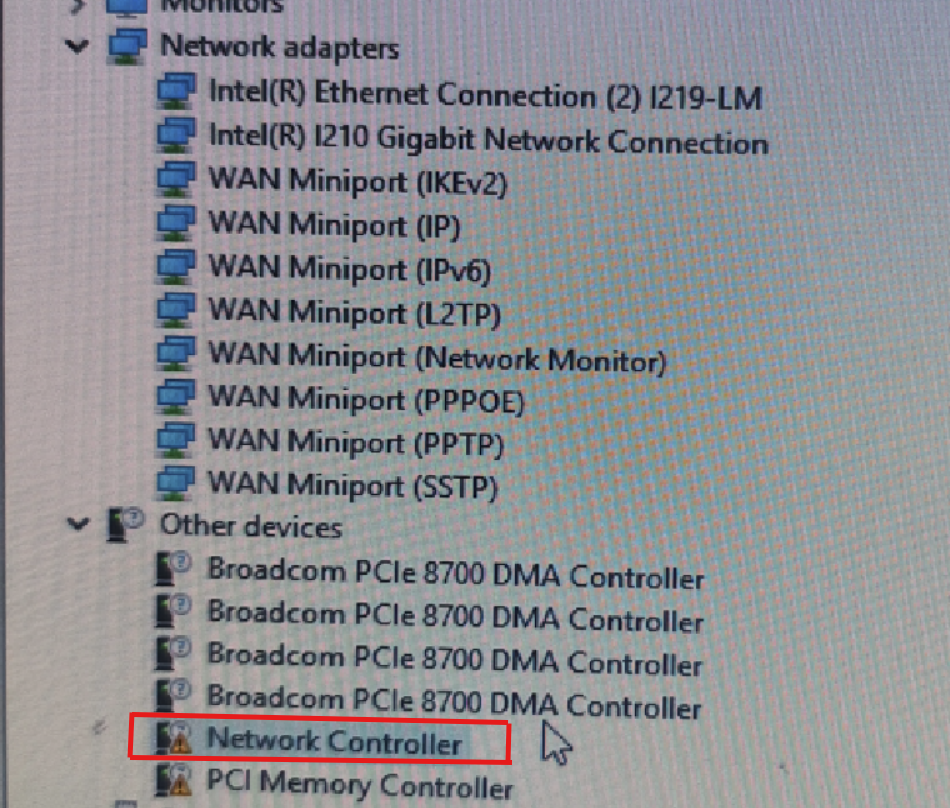
What does this mean? This means our Windows PC successfully detected the Orin Nano acting as an Endpoint via the PCIe connection cable and recognized it as an available network device! Although this is just a basic detection, it successfully verifies the feasibility of implementing the PCIe Endpoint function on the Orin Nano on the Advantech platform!
Experiment Results and Application Prospects #
The success of this experiment proves our ability to implement and verify advanced connection modes like PCIe Endpoint on Advantech’s Jetson Orin Nano related products. This technological breakthrough opens the door for many application scenarios requiring high-speed, low-latency communication:
- Industrial Automation: Machine vision systems can quickly transfer high-resolution images or processing results to the host PC via PCIe for analysis or decision-making, enabling more real-time control.
- Medical Imaging: Embedded systems in medical equipment can transfer large volumes of image data (such as ultrasound, X-ray) at high speed to workstations for diagnosis.
- AI Edge Computing: Offload part of the computation tasks to the Orin Nano for execution, and then quickly transfer the results back to the main system via PCIe, improving overall system performance.
- Data Acquisition and Processing: Data collected by high-speed sensors can be directly transferred to the main system via PCIe for storage or analysis, avoiding the bottlenecks of traditional interfaces.
Compared to traditional Ethernet, PCIe Endpoint mode theoretically can provide higher bandwidth and lower communication latency, especially suitable for applications with extremely high real-time requirements. This also demonstrates Advantech’s continuous investment and innovation capabilities in embedded system connection technology.
Conclusion and Future Outlook #
This successful PCIe Endpoint mode detection experiment is an important milestone for Advantech in exploring high-speed connection technology for embedded systems. It not only verifies the technical feasibility of the Orin Nano on our platform but also provides new possibilities for future product development and customer solutions.
We will continue to delve deeper into PCIe Endpoint technology, exploring more complex application scenarios, such as achieving true network communication (ping, TCP/IP), higher bandwidth data transfer, or even using the Orin Nano as a co-processor, allowing the host PC to directly access its memory or hardware resources via PCIe.
At Advantech, we don’t just provide hardware platforms; we are also committed to exploring and verifying cutting-edge technologies to help our customers succeed in the rapidly developing fields of edge computing and AI. Please look forward to more of our future sharing on high-speed connectivity and embedded innovation!
If you are interested in this technology, or if your application requires a high-speed, low-latency embedded system connection solution, please feel free to contact our AE or sales team at any time. We are happy to discuss it with you in depth!