This article has been rewritten and reorganized using artificial intelligence (AI) based on referenced technical documentation. The purpose is to present the content in a clearer and more accessible manner. For technical clarifications or further verification, readers are advised to consult the original documentation or contact relevant technical personnel.
Hey everyone! To all friends curious about the latest technology, and to our frontline AE and sales partners, hello!
As the wave of AI sweeps across the globe, bringing powerful AI capabilities from the cloud to edge devices has become a key trend in industrial development. Imagine real-time defect detection on a factory production line, analyzing customer flow in smart retail stores, or monitoring traffic in smart cities – all these rely on the successful implementation of edge AI.
However, deploying AI applications on a wide variety of edge hardware often encounters challenges such as complex software environments, dependency conflicts, and time-consuming deployment. This is where we need a smarter, more efficient approach!
At Advantech, our engineering team continuously explores how to make edge AI deployment as simple as “one-click installation”. Today, we’re going to give you a glimpse into an interesting experiment we conducted internally, showing how to leverage Docker container technology to easily run AI applications on our hardware platforms, demonstrating Advantech’s R&D strength in software and hardware integration!
Why Docker Containers? A New Weapon for Edge AI Deployment! #
Before diving into the experiment details, let’s briefly discuss why container technology (especially Docker) is an excellent helper for edge AI deployment.
Traditionally, when we need to run an AI program on a new edge device, it requires manually installing a large number of software packages and libraries, dealing with various version compatibility issues. Environment setup alone can consume a significant amount of time and effort. Furthermore, if deployment is needed on devices of different models or operating systems, this process might need to be repeated multiple times, or even require recompiling the program for specific hardware, which is very cumbersome.
This is where Docker containers come in! You can think of Docker as a standardized “software package” that bundles the application itself along with all the necessary runtime environment (operating system, libraries, configuration files, etc.). This package can run anywhere that supports Docker, and its behavior is almost identical, unaffected by differences in underlying hardware or operating systems.
For edge AI, this means:
- Simplified Deployment: Simply load the packaged container image onto the device and run it, significantly reducing manual setup time.
- Environment Consistency: Regardless of which device it runs on, the AI application operates within an isolated and standardized environment, reducing the “it works on my machine” problem.
- Resource Isolation: Containers are isolated from each other, so an issue with one application does not affect others.
- Version Management: Easily manage different versions of AI applications or models.
Advantech is committed to providing complete edge AI solutions, which include not only powerful hardware platforms but also optimized software stacks. By containerizing AI applications, we can offer customers a faster and more reliable deployment experience.
Experiment Revealed: Running Containerized AI Demo on Advantech Platform #
For this experiment, we chose to conduct it on an Advantech development board equipped with a specific processor (Note: referring to chips with AI acceleration capabilities like RK3588). Our goals were to verify:
- Whether a Docker runtime environment can be quickly set up under the default operating system environment.
- Whether a Docker image containing the AI runtime environment can be successfully loaded.
- Whether an AI application requiring hardware acceleration and multimedia processing (e.g., object detection) can be successfully run within the container, and the results outputted via HDMI.
Next, let’s follow the engineers’ steps and see how the experiment was conducted!
Experiment Environment Preparation #
Our experiment platform came pre-installed with Debian 12 operating system, kernel version 6.1.75, and was installed on eMMC storage. The default user account is linaro, the password is 123456, and the root account password is also 123456.
Install Necessary Host OS Packages #
First, we need to install some necessary tools on the host operating system (Host OS) for subsequent Docker operations and related functions. This step is simple and only requires executing the following command:
apt-get install rsync sysstat libqrencode-dev libqt5charts5 libqt5charts5-dev
These packages include file synchronization tools (rsync), system monitoring tools (sysstat), and some libraries required for graphical interfaces and development.
Prepare the AI Container Image #
Our AI application runs within a specially prepared Docker container. The operating system of this container is also Debian 12, and it comes pre-installed with many important AI and multimedia processing packages, including:
- rknn:2.0.0b0 (This is a library used to utilize hardware AI accelerators)
- GStreamer:1.22.9 (A powerful multimedia processing framework used for handling video streams)
- glmark2:2023.01 (Graphics performance testing tool)
- opencv:4.6.0 (Computer vision library)
- python:3.11.2 (Programming language environment)
- glibc:2.36 (C standard library)
- gcc:12.2.0 (C/C++ compiler)
The pre-installation of these packages ensures that the AI application has a complete and consistent runtime environment within the container.
Quickly Launch the Containerized AI Demo #
Next, comes the crucial step of loading and running this AI environment!
- Download the Docker Image: We will first download the Docker image containing the aforementioned environment to a specific path on the host operating system, for example,
/userdata/debian12_rk3588_v1.0.tar. This file is our pre-packaged AI runtime environment. - Move the Docker Data Root Directory (Optional but Recommended): To ensure Docker has sufficient storage space, we will move Docker’s data storage path to the
/userdata/partition. This is a common practice, especially on embedded devices with limited storage.Edit thesudo systemctl stop docker sudo mkdir -p /userdata/docker sudo rsync -aqxP /var/lib/docker/ /userdata/docker/ sudo nano /etc/docker/daemon.jsondaemon.jsonfile, add or modify the following content:{ "data-root": "/userdata/docker" }This sequence of operations means: first stop the Docker service, create a new folder, copy the existing Docker data to it, then modify Docker’s configuration file to tell it to store data in the new location from now on, and finally restart the Docker service.sudo systemctl start docker - Load and Inspect the Docker Image: Now, we will load the downloaded image into Docker.
sudo docker load < /userdata/debian12_rk3588_v1.0.tar
sudo docker images
docker loadcommand is like decompressing a packaged virtual machine image and registering it with the Docker system.docker imagesis used to confirm whether the image has been successfully loaded. - Connect Hardware and Run the AI Demo: Ready to go! Connect the HDMI cable to the monitor and the UVC camera to the development board’s USB port. Then, execute the following command to start the AI Object Detection Demo:
This command line looks a bit long, but don’t worry, we can briefly explain what it does:
docker run -d -it --privileged --rm --device=/dev/dri/card0 -e DISPLAY=$DISPLAY -e XAUTHORITY=/tmp/.Xauthority -v ~/.Xauthority:/tmp/.Xauthority:ro -v /tmp/.X11-unix:/tmp/.X11-unix:rw -v /dev/:/dev/ your-docker-image /bin/bash -c ai-demodocker run: Starts a new container.-d -it: Runs the container in the background (-d) and keeps it in interactive mode (-it).--privileged: Grants the container elevated privileges to access hardware resources.--rm: Automatically removes the container after it stops, keeping the system clean.--device=/dev/dri/card0: Maps the graphics card device into the container, allowing the container to perform graphical output.-e DISPLAY=$DISPLAY -e XAUTHORITY=/tmp/.Xauthority -v ~/.Xauthority:/tmp/.Xauthority:ro -v /tmp/.X11-unix:/tmp/.X11-unix:rw: These parameters allow the container to access the host’s X Server so that the graphical interface (which is our video feed) can be displayed.-v /dev/:/dev/: Maps the host’s/devdirectory into the container, allowing the container to access connected camera devices (/dev/video0etc.).your-docker-image: Replace this with the name of the Docker image you just loaded./bin/bash -c ai-demo: After the container starts, execute the command/bin/bash -c "ai-demo", which launches the AI object detection application we pre-installed in the container.
After execution, something magical happens! You will see a real-time video stream from the camera on the connected HDMI monitor, and objects in the frame (e.g., people, cars) will be boxed and labeled with their categories!
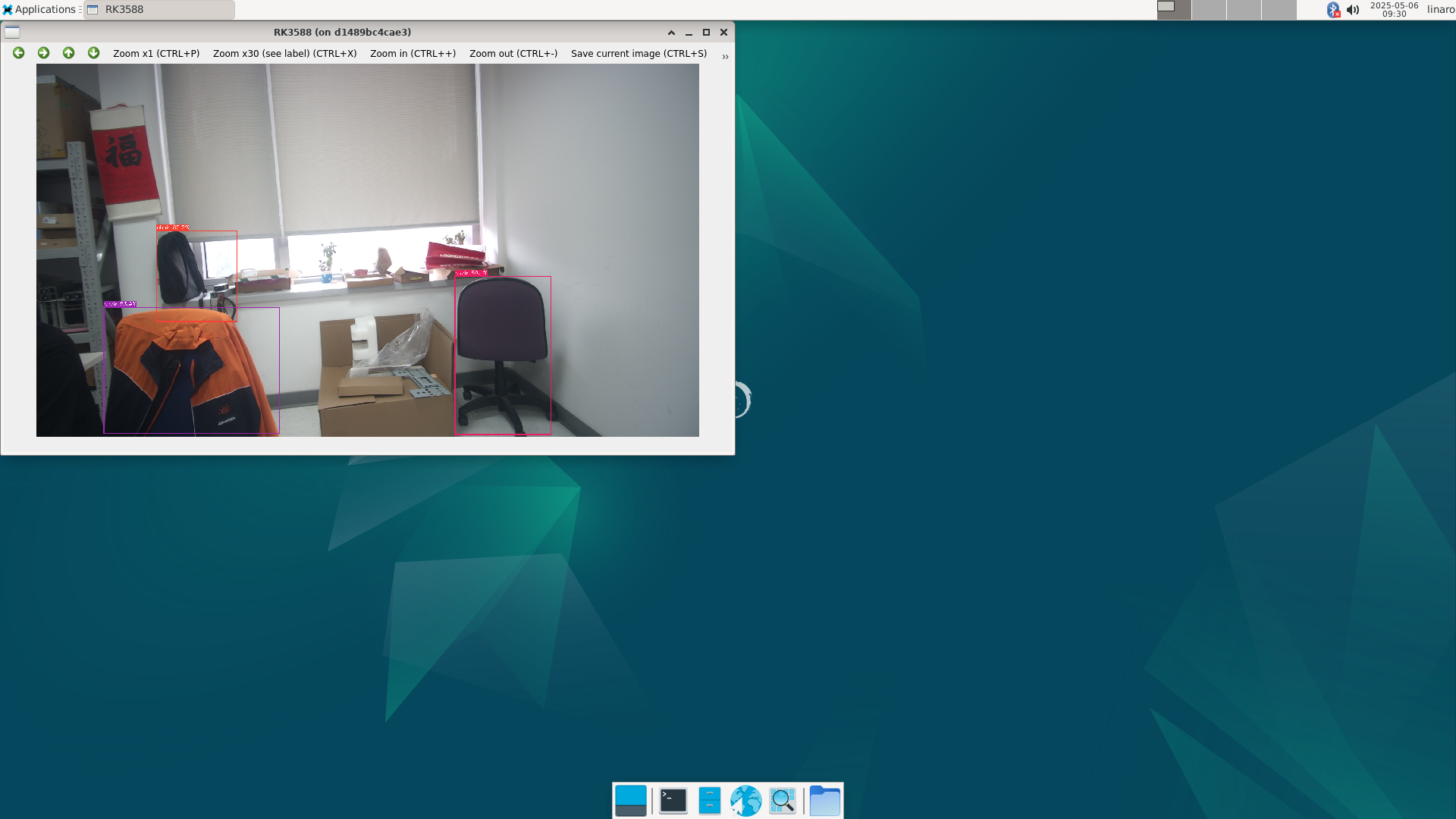
This image is proof of the successful experiment! We successfully ran an AI application requiring hardware acceleration within the container and displayed the results in real-time.
Experiment Results and Value: Accelerating Your Edge AI Implementation #
The success of this experiment is not just about getting a demo to run; it further demonstrates Advantech’s key capabilities in the field of edge AI:
- Deep Software and Hardware Integration: Our provided hardware platform perfectly supports Docker container technology and allows applications within containers to effectively utilize the underlying AI accelerators and multimedia processing capabilities.
- Pre-validated Software Stack: We pre-package and validate various libraries and tools required for AI applications within containers, saving customers the trouble of setting up the environment themselves.
- Simplified Deployment Process: Through Docker, the previously complex AI application deployment process becomes standardized and fast, significantly lowering the technical barrier and deployment costs.
This means that whether you are a system integrator, application developer, or a potential customer interested in edge AI, Advantech can provide a powerful and easy-to-use platform to help you quickly transform your ideas into practical edge AI solutions. From quality inspection in smart manufacturing and customer behavior analysis in smart retail to traffic monitoring in smart transportation, our platform can be a solid foundation for implementing these applications.
Compared to traditional methods that require cumbersome porting and testing for different hardware and operating systems, container-based deployment solutions significantly improve efficiency and reliability. This is a testament to Advantech’s continuous investment in R&D to create value for customers.
Conclusion and Future Outlook #
This experiment, successfully running an edge AI demo on the Advantech platform using Docker containers, once again proves the immense potential of container technology in simplifying edge deployment. It allows us to focus more on the development of AI models and the implementation of application logic, rather than being troubled by complex underlying environment configurations.
Looking ahead, Advantech will continue to deepen its R&D investment in the field of edge AI. We will not only launch more hardware platforms equipped with high-performance AI processors but also continuously optimize our software services, including providing more pre-validated container images, developing more convenient container management tools, and exploring seamless integration with cloud AI platforms.
We believe that through continuous technological innovation and software-hardware integration, Advantech can become your most trusted partner on your edge AI journey, jointly unlocking more exciting possibilities for smart applications!
If you are interested in Advantech’s edge AI solutions or would like to learn more about containerized deployment details, please feel free to contact our AE or sales team anytime. We are very happy to communicate with you!