This article has been rewritten and reorganized using artificial intelligence (AI) based on referenced technical documentation. The purpose is to present the content in a clearer and more accessible manner. For technical clarifications or further verification, readers are advised to consult the original documentation or contact relevant technical personnel.
Imagine if doctors could identify lesions from CT scans faster and more accurately? If AI could provide real-time, “eagle-eye” insights during surgery? This might sound like science fiction, but at Advantech, we are turning these visions into reality!
Today, let’s step inside Advantech’s AI Lab to see how our engineers are harnessing cutting-edge technology to pave the way for the future of intelligent healthcare. The stars of this show are two renowned AI tools: MONAI Label and NVIDIA Holoscan. Ready? An exciting journey of technological exploration is about to begin!
Why Does Medical Imaging Need an AI Boost? #
In modern medicine, imaging examinations like CT and MRI play a crucial role. However, interpreting these complex images and accurately annotating organs or lesions often consumes significant time and effort from physicians. If AI can share this heavy workload, it not only improves efficiency but also assists doctors in making more comprehensive judgments.
This is where MONAI Label comes into play! It’s like an intelligent AI assistant specifically designed to help with the annotation and segmentation of medical images. Imagine, with just a few clicks, AI can automatically outline the contours of various organs in a CT image – isn’t that amazing?
And NVIDIA Holoscan is another powerhouse. It’s a real-time AI computing platform specifically built for medical devices. Simply put, it allows AI models to “come alive” directly during surgery or examinations, analyzing image streams in real-time and providing critical information to frontline medical staff.
The market’s demand for faster, more accurate, and smarter medical solutions is increasingly urgent, and Advantech has always been at the forefront, actively investing in R&D to explore how to integrate these powerful AI technologies into our solutions and create more value for our customers.
Advantech Lab in Progress: Enabling AI to Understand Whole-Body CT Scans #
Our engineers recently conducted a series of exciting tests on Advantech’s high-performance AIR-510 platform, paired with powerful NVIDIA A6000/A5000 graphics cards. The goal was to achieve automatic segmentation of whole-body CT images using the TotalSegmentator model within MONAI Label.
TotalSegmentator is a powerful pre-trained model capable of identifying and segmenting over 100 organs and structures in human CT images simultaneously! Sounds complex? Don’t worry, our engineers have clarified the intricate setup steps.
Below are some records of the engineers’ actual operations, offering a glimpse behind the scenes:
Technical Validation: MONAI Label - Whole Body CT TotalSegmentator Experiment Notes #
How to Use
-
Start Background Process
- Open a CMD window and execute the following commands:
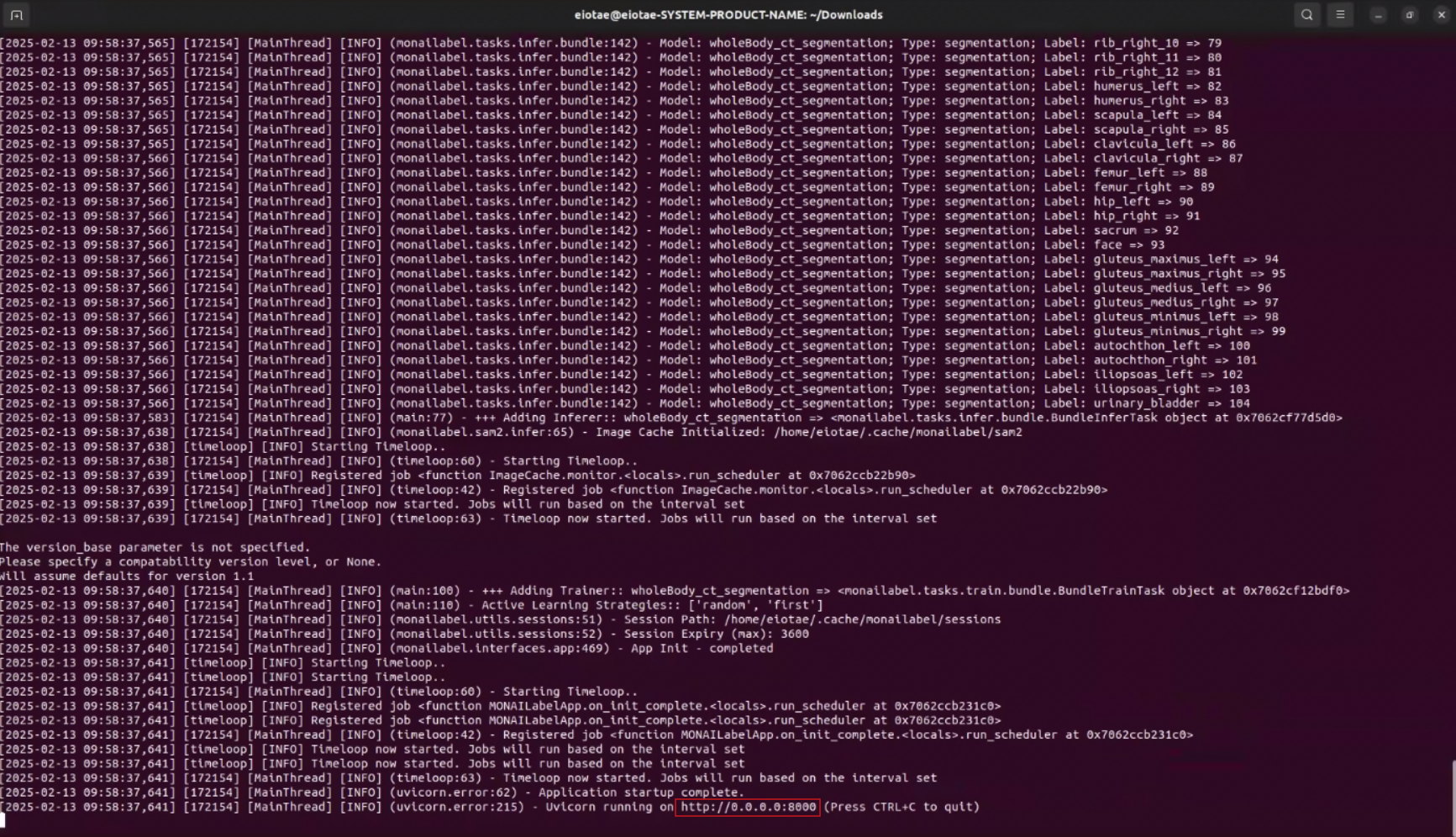
cd /home/eiotae/Downloads source ~/miniconda3/bin/activate conda activate monai monailabel start_server --app apps/monaibundle --studies datasets/Task09_Spleen/imagesTs --conf models wholeBody_ct_segmentation- Once the CMD displays the following icon, do not interact with this window.
-
Start 3D Slicer
- Open another CMD window and execute the following command:
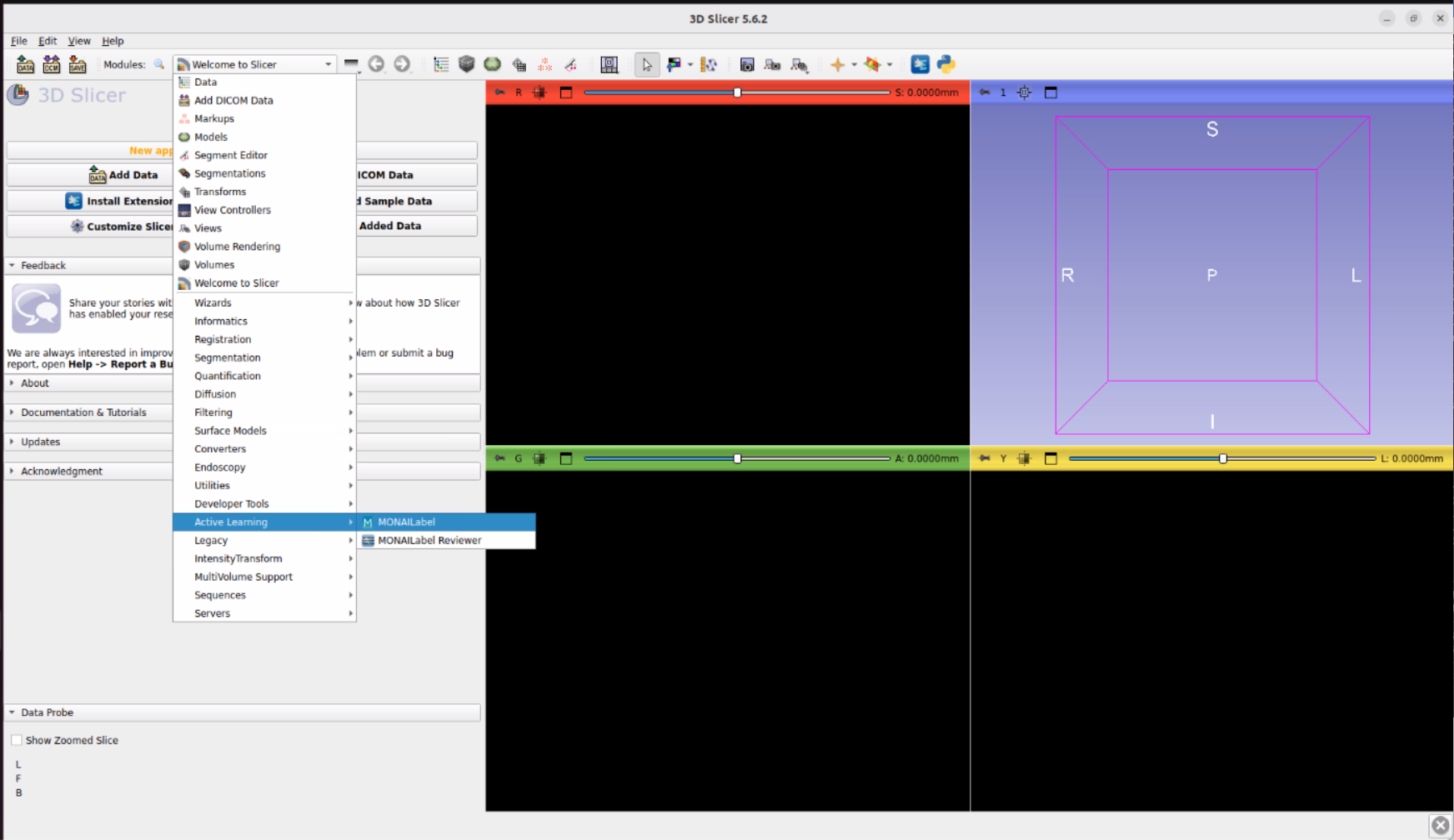
cd /home/eiotae/Downloads/Slicer-5.6.2-linux-amd64 ./Slicer- Click on MONAI Label in the interface.
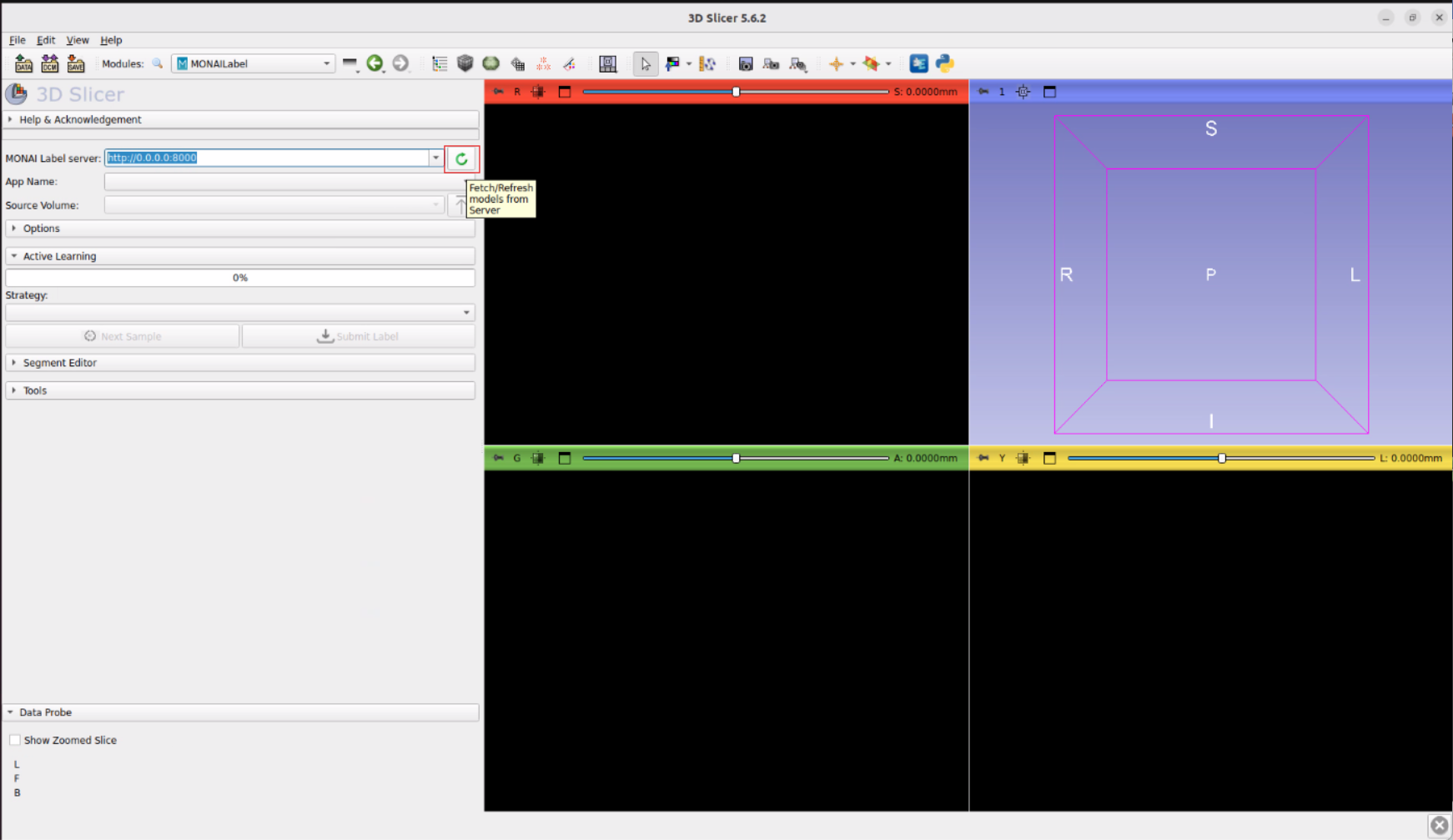
- Enter the URL displayed in the first CMD window: http://0.0.0.0:8000.
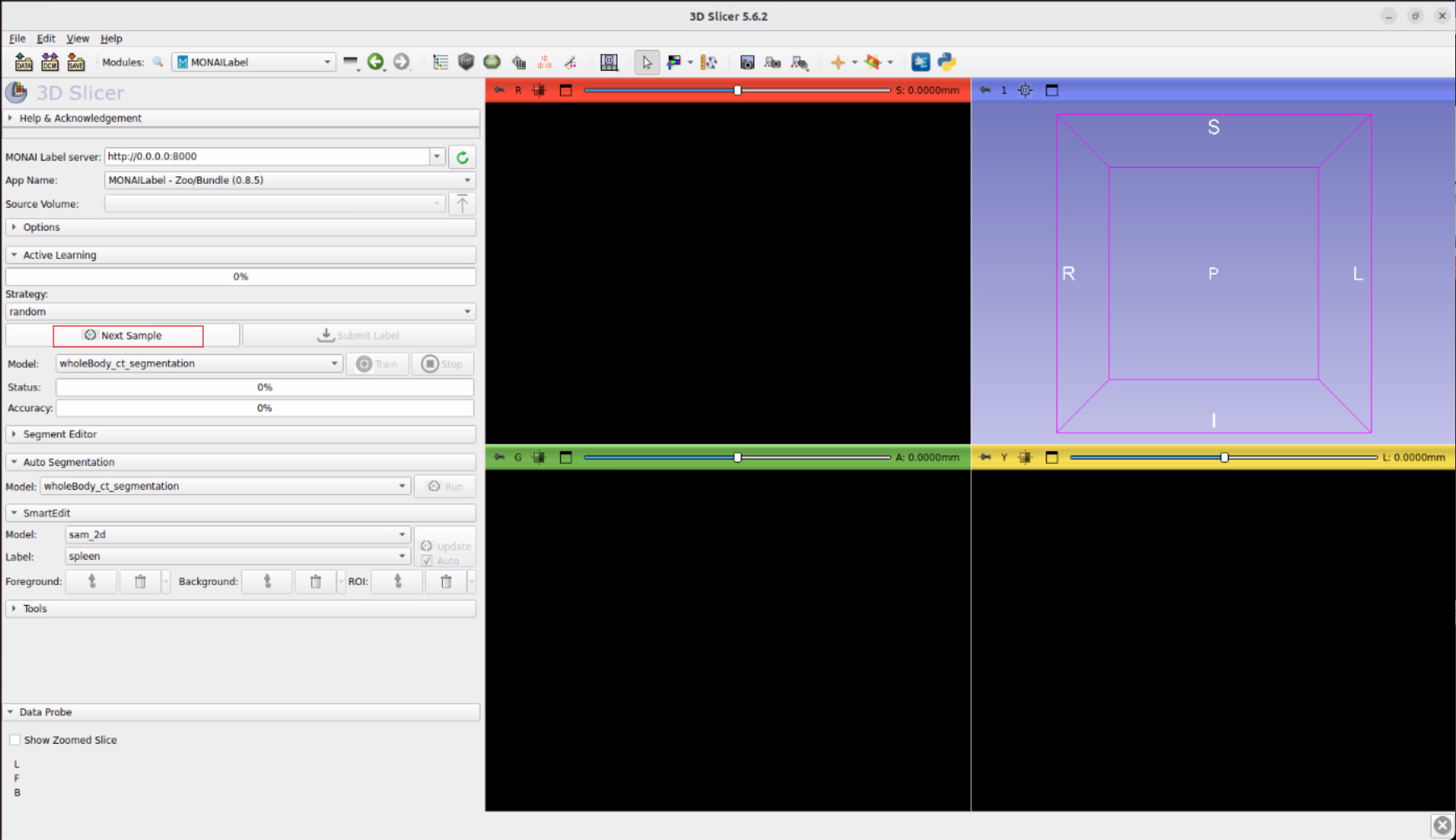
- Click Next Sample in the interface.
- Click Run in the interface.
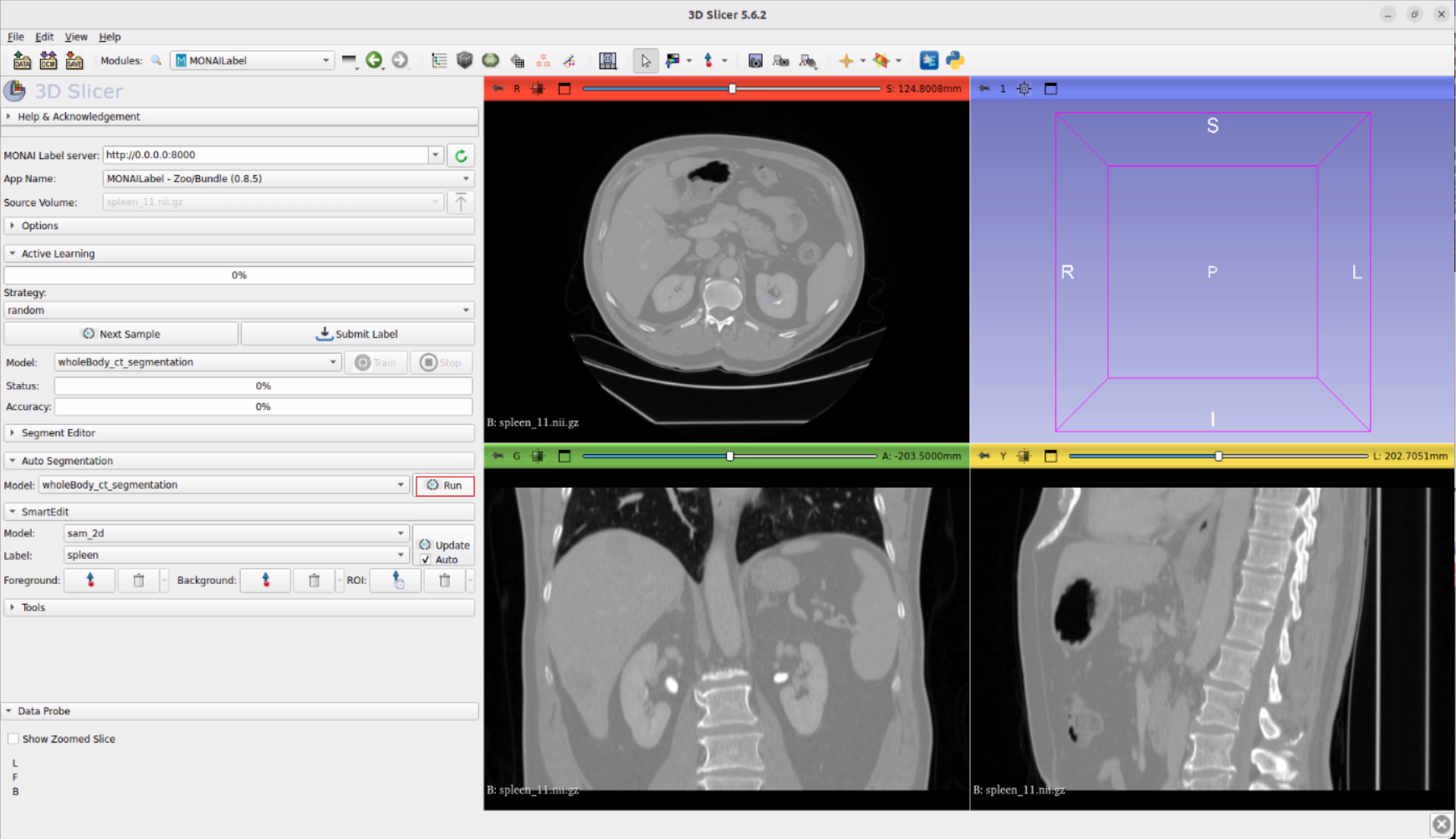
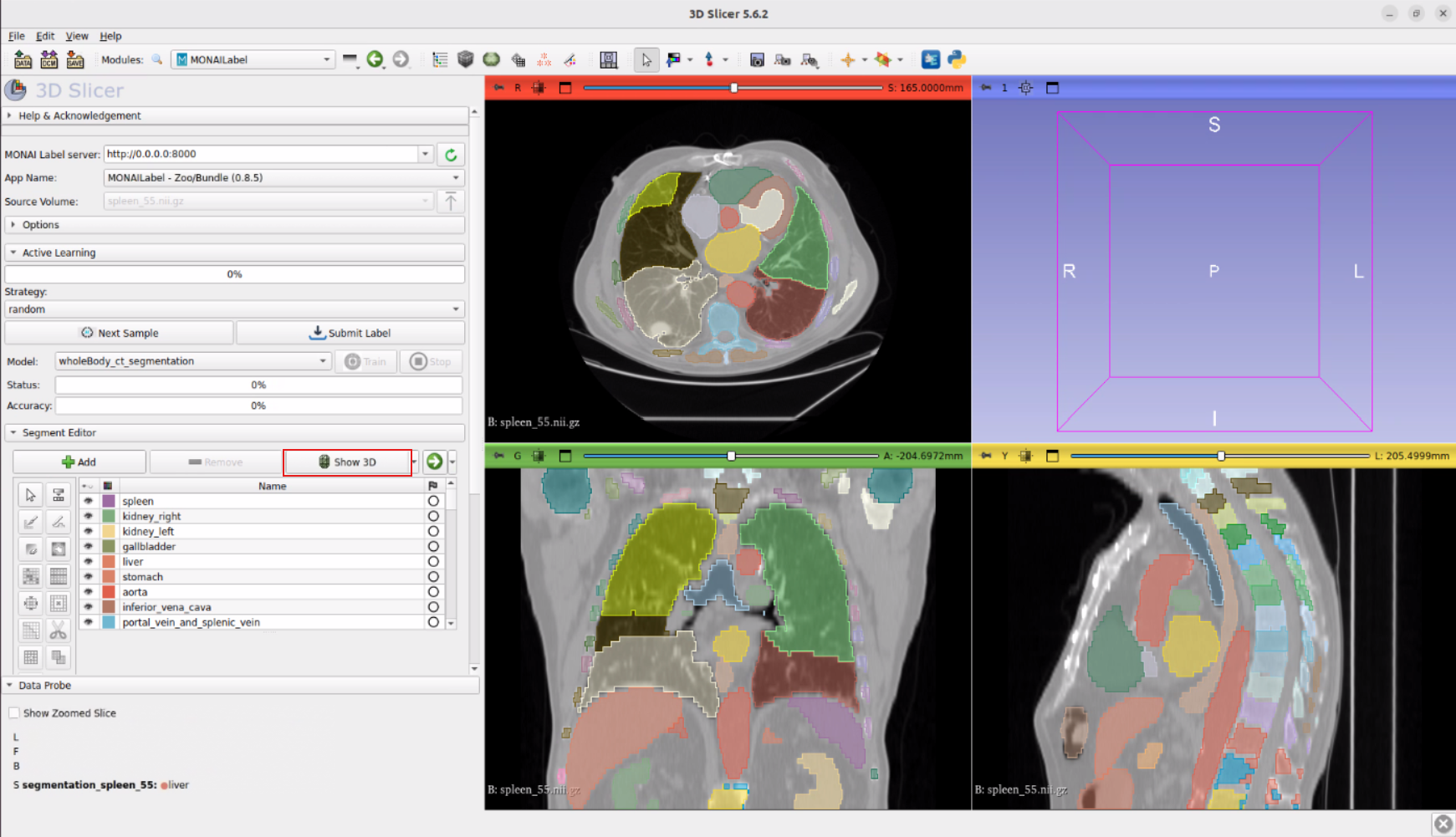
- Finally, in 3D Slicer, if you want to display the 3D structure, click “Show 3D”.
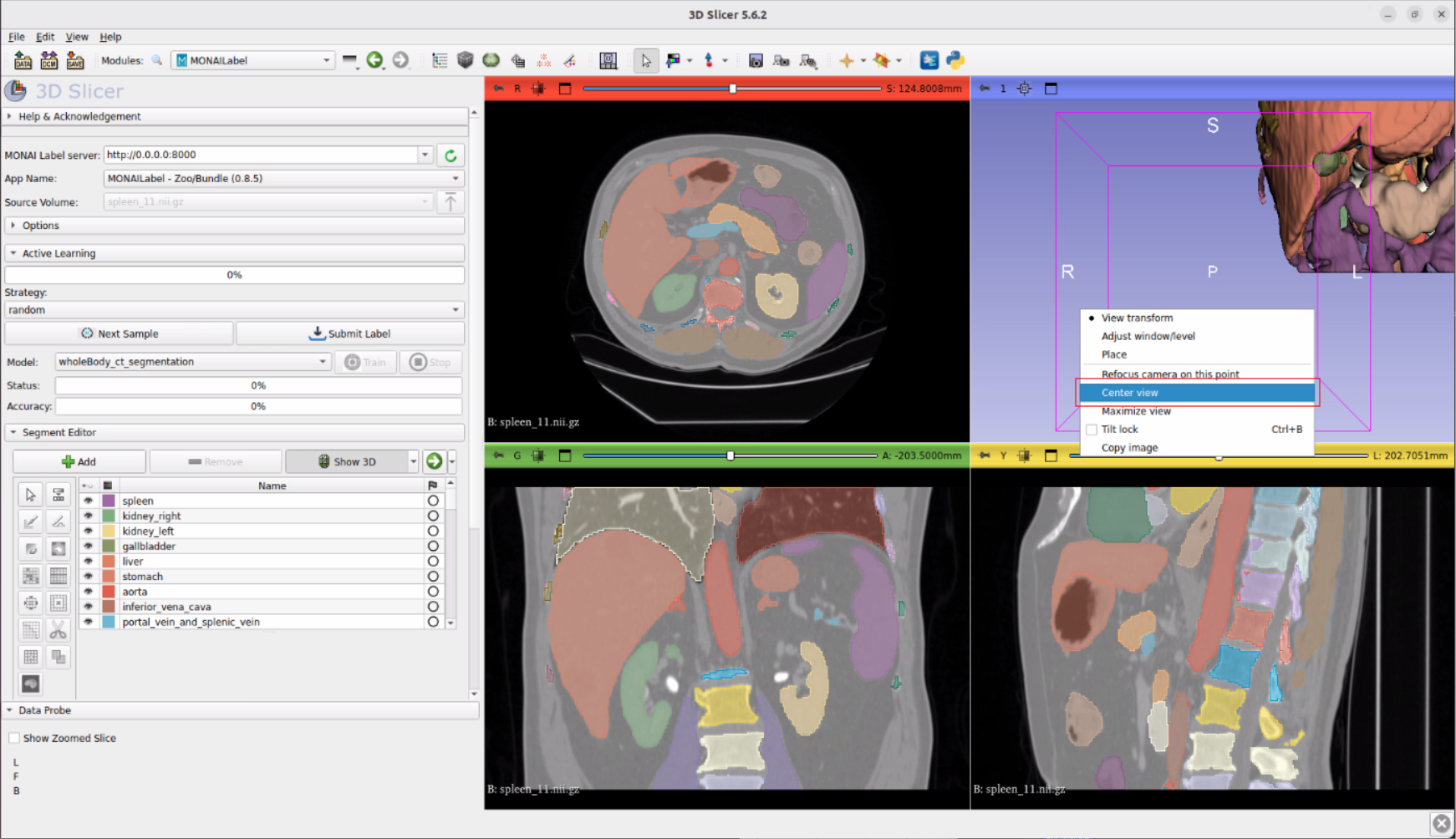
- Move the mouse to the upper right area of the view, right-click to bring up the menu, and click Center view.
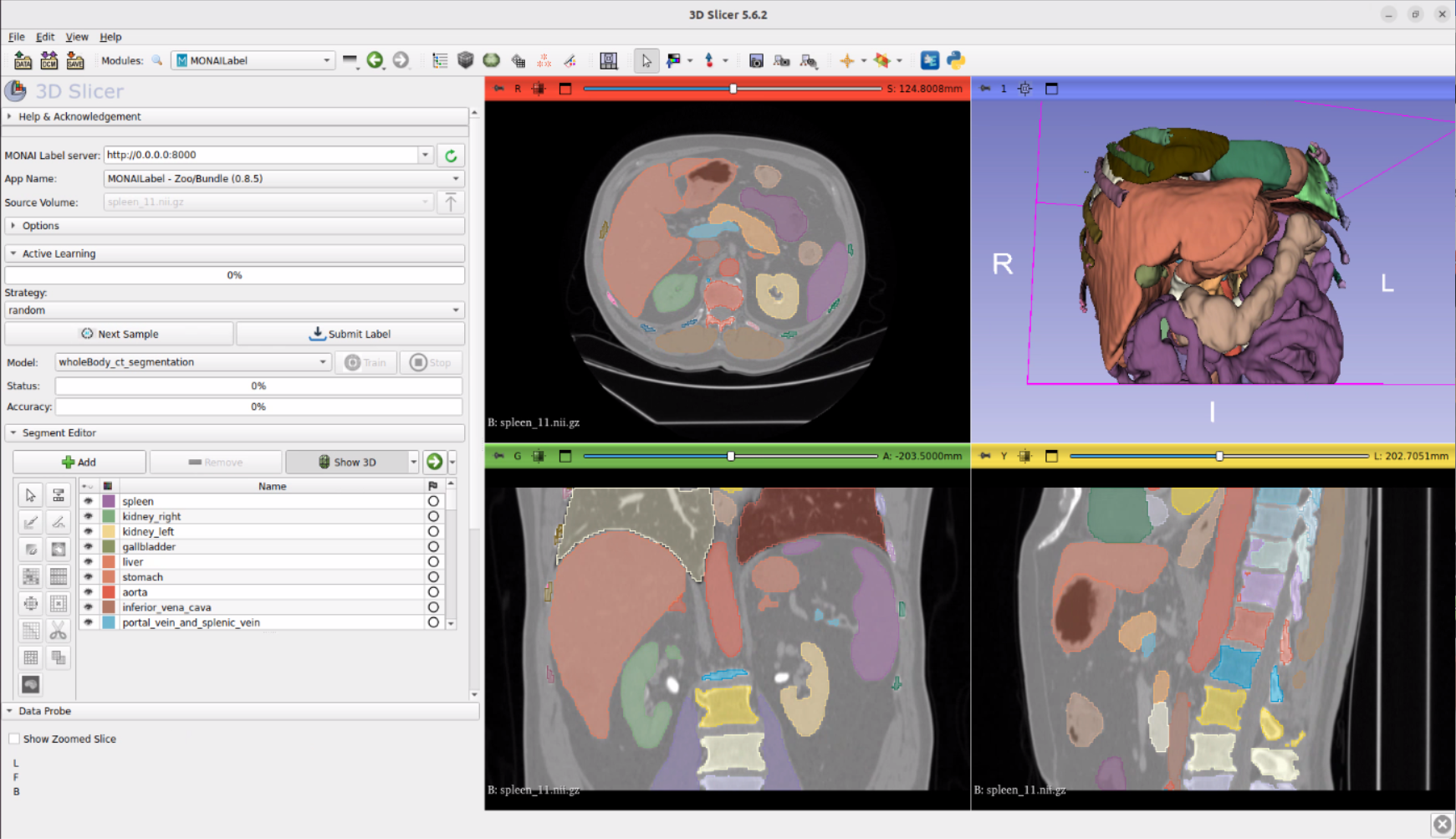
- Done! The results of the AI automatic segmentation can now be displayed in 3D.
How to Install and Configure (Detailed Technical Specifications and Commands)
-
Basic Requirements
Name Description Notes Platform x86 NVIDIA Graphics Card A6000 or A5000 Operating System Ubuntu 20.04 NVIDIA CUDA 11.7 MONAI Label Latest version 30GB -
Install MONAI Label
python -m pip install --upgrade pip setuptools wheel # Install the latest stable version of PyTorch pip install torch torchvision torchaudio --extra-index-url https://download.pytorch.org/whl/cu113 # Check if CUDA is enabled python -c "import torch; print(torch.cuda.is_available())" pip install -U monailabel -
MONAI Label CLI Simple
monailabelcommands help users download sample applications, datasets, and run the server.monailabel --help -
Download Endoscopy Sample Application
monailabel apps --download --name endoscopy --output apps -
Download Sample Datasets
mkdir MONAI_Label cd MONAI_Label # Download MSD dataset monailabel datasets # List sample datasets monailabel datasets --download --name Task01_BrainTumour --output datasets cd datasets wget "https://github.com/Project-MONAI/MONAILabel/releases/download/data/endoscopy_frames.zip" -O datasets/endoscopy_frames.zip unzip datasets/endoscopy_frames.zip -d datasets/endoscopy_frames -
Install 3D Slicer 3D Slicer is a free, open-source platform for analyzing, visualizing, and understanding medical image data. MONAI Label primarily uses 3D Slicer for radiology research, algorithm development, and integration testing. It is recommended to install a stable version of 3D Slicer.
- Download and install 3D Slicer 5.0 or newer (using 5.4.0 as an example):
sudo apt-get update sudo apt-get install -y libpulse-dev libnss3 libglu1-mesa libxcb-xinerama0 wget https://slicer-packages.kitware.com/api/v1/item/64e0b4a006a93d6cff3638ce/download -O Slicer-5.4.0-linux-amd64.tar.gz tar zxvf Slicer-5.4.0-linux-amd64.tar.gz # Afterwards, you can enter the extracted directory and run ./Slicer to start -
Whole Body CT TotalSegmentator Reference Example https://github.com/Project-MONAI/tutorials/blob/main/monailabel/monailabel_wholebody_totalSegmentator_3dslicer.ipynb
Technical Validation: Holoscan - Real-time Medical Recognition DEMO Experiment Notes #
Our engineers also explored the powerful real-time AI platform, NVIDIA Holoscan! With Holoscan, AI is no longer just for post-analysis; it can play an active role during medical procedures.
Enter Holoscan Docker Environment:
cd /home/eiotae/Downloads/holohub
sudo ./dev_container launch
Run DEMO:
-
Multi-AI Ultrasound (multiai_ultrasound)
- Execute command:
./run launch multiai_ultrasound cpp - Demo Video Link
-

- Highlight: This model automatically identifies four key measurement indicators in cardiac ultrasound images (Right Ventricle Diameter, Interventricular Septum Thickness, Left Ventricle Diameter, Posterior Wall Thickness), crucial for diagnosing heart conditions. Imagine AI instantly highlighting this data, significantly aiding physician interpretation.
- Execute command:
-
Colonoscopy Segmentation (colonoscopy_segmentation)
- Execute command:
./run launch colonoscopy_segmentation cpp - Demo Video Link
-

- Highlight: Real-time identification and bounding of polyps during colonoscopy helps doctors avoid missing tiny lesions, improving early diagnosis rates.
- Execute command:
-
Multi-AI Endoscopy (multiai_endoscopy)
- Execute command:
./run launch multiai_endoscopy cpp - Demo Video Link
-

- Highlight: Real-time tracking of surgical instrument positions during laparoscopic surgery helps enhance surgical precision and safety, like equipping surgeons with GPS!
- Execute command:
Experiment Results: Not Just “Feasible,” but “Highly Efficient”! #
Through these experiments, we not only validated the feasibility of running MONAI Label and Holoscan on Advantech’s hardware platforms but also witnessed incredible potential:
- Significant Efficiency Leap: Whole-body CT organ annotation, which previously took hours or even days, can now be automatically completed in minutes using AI models, drastically reducing image preprocessing time.
- Improved Accuracy: AI models trained on vast amounts of data provide consistent and objective segmentation results, reducing variability from manual interpretation and assisting physicians in making more precise diagnoses and treatment plans.
- Real-time Insights: Holoscan’s real-time AI analysis capabilities bring revolutionary changes to surgeries and examinations. Whether it’s polyp detection, instrument tracking, or ultrasound measurements, AI can become the physician’s most powerful assistant on the front lines.
- Advantech Hardware Strength: The experiments proved that Advantech’s edge computing platforms, like the AIR-510, possess sufficient computing power and stability to smoothly run these complex AI models, providing a solid foundation for implementing intelligent healthcare applications.
These technological breakthroughs signify that future healthcare will become more intelligent. For example:
- Radiologists: Can obtain preliminary image analysis reports faster, allowing them to focus more energy on interpreting complex cases.
- Surgeons: Can receive real-time AI assistance during procedures, enhancing surgical precision and safety.
- Researchers: Can process large volumes of medical image data more quickly, accelerating the progress of medical research.
- Patients: Have the opportunity to receive faster, more accurate diagnoses and more effective treatments.
Conclusion: Advantech Continues to Drive Medical AI Innovation #
This technical experiment with MONAI Label and Holoscan once again demonstrates Advantech’s active investment and R&D capabilities in the field of medical AI. We not only provide stable and reliable hardware platforms but also continuously explore and validate the latest AI technologies, committed to implementing these innovative applications to address real pain points in the healthcare industry.
From automated image segmentation to real-time surgical assistance, AI is bringing limitless possibilities to the medical field. Advantech will continue to act as a technology enabler, working alongside our partners and customers to develop more innovative intelligent healthcare solutions and jointly shape a healthier, better future!
We believe this is just the beginning. In the future, Advantech will continue to explore more AI models and application scenarios, integrating these cutting-edge technologies into our products and services. Stay tuned for more exciting breakthroughs from Advantech in the field of intelligent healthcare!