This article has been rewritten and reorganized using artificial intelligence (AI) based on referenced technical documentation. The purpose is to present the content in a clearer and more accessible manner. For technical clarifications or further verification, readers are advised to consult the original documentation or contact relevant technical personnel.
Imagine your robot is like a highly skilled dancer, needing perfect coordination between its eyes (cameras), ears (microphones), and even touch (LiDAR) – multiple senses – to perform fluid and precise movements. But in the world of robotics, what happens if the signals from these senses (i.e., sensors) don’t arrive at the brain (processing unit) at the “right time”?
Minor issues might include jerky movements or skewed paths, while severe problems could lead to localization failures or incorrect judgments. This is the trouble that “time desynchronization” can cause! Especially in applications requiring multi-sensor fusion, such as Simultaneous Localization and Mapping (SLAM) for Autonomous Mobile Robots (AMR), precision flight for drones, or applications needing deep learning for environmental perception, the time synchronization of sensor data is practically the lifeline for system stability and accuracy!
To tackle this tricky problem, Advantech proudly introduces a secret weapon tailored for ROS 2 – the Time Sync Viewer time synchronization detection toolset!
Why is “Time Synchronization” So Important? #
In robotic systems, data from different sensors (like cameras, Inertial Measurement Units (IMUs), LiDAR) must be accurately timestamped and aligned during processing. If timestamps deviate, even by milliseconds, it can lead to:
- SLAM Inaccuracy: The robot loses track of its location, resulting in erroneous map construction.
- Sensor Fusion Failure: The system cannot correctly integrate information from different sensors, leading to wrong decisions.
- Degraded Deep Learning Model Performance: Misaligned input data timestamps affect the accuracy of model training and inference.
Simply put, time desynchronization is like an orchestra where some musicians are half a beat early and others are half a beat late, ultimately composing only a chaotic piece.
Advantech Time Sync Viewer: Your Time Synchronization Helper #
Time Sync Viewer includes two core tools: the RQT Time_Sync_Viewer Plugin (visualization plugin) and the ROS2 Time_Sync_Checker Node (time synchronization checking node). Together, they provide developers with a complete and easy-to-use solution.
Core Highlights:
- Catch Anomalies: Automatically detects hardware latency, network jitter, or data loss that might cause incomplete data.
- Multi-Sensor Sync Monitoring: Simultaneously monitor timestamps from multiple sensors to ensure they are in step.
- Real-time Sync Flag (sync_flag): Automatically triggers a flag when data meets synchronization conditions, providing instant confirmation.
- Quantitative Analysis: Calculates statistics like sync frequency, average time interval, standard deviation, etc., to precisely evaluate synchronization performance.
- Visualization Interface: Through the
Time_Sync_Viewergraphical interface, the alignment of data on the timeline is clear at a glance – no more guesswork. - Optimize Sensor Fusion: Enhances data consistency and stability, boosting applications like SLAM, robotic arms, drones, and AMRs!
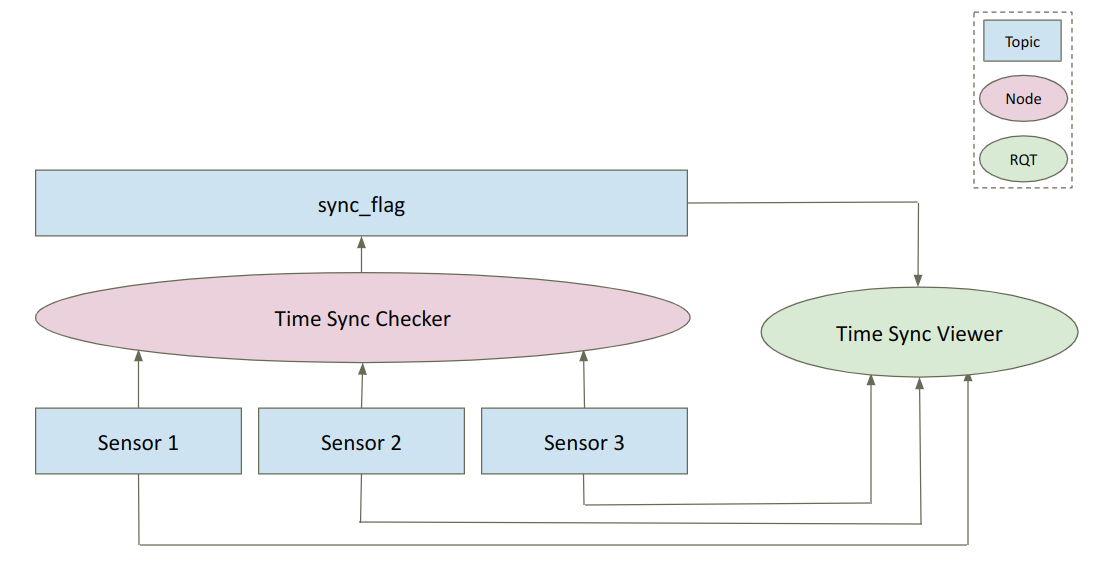
System Architecture Overview:
After sensor data input, it first passes through the Time_Sync_Checker Node for time synchronization checks and outputs a sync flag. Finally, the RQT Time Sync Viewer Plugin visualizes the results.
Get Started Immediately: Installation and Building #
Ready to experience the power of Time Sync Viewer? Follow these steps for easy installation:
(Please note: This tool currently only supports the ROS 2 Humble version)
wget https://iedgeblob.blob.core.windows.net/iedge-public/ros2-timesync-tools/ros2-timesync-tools-1.0.0-Ubuntu_22.04-x64.run
sudo ./ros2-timesync-tools-1.0.0-Ubuntu_22.04-x64.run
cd /usr/local/Advantech/ros/humble/ros2-timesync-tools
colcon build --symlink-install
RQT Time_Sync_Viewer Plugin: Making Time Synchronization “Visible” #
This RQT plugin is your visualization tool, specifically designed to check if multiple subscribed sensor data streams are synchronized in a ROS 2 environment. For robotic applications requiring analysis of Camera, IMU, and LiDAR time alignment, it’s practically a godsend!
What Can the Graphical User Interface (GUI) Tell You?
The following uses monitoring Camera, IMU, LiDAR simultaneously with the Time_Sync_Checker Node as an example:
- Timeline Display:
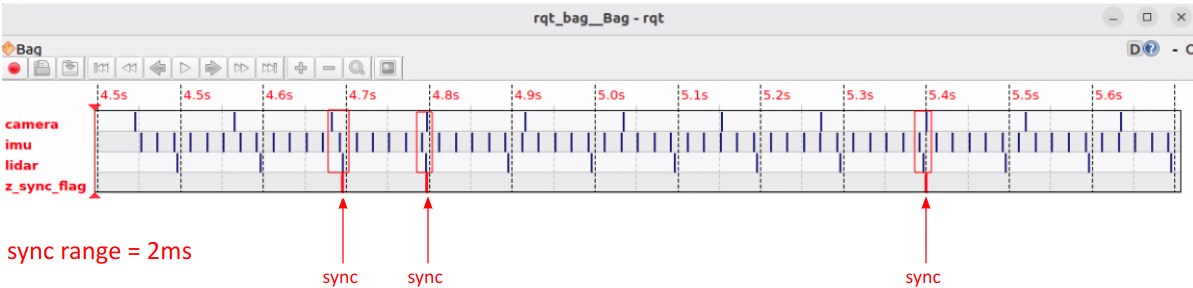
- The graph shows the timestamps of different data streams (ROS Topics). Each horizontal line represents a Topic. For example:
camera(Camera image)imu(IMU data)lidar(LiDAR scan)z_sync_flag(Synchronization flag)
- The graph shows the timestamps of different data streams (ROS Topics). Each horizontal line represents a Topic. For example:
- Synchronization Range:
- In this example, the synchronization range (sync range) set in the
Time_Sync_Checker Nodeis 2 milliseconds (ms). This means data points arriving within a 2 ms time window are considered synchronized. - When a synchronization event is triggered, a
sync flagis marked on the timeline.
- In this example, the synchronization range (sync range) set in the
- Synchronization Analysis:
- When data points from all sensors fall within the set 2ms range, they are considered synchronized (sync).
- The figure below shows multiple synchronization points, indicating that the sensor data is well-synchronized at these moments.
How to Use the RQT Plugin?
cd /usr/local/Advantech/ros/humble/ros2-timesync-tools
source install/setup.bash
rqt --force-discover
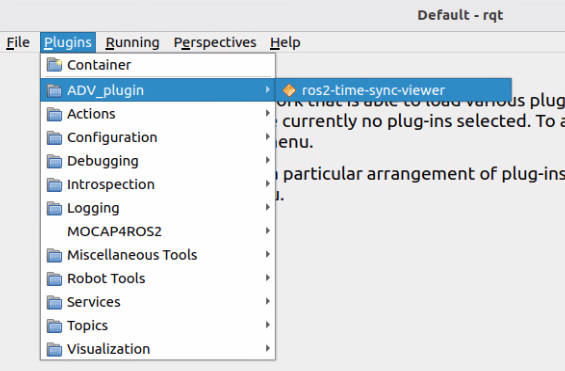
Step 1: Select the ros2_time_sync_viewer plugin in the RQT interface.
Step 2: Click the “record” button.

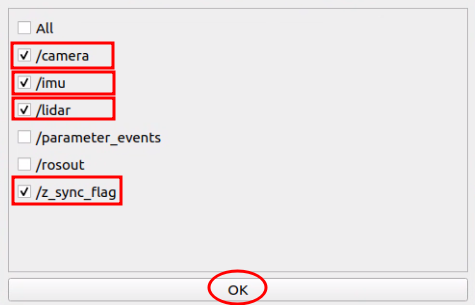
Step 3: Select the Topics you want to monitor.
Step 4: View the visualized synchronization results!

ROS2 Time_Sync_Checker Node: The Behind-the-Scenes Synchronization Gatekeeper #
The Time_Sync_Checker Node is the core node that actually performs the synchronization checks. It monitors whether data from different Topics arrives within the time range you specify.
Main Functions:
- Trigger Sync Flag: When a synchronization event occurs, it publishes a
sync_flagTopic, making it convenient for other nodes or developers to verify synchronization performance. - Provide Detailed Statistics:
Metric Description Sync Frequency The number of times the synchronized_callback is triggered per second (Hz). Avg Interval The average time interval between each callback (seconds). Std Dev The standard deviation of the time interval (seconds), indicating sync stability (smaller is more stable). Max Interval The maximum time interval, showing the longest delay. Min Interval The minimum time interval, showing the shortest synchronization time.
How to Configure and Run?
Again, using Camera, IMU, and LiDAR as an example:
Configuration:
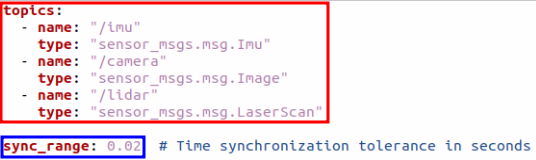
First, you need to configure parameters in the config.yaml file.
cd /usr/local/Advantech/ros/humble/ros2-timesync-tools/src/ros2-time-sync-checker/time_sync_checker
vim config.yaml
- In the red box in the image below, specify the Topics to be synchronized and their data format (Type).
- In the blue box in the image below, set the time synchronization range (sync_range) in seconds (e.g., 0.002 represents 2ms).
Execution:
Start the Time Sync Check Node.
cd /usr/local/Advantech/ros/humble/ros2-timesync-tools
source install/setup.bash
ros2 run time_sync_checker time_sync_checker
After execution, you will see the real-time monitoring results and statistics output in the terminal.

Results and Applications: Advantech Helps You Accelerate Innovation #
Time Sync Viewer is more than just a tool; it represents Advantech’s continuous investment and innovation strength in the field of robotics. With this toolset, developers can:
- Significantly reduce debugging time: Quickly locate and resolve tricky time synchronization issues.
- Enhance system reliability: Ensure the consistency of multi-sensor data for more stable robot operation.
- Optimize application performance: Build a solid data foundation for applications like SLAM, sensor fusion, and deep learning.
- Accelerate product development: Allow development teams to focus more on core algorithms and application feature innovation.
Whether you are developing the next generation of AMRs, high-precision drones, or complex robotic collaboration systems, Time Sync Viewer can lend you a hand, ensuring your robot’s senses are perfectly synchronized!
Conclusion and Future Outlook #
Time synchronization of sensor data is the cornerstone of success for modern robotic systems. The Time Sync Viewer toolset launched by Advantech provides a solution for ROS 2 developers with its intuitive visualization interface, powerful analysis capabilities, and ease of use.
This is just a small step in Advantech’s ongoing efforts in the fields of robotics and edge computing. We believe that through continuous technological research, development, and innovation, we can bring more value to our customers and jointly usher in a new era of smarter, more efficient robotics. Stay tuned for more exciting results from us in the future!