This article has been rewritten and reorganized using artificial intelligence (AI) based on referenced technical documentation. The purpose is to present the content in a clearer and more accessible manner. For technical clarifications or further verification, readers are advised to consult the original documentation or contact relevant technical personnel.
Hey, partners and friends interested in Advantech technology! Today, we’re sharing a highly practical behind-the-scenes experiment starring our powerful IoT device management platform – DeviceOn. Imagine you need to deploy tens, or even hundreds, of new edge devices. Doesn’t the thought of manually configuring the connection for each one seem daunting? Don’t worry, Advantech’s engineers have already thought of this! This time, we’ll reveal how to make devices running Ubuntu automatically “check in” with a specified DeviceOn server the first time they boot up and connect to the network, with absolutely no manual intervention! This is a game-changer for large-scale deployment scenarios!
The Challenge of the IoT Era: The Complexity of Device Management #
The applications of the Internet of Things (IoT) are becoming increasingly widespread, with edge computing devices appearing everywhere from smart factories and smart cities to retail and healthcare. As the number of devices grows, management becomes a significant challenge. How can you effectively monitor, manage, and update these devices scattered across various locations? This is where DeviceOn comes into play!
DeviceOn acts as the central command center for managing all your IoT devices. But before enjoying the convenience of management, the first step is to get each device to “join the organization,” a process known as “Onboarding.” Traditional methods might require engineers on-site or remote connections to manually enter server addresses, account keys, and other information for each device. When dealing with a large number of devices, this is not only time-consuming and labor-intensive but also prone to errors due to human oversight.
To address this pain point, our engineers conducted an experiment aimed at achieving “automated onboarding” for the DeviceOn Agent (the agent program installed on the device)!
Unboxing the Experiment: Creating the “Auto-Onboarding” Golden Image in Steps #
Our engineers cleverly devised a method by modifying the Agent’s configuration file and creating a “Golden Image.” New devices cloned from this image can automatically complete the onboarding process upon boot-up. It might sound a bit technical, but don’t worry, we’ll explain it in the simplest terms:
Core Concept: We first prepare a “template” device and tell its Agent: “Hey! Your ’new home’ is here (the specified DeviceOn server), and you need to ‘automatically’ report back!” Then, we replicate this configured “template” for all new devices.
Key Steps Breakdown:
-
Stop the Service, Prepare for Modification: First, we need to stop the running Agent service (
saagent) on the device to safely modify its configuration.sudo stop saagent -
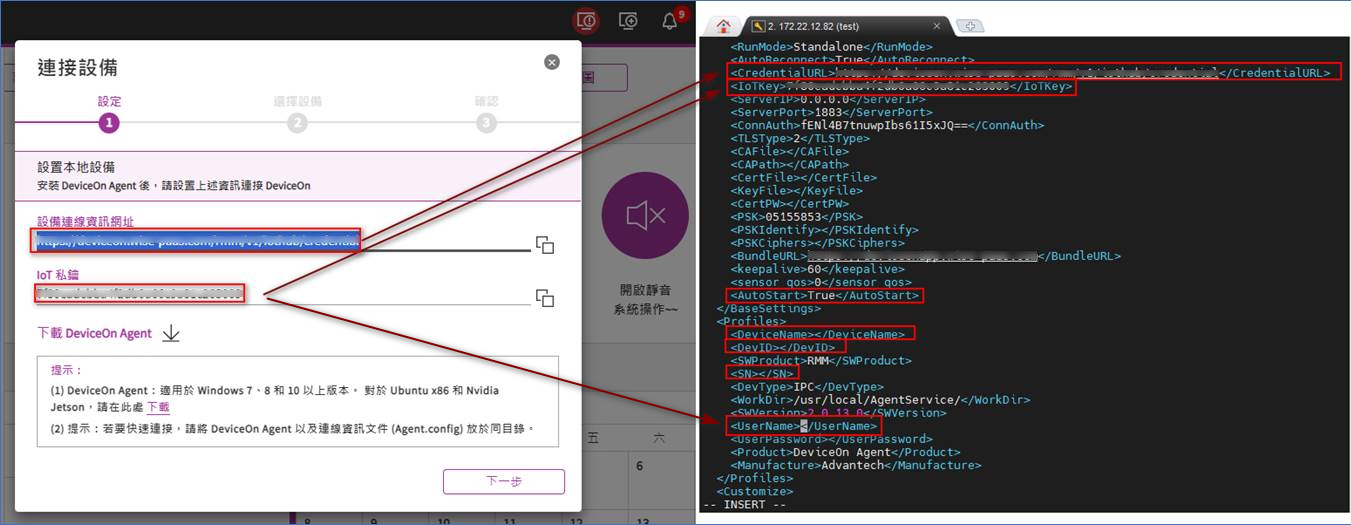
Modify the Agent’s ‘Profile’: Next, we edit a configuration file named
agent_config.xml(path:/usr/local/AgentService/agent_config.xml). Think of this as the Agent’s “profile.” We need to fill in some key information and clear some personal details to make it a universal “template”:CredentialURL: Enter the URL of the “Device Onboarding page” on your DeviceOn server. This tells the Agent where to report.IoTKey: Enter the Account Key from the “Device Onboarding page” on your DeviceOn server. This is the “passphrase” for reporting.AutoStart: Set toTrue. This tells the Agent to start automatically upon boot and attempt connection.DeviceName,DevID,SN: These three fields must be cleared! This is crucial! After clearing, when a new device connects for the first time, the Agent will automatically generate its own unique information and fill it back in.UserName: This field must contain the same content asIoTKey.
-
Shut Down and Package the ‘Golden Image’: Once the configuration is complete, shut down this “template” device.
-
Clone and Deploy: Create a system image (Image) from the hard drive of this template device. This image acts as a perfect “cloning template.” Then, clone this image onto all the new edge devices.
-
Witness the Magic Moment: Connect the new devices to the network cable, and then power them on!
-
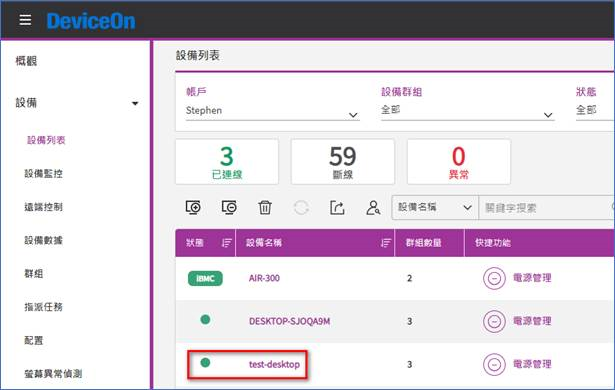
Auto-Onboarding Successful! If everything goes smoothly, you will see these new devices automatically appear in the “Device List” on the DeviceOn server management interface, without any manual operation!
-
Verification: Agent Auto-Populates Information You can randomly check a new device and open its
agent_config.xmlfile (same path as above). You’ll find that theDeviceName,DevID, andSNfields, which we previously cleared, have been automatically filled with unique information by the Agent! This confirms the automation process worked perfectly.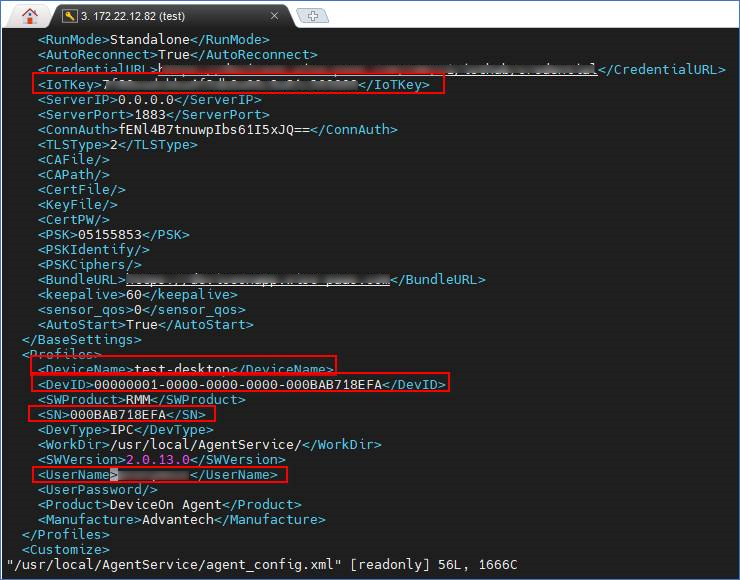
Key Results: Time-Saving, Effortless, and Error-Free! #
The results of this experiment perfectly demonstrate Advantech’s efforts and breakthroughs in simplifying the IoT deployment process:
- Drastically reduces deployment time: What previously might have taken hours or even days for large-scale device onboarding can now be completed automatically by creating the image once, then cloning and booting – reducing the time to a matter of minutes!
- Reduces labor costs and error rates: Eliminates the need for engineers to configure each device individually, reducing significant repetitive labor and avoiding potential errors from manual input.
- Enhances deployment efficiency and consistency: Whether it’s 10 or 1000 devices, ensures they are quickly onboarded with the same, correct configuration, accelerating project implementation.
- Demonstrates the flexibility of the DeviceOn platform: Proves that DeviceOn is not only powerful in functionality but also continuously optimized for deployment convenience, meeting customer needs for large-scale applications.
This “auto-onboarding” feature is undoubtedly a major boon for system integrators, large factories, retail chains, and other customers needing to deploy numerous edge devices, significantly improving project efficiency and reliability.
Conclusion: Advantech Innovation Makes IoT Management Simpler! #
This experiment with automated onboarding for Ubuntu devices is just one example of Advantech’s continuous investment in R&D and optimizing the user experience. We understand that in the world of IoT, while technological leadership is important, being “easy to use” and “user-friendly” is key to helping customers succeed.
Through constant exploration, experimentation, and improvement like this, Advantech is committed to making the DeviceOn platform more comprehensive. We not only provide powerful device management functions but also consider the customer’s perspective in deployment, operations, and maintenance, lowering the barrier to entry. In the future, we will continue to listen to the market and customer feedback, invest more R&D resources, and explore more possibilities for automation and intelligence, making Advantech’s solutions your most reliable partner in deploying IoT applications! Stay tuned for more exciting innovations from us!